You can enter all types of invoices, including prepayments, expense reports, and recurring invoices, in a foreign currency and then pay them in that currency.
Note: If the invoice currency is a fixed-rate currency such as euro or another EMU currency, you can pay the invoice in an associated fixed-rate currency. See: Cross Currency Payments for Fixed-Rate Currencies.
When you enter an invoice, Payables uses the exchange rate you select to convert the invoice distributions into ledger currency. You define your ledger currency during setup for your ledger. When you create a payment for a foreign currency invoice, Payables uses the exchange rate you enter at that time to convert the payment lines into your ledger currency. Any difference in ledger currency between invoice entry and invoice payment is recorded as realized Gain/Loss.
When you reconcile your payments using Oracle Cash Management, Payables also creates Gain/Loss accounting entries to record differences between the original payment amount and the cleared payment amount due to exchange rate fluctuations. See also: Reconciling Payments with Oracle Cash Management.
Transactions must have any necessary exchange rates before you can account for them. Payables creates accounting entries for your invoices and payments in both the functional and foreign currency.
To make a foreign currency payment, use a bank account with a payment document that uses a payment format that is either multi-currency or defined for the foreign currency.
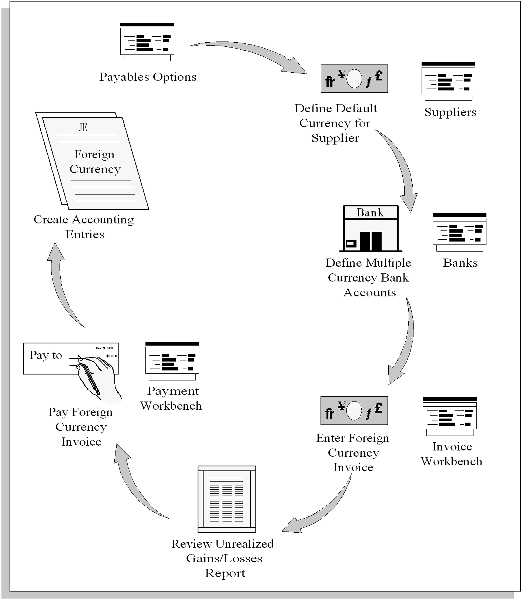
The following diagram shows the general steps you follow to enter and pay a foreign currency invoice.
You can pay invoices in either the same currency you used to enter them, or an associated fixed-rate currency. You can enter or change invoice currency defaults at five subsequent times. During each of these steps you can override the default created by the previous step.
Payables Options, choose default invoice currency
Supplier Entry
Supplier Site Entry
Invoice Batch defaults (optional)
Invoice or Expense Report Entry
The invoice currency is the default for invoice distributions, and this invoice distribution currency default cannot be changed.
To pay foreign currency invoices you must have bank accounts and payment documents that are defined for foreign currency payments. You must use one of the following combinations:
A foreign currency bank account with a payment document that uses a payment format defined for the intended foreign currency.
A multi-currency bank account with a payment document that uses multi-currency payment format. If you use a multi-currency payment format, you enter the payment currency at payment time.
A multi-currency bank account with a payment document that uses a payment format defined for the intended foreign currency.
Payables can track currency gains and losses in your ledger currency caused by exchange rate fluctuations between the following dates:
Invoice GL date
Payment issue date
Payment maturity (for future dated payments)
Payment reconciliation or clearing with Oracle Cash Management
In addition, if you match to purchase orders or receipts, Payables uses the Exchange Rate Variance account or an expense account to record exchange rate variances between the invoice and the record you matched to--either the purchase order or receipt.
The following table lists the Payables options that, in combination with the chosen accounting method (Cash or Accrual) control how and when Payables accounts for gains and losses:
| Tabbed Region in Payables Options window | Option or Field Name | Option or Field Values |
|---|---|---|
| Accounting | Account for Payment | - When Payment is Issued - When Payment Clears |
| Accounting | Account for Gain/Loss | - When Payment is Issued - When Payment Clears |
| Payment Accounting | Calculate Gain/Loss | - For Each Invoice - For Total Payment |
For charts that show how Payables calculates gains and losses based on the Account for Gain/Loss option, your Account for Payment options, and your accounting method, see: Account for Gain/Loss.
You can have as many realized gain or loss accounts as you need. You can define default Gain or Loss Accounts for Payables and override them for each bank account you use. If you enable the Payables option to account for gains and losses at payment issue time, then Payables automatically calculates a realized gain or loss if a payment has a different exchange rate than the foreign currency invoice it pays. Payables charges the amount to the appropriate Gain or Loss account assigned to the bank account from which you created the payment. If you enable the Payables option to account for gains and losses at payment clearing time, Payables automatically calculates a realized gain or loss when you create accounting entries for a foreign currency payment that you reconciled in Oracle Cash Management.
The following diagram shows the accounting entries for the previously described example.
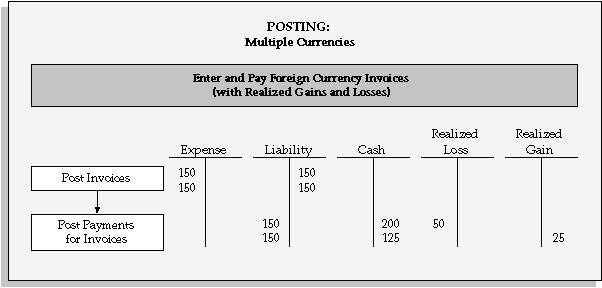
You install General Ledger and Payables and define US dollars as the ledger currency for your ledger. You select Accrual Basis as your accounting method. You account for payments and gain/loss at payment time only.
You enter two invoices, both for 300 pounds (GBP) with a Corporate exchange rate, and validate the invoices. The Corporate exchange rate on the date you enter the invoices is 2:1. When you account for the invoices, Payables creates accounting entries in both the foreign currency (300 GBP) and your ledger currency ($150 US) for both invoices, and Journal Import creates one journal entry in your ledger currency and one in GBP.
When you pay the first invoice, the exchange rate has decreased to 1.5:1, representing a loss in your ledger currency of $50 US (300/1.5 - 150). When you pay the second invoice, the exchange rate has improved to 2.4:1, creating a gain of $25 US. When you account for the payments, Payables creates accounting entries in both the foreign currency and your ledger currency for both payments. The accounting entries for the gains and losses are in your ledger currency only.
Any time after you enter invoices and before payment, you can review your unrealized gain/loss by submitting the Unrealized Gain/Loss Report.
You cannot pay or create accounting entries for foreign currency invoices that have no exchange rate, and you cannot create accounting entries for foreign currency payments that have no exchange rate. You enter exchange rates when you enter invoices and when you create payments.
You can enter the exchange rate manually, or Payables can enter the exchange rate automatically if you have defined in the GL Daily Rates table a rate that matches the invoice's currency, exchange rate type and exchange rate date. You can assign an exchange rate to a transaction in three ways:
Manual. During invoice entry or payment creation you manually enter the exchange rate. See: Manual Exchange Rate Entry.
GL Daily Rates Table Default. During invoice entry or payment creation, Payables automatically enters the exchange rate from the GL Daily Rates table. See: GL Daily Rates Table Default, Oracle General Ledger User Guide.
AutoRate. After you have entered invoices or created payments without exchange rates, ensure that the GL Daily Rates table contains the exchange rate information you need and submit the AutoRate program. Payables automatically assigns exchange rates from the GL Daily Rates table to invoices and payments requiring them. See: AutoRate Program.
Payables uses five types of exchange rates. Payables uses exchange rates to convert invoice and payment amounts into your ledger currency.
User. Used to manually enter your own exchange rate during invoice entry or at payment time. If you use the User exchange rate type, if the Payables option Calculate User Exchange Rate is enabled, and if you are using the Invoices window or the open interface table, then Payables calculates the invoice exchange rate if you provide the Ledger Currency amount.
Spot. A daily exchange rate that is a quoted market rate. When you specify a Spot rate type, Payables automatically enters the invoice Exchange Rate from the GL Daily Rates table.
Corporate. A standard market rate determined by senior management for use throughout your organization. When you specify a Corporate rate type, Payables automatically enters the invoice Exchange Rate from the GL Daily Rates table.
User-defined. An exchange rate type you define in the Define Daily Conversion Rate Types window. You can define as many exchange rate types as you need. When you specify a User-defined rate type, Payables automatically enters the invoice exchange rate for you from the GL Daily Rates table.
EMU Fixed. If you use fixed-rate currencies and your ledger currency is different from the Invoice Currency or Payment Currency, and the currencies are associated fixed-rate currencies, such as euro and another EMU currency, then Payables displays EMU Fixed as the Rate Type and you cannot update this value.
Submit the following reports to review foreign currency information:
Unaccounted Transactions Report: Lists invoices for which Payables cannot create accounting entries. Report includes foreign currency invoices with no exchange rates, unbalanced distributions, etc. See: Unaccounted Transactions Report.
Unrealized Gain / Loss Report, and Realized Gain / Loss Report: Lists gains and losses in ledger currency due to changes in exchange rates. See: Unrealized Gain/Loss Report.
Cash Requirement Report: Forecasts cash needs for payment of invoices that match parameters you enter. See: Cash Requirement Report.
Payables is fully integrated with all other Oracle Applications. For example, if you define currencies, exchange rate types and exchange rates information in Oracle General Ledger, you do not need to enter the same information in Payables.
EXCHANGE RATE REQUIRED: If a foreign currency invoice has no exchange rate, Payables will apply a hold to the invoice and will not pay or create journal entries for it. You can review the Unaccounted Transactions Report to see all the invoices on hold.
