
Use the online purchasing functionality of Third Party Data Integration to search for and purchase Dun & Bradstreet (D&B) information on specific companies from D&B's database. You can update the information obtained from D&B during online sessions or by using the batch loading process.
You can purchase and retrieve D&B information for organizations that exist or do not exist in the TCA Registry. When you obtain D&B information about a company that does not exist in the TCA Registry, a new party is created using the D&B data. See: Details on Creating Parties with D&B Information.
This diagram describes the process flow for purchasing D&B information online. You can correct errors that might occur in this process. See: Correcting Mapping API Utility Errors.
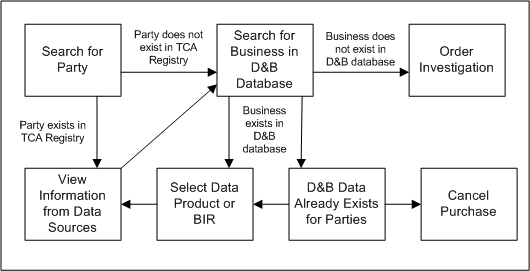
If the party exists, you view the information it currently has from data sources, if any. You can search the D&B database for that company if you want to initially purchase or update D&B information for the selected party.
If the party does not exist, you can search the D&B database to create a new party with purchased D&B information.
If the company exists in the D&B database:
You can continue and select the data product or Business Information Report (BIR) to purchase.
And if the D&B information for the selected company is already purchased for at least one existing party, you can either:
Continue purchase by selecting a data product or BIR for your selected or new party.
Cancel the purchase.
If the company does not exist in the D&B database, you can request a D&B investigation for a party.
After the purchase process completes, view the updated or purchased D&B information for your party. If you purchased D&B information for a party that did not exist in the TCA Registry, a new party is created with that D&B information.