Use the Hierarchy and Move Parties pages to move selected parties within a hierarchy, accordingly updating affected relationships. You can select one or more parties that you want to move under a new parent in the same hierarchy. The parties that you move and the new parent can be on any level of the hierarchy.
Each move ends the existing relationship and creates a new one based on the new structure in the hierarchy. The current date is the end date of the existing relationship as well as the start date of the new relationship.
Note: If you need to change start or end dates after moves, use the Edit Relationships page. See: Editing Relationships.
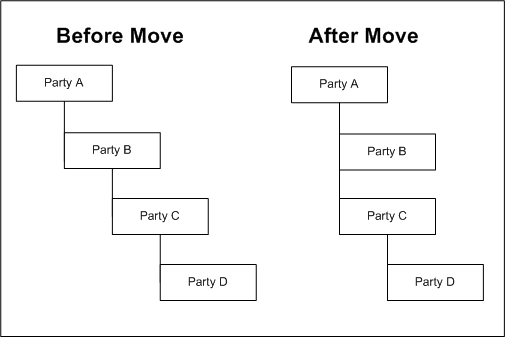
For example, the current hierarchy has Party A as the parent of Party B, which is the parent of Party C, which is the parent of Party D. You move Party C and select Party A as its new parent. This move ends the relationship for Party B as the parent of Party C and creates a new relationship for Party A as the parent of Party C. Party D moves along with Party C and remains a child of Party C.
This diagram shows the hierarchy before and after the move:
The relationship phrase of the moved relationship stays the same with respect to parties that you move. For example, if Party C was a subsidiary of Party B, it would then be the subsidiary of Party A, and Party D is still a subsidiary of Party C.
Navigate to the Hierarchy page for the hierarchy that you want to view and manage. See: Viewing Relationship Hierarchies.
Attention: To ensure accurate results when you move parties, use the current date as the as of date. All moves are based on the hierarchy as it is today.
Select the party or parties that you want to move and click the Move button.
Note: You cannot move parties with the relationship start date in the future.
In the Move Parties page, expand the hierarchy as necessary to find the new parent party.
Select the new parent party and click the Apply button.
The confirmation takes you back to view the results of your move in the updated relationship hierarchy.
