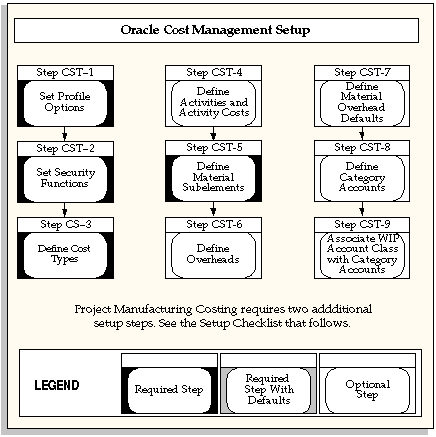
This section contains an overview of each task you need to complete to set up Oracle Cost Management.
The following steps may need to be performed to implement Oracle Cost Management. These steps are discussed in detail in the Setting Up sections of other Oracle product user's guides.
You need to complete several other setup steps, including:
Performing system - wide setup tasks such as configuring concurrent managers and printers
Managing data security, which includes setting up responsibilities to allow access to a specific set of business data and complete a specific set of transactions, and assigning individual users to one or more of these responsibilities.
Setting up Oracle Workflow
Setting up an Oracle E-Business Suite System Administrator responsibility. See: Setting Up Oracle E-Business Suite System Administrator
See also:
Oracle E-Business Suite System Administrator's Guide
Oracle Workflow Guide
Use the Setting Up General Ledger section in the General Ledger User's Guide for help in completing the following setup steps.
| Step | Reference |
|---|---|
| Define Your ledger for Perpetual Costing See: Defining Ledgers. Note: If you are not implementing Oracle General Ledger, you can use the Ledger window in Oracle Inventory or Oracle Cost Management to define your ledger. | Common Applications |
| See: Entering Daily Rates | Common Applications |
Use the Setting Up Oracle Inventory section in the Oracle Inventory User's Guide for help in completing the following setup steps.
| Step | Reference |
|---|---|
| Define Organizations See: Inventory Structure. | Common Applications |
| Define Organization Parameters for Perpetual Costing. See: Defining Organization Parameters . Note: Organization parameters define the costing method for your organization, the general ledger transfer option (Required), the organization level default and system accounts, and the inter - organization transfer information. | Common Applications |
| Define Units of Measure. See: Defining Units of Measure. Note: If you are not implementing Oracle Inventory, you can use the Units of Measure window in Oracle Inventory to define your units of measure. | Common Applications |
| Define Subinventories. See: Defining Subinventories. | Common Applications |
| Define Categories See: Defining Categories. | Common Applications |
| Define Category Sets. See: Defining Category Sets. | Common Applications |
| Open Accounting Periods. See: Maintaining Accounting Periods. | Common Applications |
| Define Default Category Sets. See: Defining Default Category Sets. | Common Applications |
| Define Items, Item Attributes, and Controls. See: Defining Item Attribute Controls. | Common Applications |
| Define Account Aliases. See: Defining Account Aliases. | Common Applications |
| Launch Transaction Managers. See: Launching Transaction Managers (Oracle Inventory User's Guide). | Common Applications |
Use the Setting Up Oracle Purchasing section in the Oracle Purchasing User's Guide for help in completing the following steps.
Note: These steps are required only if you plan to use Purchasing as part of costing.
| Step | Reference |
|---|---|
| Define Receiving Options and Controls. See: Setup Overview. | Common Applications |
| Define Purchasing Options. See: Defining Purchase Options. | Common Applications |
Use the Setting Up Oracle Bills of Material section in the Oracle Bills of Materials User's Guide for help in completing the following steps.
Note: These steps are required only if you plan to use Bills of Material as part of costing.
| Step | Reference |
|---|---|
| Define Bills of Material Parameters. See: Defining Bills of Material Parameters. | Common Applications |
| Define Resources. See: Defining a Resource. | Common Applications |
| Define Departments. See: Defining a Department. | Common Applications |
| Assign Resources to a Department | Common Applications |
| Define Overheads and Assign them to Departments. See: Defining a Resource. | Common Applications |
Use the Setting Up Oracle Work in Process section for help in completing the following steps.
Note: These steps are required only if you plan to use Work in Process as part of costing.
| Step | Reference |
|---|---|
| Define WIP Accounting Classes and Valuation Accounts | Common Applications |
| Define WIP Parameters | Common Applications |
Some of the steps outlined in this flowchart and setup checklist are required and some are optional. Required step with defaults refers to setup functionality that comes with pre-seeded, default values in the database; however, you should review those defaults and decide whether to change them to suit your business needs. If you want or need to change them, you should perform that setup step. You need to perform optional steps only if you plan to use the related feature or complete certain business functions.
Note: Oracle Cost Management does not support costing for process inventory organizations. If you open costing setup windows in a process inventory organization context, then an error message displays a message indicating that the function is not available for a process organization, and the window process will not open.