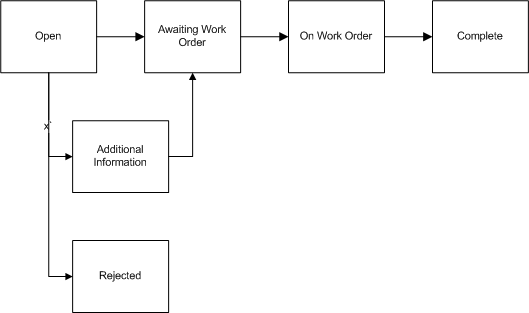
A work request transitions through several statuses during its lifecycle. The work request lifecycle is as follows:
Work Request Lifecycle
Open - A work request is created in an Open status.
Awaiting Work Order - The work request status changes from Open to Awaiting Work Order if the individual on the approval route has approved it. If the Auto-Approve Work Request functionality is enabled for the current organization, the status is automatically Awaiting Work Order (See: Defining eAM Parameters).
On Work Order - After a work request is associated with a Work Order, the status changes to On Work Order.
Rejected - The individual on the approval route rejected the work request.
Additional Information - If the work request's status is Additional Information, the originator needs to add the requested information. During the approval process, the system adds the information to the work request notes and does not transfer the work request back using Workflow.
Complete - The work request status transitions to Complete when the Work Order associated with the request is completed.
You can request more work request information by clicking one of the following action buttons on the workflow notification received:
Request Information: Click this button to obtain additional input from any specified user. The Requested Information text will appear in the notification's Action History region only, and will not update the work request log. Also, the status of the work request is not changed during this request process.
Additional Information: Click this button to alternatively request more information and to obtain additional input from the work request originator. The text entered in the notifications response comments are updated to the Work Request Log and to the notification's Comments region. Also, the status of the work request is changed to 'Additional Information' during this process.
See Defining EAM Parameters for more information regarding Oracle Workflow and eAM notifications.