Oracle provides the following methods for importing item catalog metadata:
FNDLOAD
iSetup
Interfaces and Public APIs
Import from Excel
Webservices
Refer to My Oracle Support ID 1504980.1 for a description each method's benefits and limitations, as well as examples of how to use each method. You can find additional information about some of the above methods in the following topics:
Import from Excel
The rest of this topic provides more information about using FNDLOAD and the open interface tables used to import item catalog metadata.
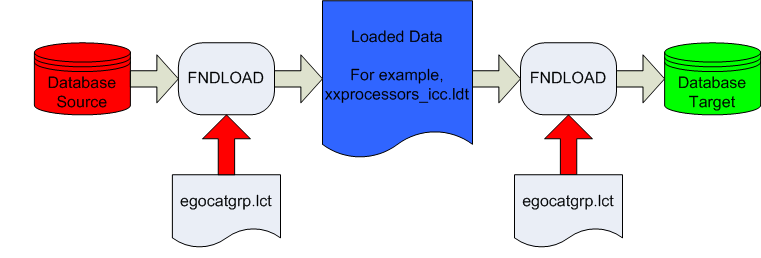
The Generic Loader (FNDLOAD) is a concurrent program that can move Oracle E-Business Suite data between database and text file representations. The loader reads a configuration file to determine what data to access. It can download data from an application entity into a portable, editable text file. You can then upload the file into any other database to copy the data. Conversion between database store and file format is specified by a configuration file read by the loader. FNDLOAD downloads data from a database according to a configuration (.lct) file, and converts the data into a data file (.ldt file). The Generic Loader can then upload this data to another database using a configuration file. Use FNDLOAD to import and export item catalog categories and the following related entities:
In addition, you can use FNDLOAD to import and export the following entities:
Refer to My Oracle Support (https://support.oracle.com) ID 1504980.1 for specific instructions on how to import and export each entity using FNDLOAD.
Data Transfer Using FNDLOAD
Use open interface tables to import the following item catalog metadata:
Item catalog categories (ICCs)
ICC definition
Attribute group association
See: Associating Attribute Groups with an Item Catalog Category
Item pages association
Item number and description generation methods
New item request association
See: Associating New Item Requests with an Item Catalog Category
ICC versions
Transaction attributes
Value sets
See: Defining Value Sets for User-Defined Attributes
Non-versioned value sets and its values
Versioned value sets and its values
Child value sets and its values
Attribute groups and attributes
Functions
See: Creating User-Defined Functions for Item Attributes
Function header
Function parameter
Using the concurrent program EGO Import Metadata (EGOIMDCP), you can choose to validate and import the above data from the open interface tables into the production tables collectively or one at a time by selecting one of the following parameters:
Import Value Sets
Import Attribute Groups
Import Item Catalog Categories
Batch Id (Null for All).
Selecting the Batch Id parameter imports all batch data into the production tables.
Delete Successfully Processed Records
Suggestion: When troubleshooting this import process, leave this parameter set to No.
Item Catalog Metadata Open Interface Tables
| Table Name | Description |
|---|---|
| EGO_FLEX_VALUE_SET_INTF | This table stores intermediate information about value sets. It stores information for both value set versions and non-versioned value sets, as well as the parent-child relationship for a value set. |
| EGO_FLEX_VALUE_INTF | This table stores intermediate values for an associated value set. It also stores table and column information for a table type value set. It stores values corresponding to each version for a value set with versions. |
| EGO_FLEX_VALUE_TL_INTF | This table stores translations for value set values in each of the installed languages. |
| EGO_ATTR_GROUPS_INTERFACE | This table stores the definitions for attribute groups. |
| EGO_ATTR_GROUPS_DL_INTERFACE | This table stores the definitions for attribute group business entities (data levels). |
| EGO_ATTR_GROUP_COLS_INTF | This table stores the definitions for attributes. |
| EGO_PAGES_INTERFACE | This table stores the definitions for Item Catalog Category pages. |
| EGO_PAGE_ENTRIES_INTERFACE | This table stores the definitions for Item Catalog Category page entries. |
| EGO_FUNCTIONS_INTERFACE | This table stores the function header information. |
| EGO_FUNC_PARAMS_INTERFACE | This table stores the function parameters information. |
| MTL_ITEM_CAT_GRPS_INTERFACE | This table stores the ICC header record mimicking the base table MTL_ITEM_CATALOG_GROUPS_B. |
| EGO_ATTR_GRPS_ASSOC_INTERFACE | This table stores the Attribute Group associations with ICCs. |
| EGO_ICC_VERS_INTERFACE | This table stores version related information. It links to the Transaction Attributes interface table (EGO_TRANS_ATTRS_VERS_INTF) by ICC name/ID and version sequence number. |
| EGO_TRANS_ATTRS_VERS_INTF | This table stores information about the transaction attributes for a specific ICC version. |
| EGO_FUNC_PARAMS_MAP_INTERFACE | This table stores function parameters mapping for number generation and description generation for ICCs. |
Warning: It is possible to create duplicate ICCs if multiple records with the same ICC name are simultaneously imported. To prevent creation of duplicate ICCs, create a custom unique index for the MTL_ITEM_CATALOG_GROUPS_B table. To create this index, determine which segments are enabled for the Item Catalogs flexfield (Flexfield Code MICG). If, for example, a two segment flexfield is used, with SEGMENT8 and SEGMENT12 enabled, then use the following command:
SQL> create unique index MTL_ITEM_CATALOG_GROUPS_B_UC2 ON MTL_ITEM_CATALOG_GROUPS_B(SEGMENT8,SEGMENT12)
Warning: The following columns in the open interface tables are either used by the system during record processing or are not supported at this time. Do not populate these columns with values.
| Column | Appears in Table |
|---|---|
| ASSOCIATION_ID | EGO_ATTR_GRPS_ASSOC_INTERFACE |
| DATA_LEVEL | EGO_ATTR_GRPS_ASSOC_INTERFACE |
| DATA_LEVEL_ID | EGO_ATTR_GRPS_ASSOC_INTERFACE |
| END_DATE | EGO_ICC_VERS_INTERFACE |
| VERSION_SEQ_ID | EGO_ICC_VERS_INTERFACE |
| INVENTORY_ITEM_ID | EGO_TRANS_ATTRS_VERS_INTF |
| ORGANIZATION_ID | EGO_TRANS_ATTRS_VERS_INTF |
| REVISION_ID | EGO_TRANS_ATTRS_VERS_INTF |
| ASSOCIATION_ID | EGO_TRANS_ATTRS_VERS_INTF
Caution: Do not populate this column if the Transaction Type = Create. You must populate this column for all other transaction types. |
| ATTR_ID | EGO_TRANS_ATTRS_VERS_INTF
Caution: Do not populate this column if the Transaction Type = Create. You must populate this column for all other transaction types. |
| CREATED_BY | Appears in all item catalog metadata open interface tables |
| CREATION_DATE | Appears in all item catalog metadata open interface tables |
| LAST_UPDATE_LOGIN | Appears in all item catalog metadata open interface tables |
| LAST_UPDATED_BY | Appears in all item catalog metadata open interface tables |
| LAST_UPDATE_DATE | Appears in all item catalog metadata open interface tables |
| REQUEST_ID | Appears in all item catalog metadata open interface tables |
| PROGRAM_APPLICATION_ID | Appears in all item catalog metadata open interface tables |
| PROGRAM_ID | Appears in all item catalog metadata open interface tables |
| PROGRAM_UPDATE_DATE | Appears in all item catalog metadata open interface tables |
| TRANSACTION_ID | Appears in all item catalog metadata open interface tables |
| START_DATE_ACTIVE | MTL_ITEM_CAT_GRPS_INTERFACE |
| END_DATE_ACTIVE | MTL_ITEM_CAT_GRPS_INTERFACE |
| SUMMARY_FLAG | MTL_ITEM_CAT_GRPS_INTERFACE |
| ITEM_DESC_ACTION_ID | MTL_ITEM_CAT_GRPS_INTERFACE |
| ITEM_NUM_ACTION_ID | MTL_ITEM_CAT_GRPS_INTERFACE |
 To import item catalog metadata using open interface tables:
Load the item catalog metadata open interface tables with the data you want to import. For detailed help on loading the Open Interface tables, refer to the Integration Repository. See: Oracle Integration Repository User's Guide.
Here are some suggestions if you encounter problems while importing item catalog metadata using the open interface tables:
Consider writing errors into the MTL_INTERFACE_ERRORS table.
Perform the following steps before logging a bug:
Set the profile option 'INV: Debug Trace' to Yes. This will write detailed debug messages into the concurrent program log file.
Turn ON the trace for the concurrent program 'EGO Import Metadata' (short name EGOIMDCP).
While launching the concurrent program, set the parameter 'Delete Successfully Processed Records' to 'No'.
In the bug, provide the following information:
Concurrent Program log file
Raw Trace file. If it is a performance issue, then generate the tkprof file for this raw trace file and provide both the raw trace file as well as the tkprof file.
Set of records from the table mtl_interface_errors for this specific request_id.
Set of records from the specific entity's interface table before and after launching the concurrent program.
List of invalid objects in EGO schema.