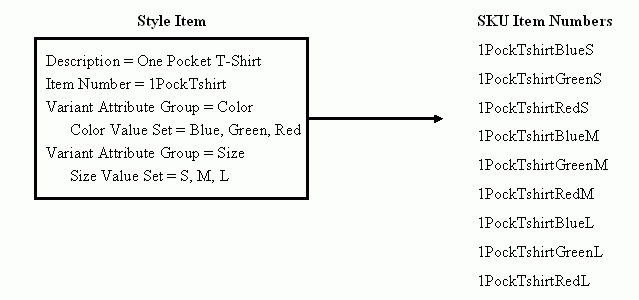
You can use style items to group similar items (called SKUs or Stock Keeping Units) together. The items grouped under the style item (the SKUs) have variant attributes. For example, a retail clothing business sells a particular shirt style in multiple colors and sizes. The multiple colors represent one variant attribute group while the various sizes represent another variant attribute group. Variant attribute groups contain attributes that differentiate the item. Each unique variant combination represents a possible SKU item. A simple example that explains the use of style items with SKUs follows.
Style/SKU Example
The style item behaves as a model item while the SKUs behave as standard items. All business transactions occur at the SKU item level.
The SKUs can either inherit or default certain item characteristics from the style item. When a SKU inherits a characteristic from its style item, the characteristic is always controlled at the style item level. For example, you can only change an inherited item level user defined attribute such as price at the style item level. Once the price is changed, all SKUs reflect the new price. When a characteristic defaults from a style item to a SKU during SKU creation, you can change the characteristic at the SKU level later without affecting the style item. Conversely, if you change a defaulted characteristic at the style item level after SKU creation, the change does not automatically appear at the SKU level. You must manually make the change at the SKU level or use a mass update function to change the SKUs. See: Mass Updating Items, Item Categories and Item Associations. The following table lists the characteristics available to style and SKU items, as well as whether the inherit or default behavior is available for the characteristic.
Characteristics Availability and Inheritance/Defaulting Behavior
| Characteristics | Style Item | SKU | Defaulting from Style to SKU | Inheritance from Style to SKU |
|---|---|---|---|---|
| Item level - User Defined Attributes | Yes | Yes | Yes | Yes |
| Item level - Retail Library defined attributes | Yes | Yes | Yes | Yes |
| Item level - Operational attributes | Yes | Yes | Yes | No |
| Variant Attribute Group | Yes | Yes | No | No |
| Revisions | Yes | Yes | No | No |
| Revision level User-defined attributes | Yes | Yes | No | No |
| Status | Yes | Yes | Yes | No |
| People/Security | Yes | Yes | Yes | No |
| Lifecycle | Yes | Yes | Yes | No |
| Retailer Sites | Yes | Yes | Yes | No |
| Item - Retailer Sites association attributes | Yes | Yes | Yes | Yes |
| Informal Pack Hierarchy | Yes | Yes | Yes* | Yes* |
| Formal Pack Hierarchy | Yes | Yes | No | not applicable |
| Structure/Bill of Material | Yes | Yes | No | No |
| Attachment - Item level | Yes | Yes | Yes | No |
| Attachment - Revision level | Yes | Yes | No | No |
| GTIN | Yes | Yes | No | No |
| Item Supplier associations | Yes | Yes | Yes | No |
| Change Management | Yes | Yes | not applicable | not applicable |
| External Transactions | not applicable | Yes | not applicable | not applicable |
| Related Items | Yes | Yes | No | No |
| Customer Item cross-reference | Yes | Yes | No | No |
| Manufacturer Part Number | Yes | Yes | No | No |
| Cross-Reference | Yes | Yes | No | No |
| Source System Cross-Reference | Yes | Yes | No | No |
* for user defined attributes only
The style item and it's related SKUs must have the same item catalog category (ICC). You can only change a style items' ICC if there are no related SKUs or if you change the ICC using a mass update function to change the style and related SKUs ICC at the same time. See: Mass Updating Items, Item Categories and Item Associations.
