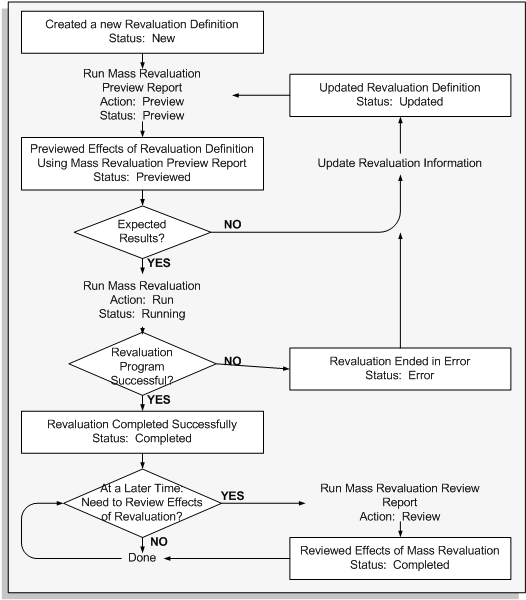
Use the status to track your revaluation. The revaluation status determines what action to perform next. The following table defines each revaluation status and their next action available.
| Status | Definition | Possible Action |
|---|---|---|
| New | Newly created mass depreciation definition | Preview |
| Preview | Preview report currently running | None |
| Previewed | Preview report completed successfully | Run |
| Updated | Revaluation definition updated after previewing | Preview |
| Running | Revaluation currently running | None |
| Completed | Revaluation completed successfully | Review Copy |
| Error | Preview report or revaluation completed in error | Preview or Run, whichever failed |
When you save a new definition, Oracle Assets gives it a unique Mass Transaction Number. Use this number to find your revaluation definition when you want to perform the next stage in the transaction cycle.
The following figure graphically illustrates the Mass Revaluation process. A detail description of the process was provided in the preceding text.
