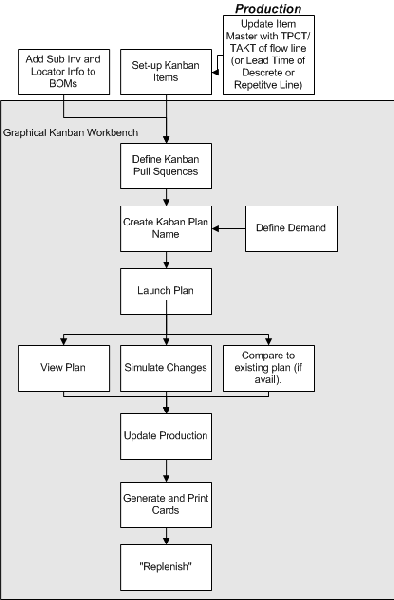
Flow Manufacturing a kanban pull replenishment system to signal material requirements and pull material from its defined source, as needed, to meet demand. The objective of the kanban replenishment system is to pull the material, signaling with a replenishment signal.
The term kanban refers to a visual replenishment signal, such as a card or an empty container for material. In a kanban system, each workstation on the flow line can have several containers, each holding the same quantity of material. Typically, an empty container is a signal to replenish. The following diagram demonstrates the flow of the kanban planning system. Oracle Flow Manufacturing uses the Graphical Kanban Workbench to create these transactions.
The Graphical Kanban Workbench combines kanban setup, kanban planning, pull sequence definition, and planning simulation in one interface. The graphical interface includes the following features:
Graphical view the pull sequence network
Graphical view the demand pattern for monitoring requirements
You can define pull sequence, and have the capability to mass add pull sequences for items
You can add items under locator control and specify point of use, point of supply, or both as locator sources
You can perform simulation replans and updates to production
You can view comparison of kanbans by variances in size, or the number of cards between the two kanban plans being analyzed
Note: The Bills of Material Workday calendar is used during kanban planning.
See: Overview of Kanban Replenishment.
The arrow on the replenishment chain canvas represents the pull sequence between point of use and a point of supply. One or more cards are generated for a pull sequence. A color on the arrow is used to easily identify the card status on the pull sequence. This information is also viewable on the View Kanban Demands and Compare Kanban Plans windows. The following values are used in the graphical replenishment network in the right pane:
Black: Cards have not been generated for the pull sequence
Green: There are cards in the pull sequence that are in the active status
Blue: Some cards in this pull sequence are on hold, and none are active
Red: All of the cards are canceled
The right pane canvas displays a toolbar when you are in the Production region. It contains icons used for creating and modifying your graphical network.
This toolbar contains icons for:
Connector: Enables you to create links between entities on the canvas
Pointer: Enables you to move existing entities on the canvas
Organization: A point of supply that is in another organization
Supplier: A point of supply that is a supplier
Subinventory: A point of user or point of supply that is a subinventory
Production: A point of supply that is a flow line, repetitive line, or discrete production area