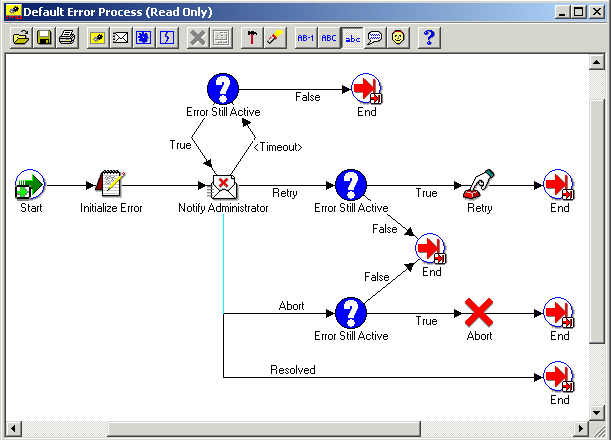
DEFAULT_ERROR is the internal name of the Default Error Process. The purpose of this error handling process is to:
send an administrator a notification when an error occurs in a process
provide information to the administrator about the error
allow the administrator to abort the process, retry the errored activity, or resolve the problem that caused the error to occur
The process automatically terminates when the error is no longer active.
Although you cannot edit the Default Error Process, the process is flexible enough for you to customize its behavior. You can define two item type attributes called WF_ADMINISTRATOR and ERROR_TIMEOUT in your item type that calls the Default Error Process to control the error processing that is performed.
WF_ADMINISTRATOR - Specify the role to which Oracle Workflow sends the error notification. The default is the SYSADMIN role.
ERROR_TIMEOUT - Specify whether the error notification times out.
Default Error Process Diagram
The Initialize Error activity calls a PL/SQL procedure named WF_STANDARD.INITIALIZEERRORS. This procedure determines if the item type of the errored process has an item type attribute defined with an internal name of WF_ADMINISTRATOR. If it does, it sets the performer of the subsequent notification activity, Notify Administrator, to the role stored in WF_ADMINISTRATOR. If it does not, the subsequent notification activity remains set to the default performer, SYSADMIN.
By checking for an item attribute called WF_ADMINISTRATOR in your errored process's item type, the Initialize Error activity lets you specify who you want a notification to be sent to in the case of an error in your specific process without modifying the error process.
The Notify Administrator activity sends the Default Retry Error message to a performer (either SYSADMIN or whatever role is stored in your item type's WF_ADMINISTRATOR item attribute). The message indicates that an error has occurred in the specified process and that a response is needed. The response options and their resulting actions are:
Abort the process - executes the Error Still Active activity to verify if the error is still present and if it is, calls the Abort function activity and ends the default error process.
Retry the process - executes the Error Still Active activity to verify if the error is still present and if it is, calls the Retry function activity and ends the default error process.
Resolved the process - ends the default error process because you addressed the errored process directly through some external means or using the embedded URL link to the Workflow Monitor.
Note: The notification message's embedded monitor URL displays the process in error in the Workflow Monitor with full administrator privileges. You can perform actions such as retrying, skipping, or rolling back part of your process to resolve the error.
The subject and body of the Default Retry Error message are as follows:
Subject: Error in Workflow &ERROR_ITEM_TYPE/&ERROR_ITEM_KEY

&ERROR_MESSAGE

Body: An Error occurred in the following Workflow.

Item Type = &ERROR_ITEM_TYPE
Item Key = &ERROR_ITEM_KEY
User Key =&ERROR_USER_KEY

Error Name = &ERROR_NAME
Error Message = &ERROR_MESSAGE
Error Stack = &ERROR_STACK

Activity Id = &ERROR_ACTIVITY_ID
Activity Label = &ERROR_ACTIVITY_LABEL
Result Code = &ERROR_RESULT_CODE
Notification Id = &ERROR_NOTIFICATION_ID
Assigned User = &ERROR_ASSIGNED_USER

&MONITOR
The Notify Administrator notification activity has a dynamic timeout value assigned to it. It checks the item type of the errored process for an item type attribute whose internal name is ERROR_TIMEOUT. ERROR_TIMEOUT must be an attribute of type number. The Workflow Engine interprets the value of this attribute as a relative offset from the begin date of the activity, in the unit of minutes, to determine the timeout value of Notify Administrator. If ERROR_TIMEOUT contains a null value, a value of zero, or is not defined at all, then Notify Administrator has no timeout.
The Workflow Engine initiates the Error Still Active function activity if the Notify Administrator activity times out or returns Abort or Retry as a result.
The Error Still Active activity calls a PL/SQL procedure called WF_STANDARD.CHECKERRORACTIVE. The purpose of the Error Still Active activity is to determine whether the errored process is still in error before continuing with the error handling. If it is, Error Still Active returns TRUE and the Workflow Engine takes the appropriate transition to either send another notification or abort or retry the errored process. If the errored process is no longer in error, this activity returns FALSE and the error handling process ends, as modelled in the process diagram.
The Retry function activity executes the PL/SQL procedure WF_STANDARD.RESETERROR to clear the activity that was in error and run it again. This procedure calls the WF_ENGINE.HandleError API to rerun the activity.
The Abort function activity executes the PL/SQL procedure WF_STANDARD.ABORTPROCESS, which in turn calls the WF_ENGINE.AbortProcess API to abort the process that encountered the error.
