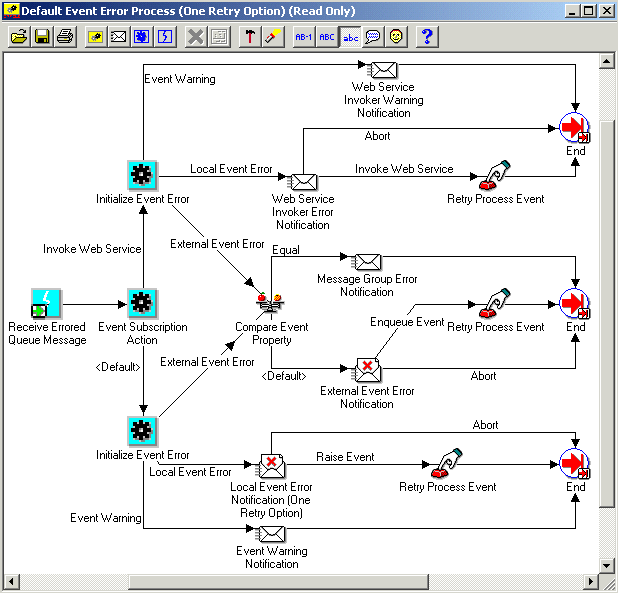
DEFAULT_EVENT_ERROR2 is the internal name of the Default Event Error Process (One Retry Option). This process is not used in the standard Oracle Workflow error handling, but you can optionally set up custom error handling that uses it. For example, you can use this process in the following cases:
You want to provide specific Web service details for any errors in subscriptions that invoke Web services.
You want to present a simpler administrative notification for local errored events than the notification in the standard Default Event Error Process.
The purpose of the Default Event Error Process (One Retry Option) is to:
send an administrator a notification when an error or warning condition occurs during event subscription processing
provide information to the administrator about the error, including specific Web service details for subscriptions that invoke Web services
allow the administrator to abort or retry the event subscription processing if appropriate
Note: The Default Event Error Process (One Retry Option) presents a simpler administrative notification for local errored events than the standard Default Event Error Process. The Default Event Error Process provides options to retry a local event with only the event name and event key; with only the event name, event key, and event data; or with the event name, event key, event data, and parameters. The Default Event Error Process (One Retry Option) simplifies the notification administrators receive by providing only the option to retry the event with the event name, event key, event data, and parameters.
To use this process in custom error handling for an event, create a subscription to that event with a source type of Error and an action of Launch Workflow. Then specify the item type to launch as System: Error (WFERROR) and the process as Default Event Error Process (One Retry Option) (DEFAULT_EVENT_ERROR2).
Default Event Error Process (One Retry Option) Diagram
The Receive Errored Queue Message activity receives an event message that has encountered an error or warning condition during subscription processing. The activity stores the event name, event key, and the complete event message in item type attributes.
The Event Subscription Action activity calls a PL/SQL procedure named WF_STANDARD.SubscriptionAction. This procedure determines the action of the subscription that encountered the error. If the action is Invoke Web Service, then the Default Event Error Process (One Retry Option) proceeds to send error notifications that include specific Web service details. For all other actions, the process sends error notifications with general event subscription details only.
The Initialize Event Error activity calls a PL/SQL procedure named WF_STANDARD.INITIALIZEEVENTERROR. This procedure determines the error type.
Event Warning - A warning condition occurred, but subscription processing continued. For this error type, the process sends the Web Service Invoker Warning Notification for Web service subscriptions, or the Event Warning Notification for all other subscriptions.
Local Event Error - An error occurred in subscription processing for an event raised on the local system. For this error type, the process sends the Web Service Invoker Error Notification for Web service subscriptions, or the Local Event Error Notification (One Retry Option) for all other subscriptions.
External Event Error - An error occurred in subscription processing for an event received from an external source. For this error type, the process first checks whether the event message belongs to a message group on a queue that is enabled for transactional grouping. If so, then the process sends the Message Group Error Notification. Otherwise, the process sends the External Event Error Notification.
The Workflow Engine initiates the Web Service Invoker Warning Notification activity when the errored subscription has an action of Invoke Web Service and the errored event has an error type of Event Warning. The activity sends the Default Web Service Invoker Event Warning message to the system administrator to indicate that a warning condition has occurred during Web service subscription processing. This message is an FYI message and does not require a response.
The subject and body of the Default Web Service Invoker Event Warning message are as follows:
Subject: Web Service Invoker &ERROR_TYPE : &EVENT_NAME / &EVENT_KEY

Body: A Warning occurred while invoking following web service.

&WEBSERVICE_DETAILS
&ERROR_DETAILS
&EVENT_DETAILS
The Workflow Engine initiates the Event Warning Notification activity when the errored subscription has any action other than Invoke Web Service and the errored event has an error type of Event Warning. The activity sends the Default Event Warning message to the system administrator to indicate that a warning condition has occurred during subscription processing. This message is an FYI message and does not require a response.
The subject and body of the Default Event Warning message are as follows:
Subject: Event WARNING : &EVENT_NAME / &EVENT_KEY

Body: A Warning occurred in the following Event
Subscription: &EVENT_SUBSCRIPTION

Event Error Name: &ERROR_NAME
Event Error Message: &ERROR_MESSAGE
Event Error Stack: &ERROR_STACK

Event Data: &EVENT_DATA_URL

Other Event Details: &EVENT_DETAILS
The Workflow Engine initiates the Web Service Invoker Error Notification activity when the errored subscription has an action of Invoke Web Service and the errored event has an error type of Local Event Error. The activity sends the Default Web Service Invoker Event Error message to the system administrator. This message indicates that an error has occurred during Web service subscription processing for an event raised on the local system, and that a response is needed. The response options and their resulting actions are:
Abort - aborts subscription processing and ends the process.
Invoke Web Service - executes the Retry Process Event activity to reattempt invoking the Web service by reraising the event, and ends the process.
The system administrator can attempt to correct the error before reattempting to invoke the Web service.
The subject and body of the Default Web Service Invoker Event Error message are as follows:
Subject: Web Service Invoker &ERROR_TYPE : &EVENT_NAME / &EVENT_KEY

Body: An Error occurred while invoking following web service.

&WEBSERVICE_DETAILS
&ERROR_DETAILS
&EVENT_DETAILS
The Workflow Engine initiates the Local Event Error Notification (One Retry Option) activity when the errored subscription has any action other than Invoke Web Service and the errored event has an error type of Local Event Error. The activity sends the Default Local Event Error (One Retry Option) message to the system administrator. This message indicates that an error has occurred during subscription processing for an event raised on the local system, and that a response is needed. The response options and their resulting actions are:
Abort - aborts subscription processing and ends the process.
Raise Event - executes the Retry Process Event activity to reraise the event with the event name, event key, event data, and parameters, and ends the process.
Note: The Default Event Error Process (One Retry Option) presents a simpler administrative notification than the standard Default Event Error Process by providing only the option to retry the event with the event name, event key, event data, and parameters. The Default Event Error Process (One Retry Option) does not include options to retry the event with only the event name and event key, or only the event name, event key, and event data. If you want to provide administrators those options, use the standard Default Event Error Process instead.
The system administrator can attempt to correct the error before reraising the event.
The subject and body of the Default Local Event Error (One Retry Option) message are as follows:
Subject: Local Event &ERROR_TYPE : &EVENT_NAME / &EVENT_KEY

Body: An Error occurred in the following Event
Subscription: &EVENT_SUBSCRIPTION

Event Error Name: &ERROR_NAME
Event Error Message: &ERROR_MESSAGE
Event Error Stack: &ERROR_STACK

Event Data: &EVENT_DATA_URL

&EVENT_DETAILS
The Workflow Engine executes the standard Compare Event Property activity when the errored event has an error type of External Event Error. This activity node checks whether the DEQUEUE_MODE event parameter is set to the value TRANSACTIONAL, indicating that the event message belongs to a message group on a queue that is enabled for transactional grouping. If so, then the Workflow Engine sends the Message Group Error Notification and ends the process. Otherwise, the Workflow Engine sends the External Event Error Notification.
The Workflow Engine initiates the Message Group Error Notification activity when the errored event has an error type of External Event Error and the event message belongs to a message group on a queue that is enabled for transactional grouping. The activity sends the Default External Message Group Error message to the system administrator to indicate that an error occurred while processing a message that belongs to a message group. In this case the event message should not be aborted or retried individually. The administrator should investigate the error for the entire message group. Consequently, this notification message is an FYI message and does not require a response. For more information about transactional queues, see: Oracle Streams Advanced Queuing User's Guide.
Note: The standard Business Event System queues provided by Oracle Workflow are not enabled for transactional grouping.
The subject and body of the Default External Message Group Error message are as follows:
Subject: External Event &ERROR_TYPE : &EVENT_NAME / &EVENT_KEY

Body: An error occured while processing a message that belonged to a message group.

Details of this message are included in this notification for informational purposes only.  The dequeue retry count for all messages in this message group have been incremented by one.

An Error occurred in the following Event Subscription: &EVENT_SUBSCRIPTION

Event Error Name: &ERROR_NAME
Event Error Message: &ERROR_MESSAGE
Event Error Stack: &ERROR_STACK

Event Data: &EVENT_DATA_URL

Other Event Details: &EVENT_DETAILS
The Workflow Engine initiates the External Event Error Notification activity when the errored event has an error type of External Event Error and the event was on a non-transactional queue. The activity sends the Default External Event Error message to the system administrator. This message indicates that an error has occurred during subscription processing for an event received from an external source, and that a response is needed. The response options and their resulting actions are:
Abort - aborts subscription processing and ends the process. For example, if the event data contained in an event message is corrupted, the system administrator can abort subscription processing on that event message.
Enqueue Event - executes the Retry Process Event activity to enqueue the event message back onto the queue where it was originally received, and ends the process. The event message is enqueued with a priority of -1 so that it will be the first message to be dequeued the next time the listener runs.
The system administrator can attempt to correct the error before re-enqueuing the event. For example, the system administrator can create a subscription to handle an unexpected event and then re-enqueue the event message to trigger the new subscription.
The subject and body of the Default External Event Error message are as follows:
Subject: External Event &ERROR_TYPE : &EVENT_NAME / &EVENT_KEY

Body: An Error occurred in the following Event
Subscription: &EVENT_SUBSCRIPTION

Event Error Name: &ERROR_NAME
Event Error Message: &ERROR_MESSAGE
Event Error Stack: &ERROR_STACK

Event Data: &EVENT_DATA_URL

Other Event Details: &EVENT_DETAILS
The Retry Process Event activity executes the PL/SQL procedure WF_STANDARD.RETRYRAISE. Depending on the notification response selected by the system administrator, this procedure either reraises or re-enqueues an errored event. The responses that can initiate the Retry Process Event activity and their resulting actions are:
Invoke Web Service - reattempts invoking a Web service by reraising a local errored event with the event name, event key, event data, and parameters.
Raise Event - reraises a local errored event with the event name, event key, event data, and parameters.
Enqueue Event - enqueues an errored external event message back onto the queue where it was originally received. The event message is enqueued with a priority of -1 so that it will be the first message to be dequeued the next time the listener runs.
