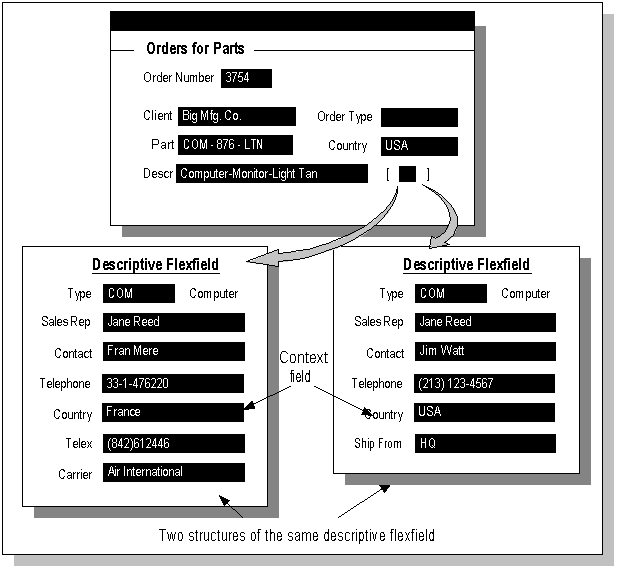
This chapter contains information on planning and defining descriptive flexfields. It includes further discussion of flexfields concepts and provides additional concepts that are specific to descriptive flexfields. It also includes discussions of the procedures you use to set up any descriptive flexfield, as well as how to identify a descriptive flexfield on a particular form.
You should already know some basic flexfields terms and concepts:
Flexfield
Segment
Structure
Value
Validation (Validate)
Value set
Now that you know terms and concepts that apply to both key and descriptive flexfields, you need to know additional terms that apply to descriptive flexfields only.
Descriptive flexfields have two different types of segments, global and context-sensitive, that you can decide to use in a descriptive flexfield structure.
A global segment is a segment that always appears in the descriptive flexfield pop-up window (or page, for HTML-based applications), regardless of context (any other information in your form or page). A context-sensitive segment is a segment that may or may not appear depending upon what other information is present in your form.
If you have context-sensitive segments, your descriptive flexfield needs context information (a context value) to determine which context-sensitive segments to show. A descriptive flexfield can get context information from either a field somewhere on the form, or from a special field (a context field) inside the descriptive flexfield pop-up window. If the descriptive flexfield derives the context information from a form field (either displayed or hidden from users), that field is called a reference field for the descriptive flexfield.
Note: Reference fields have limited support in HTML-based applications, and their usage in HTML-based applications requires additional setup steps. For more information, see the Oracle Application Framework Developer's Guide, available from My Oracle Support Knowledge Document 1087332.1, Oracle Application Framework Release Notes, Release 12.1.3.
A context field appears to an end user to be just another segment, complete with its own prompt. However, a context field behaves differently from a normal flexfield segment (either global or context-sensitive). When a user enters a context value into the context field, the user then sees different context-sensitive segments depending on which context value the user entered. You define a context field differently as well. You use a context field instead of a reference field if there is no form field that is a suitable reference field, or if you want your user to directly control which context-sensitive segments appear.
A context-sensitive segment appears once the appropriate context information is chosen. The context-sensitive segments may appear immediately if the appropriate context information is derived from a field before the user enters the descriptive flexfield.
For a descriptive flexfield with context-sensitive segments, a single "structure" consists of both the global segments plus the context-sensitive segments for a particular context field value. That is, a structure consists of all the segments that would appear at one time (after the structure has been chosen).
Example of context-sensitive segments

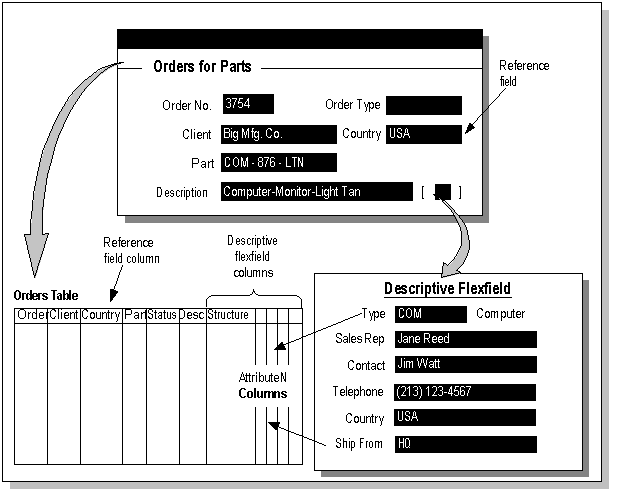
A descriptive flexfield uses columns that are added on to a database table. The table contains any columns that its entity requires, such as a primary key column and other information columns. For example, a Vendors table would probably contain columns for standard vendor information such as Vendor Name, Address, and Vendor Number. The descriptive flexfield columns provide "blank" columns that you can use to store information that is not already stored in another column of that table. A descriptive flexfield requires one column for each possible segment and one additional column in which to store structure information (that is, the context value). You can define only as many segments in a single structure as you have descriptive flexfield segment columns in your table. The descriptive flexfield columns are usually named ATTRIBUTEn where n is a number.
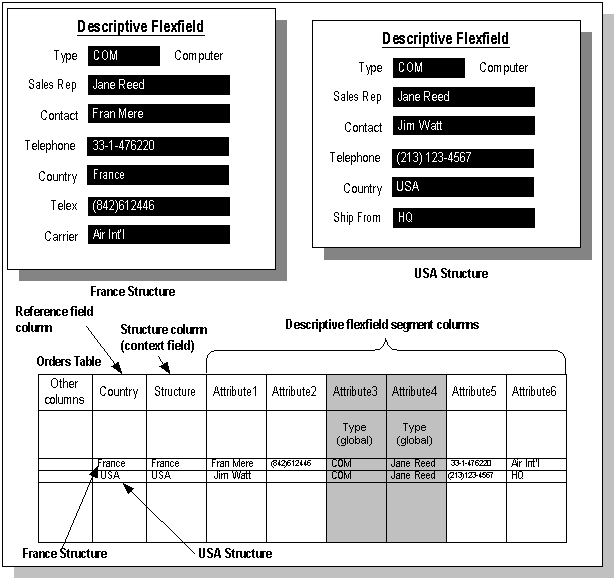
A global segment uses the same column for all rows in the table. A context-sensitive segment for one structure uses a given column, but a context-sensitive segment in a different structure can "reuse" that same column. When you define your descriptive flexfield, you should always define your global segments first to ensure that your global segment can "reserve" that column for all structures. Then, you define your context-sensitive segments using the remaining columns.
Note that when you use a descriptive flexfield that has context-sensitive segments, and you change an existing context value to a new context value, the flexfield automatically clears out all the context-sensitive segment columns, and re-defaults any segments that have default values.