Oracle Workflow is a process management tool used to seamlessly integrate Oracle E-Business Suite business processes together. Introduced with Oracle Workflow 2.6 is the Business Event System to further support business process integration at the business event level.
Integral to the Business Event System is the ability to raise a business event to signal that something of interest has occurred in the Oracle E-Business Suite. Using Oracle Purchasing as an example, an event of interest would be the creation, change, confirmation, or deletion of a purchase order.
Complementary to the raise event is an event subscription defined to perform some activity when it detects an event of interest has occurred. An example of an event subscription in our Oracle Purchasing scenario is to send a message to the appropriate supplier when a new order is created, or when an existing order is changed, confirmed, or deleted.
An event subscription is controlled by a rule function. The result of the rule function determines whether the associated Workflow process will be executed. The actual activity performed by the event subscription is based on the Workflow process defined for it.
In the context of the integration between the Oracle Workflow Business Event System and Oracle XML Gateway, business events and their corresponding event subscriptions are seeded and deployed to the Oracle E-Business Suite. Once the Trading Partner is defined, the seeded business events and event subscriptions may be implemented as is, or they may be configured to perform specific activities relevant to the business requirements.
Application business events for outbound messages are raised by the Oracle E-Business Suite application module responsible for the message and processed by the event subscription defined for it. The seeded event subscription for the B2B integration may be based on the XML Gateway Rule Function or the Workflow Default Rule Function.
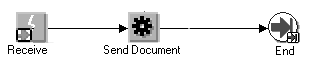
Embedded in the XML Gateway Rule Function is the Transaction Delivery Required Function used to determine if the Trading Partner is enabled for the transaction. The XML Gateway Rule Function can therefore be simply represented as follows:
The Receive Event is followed by the Send Document function activity which proceeds to End.
The Workflow Default Rule Function uses the Transaction Delivery Required function as a process activity to determine if the Trading Partner is enabled for the transaction. This process consists of the following steps: The Receive Event is followed by the Transaction Delivery Required function activity. If it returns TRUE, the Send Document function activity is executed. If FALSE, the process proceeds to End. This process is shown below:
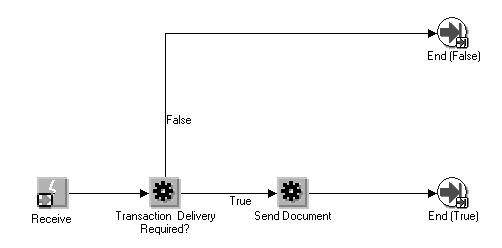
With either rule function, no message is sent if the Trading Partner is not enabled for the transaction.
For efficiency, the XML Gateway Rule Function is the recommended approach as it has already predetermined that the Trading Partner is enabled for the transaction before it proceeds with generating the message. However, the Workflow Default Rule function approach provides a visual audit trail of the Workflow process.
With either approach, Oracle XML Gateway gathers the data from the Oracle E-Business Suite, creates the XML message, and delivers it to the Trading Partner for Business to Business (B2B) integration or to another application module for Application to Application (A2A) integration.
Inbound messages received from the Trading Partner for Business to Business (B2B) integration are enqueued onto the inbound queue. Inbound messages received from another application module for Application to Application (A2A) integration are stored in the Event Message attribute (of the Consume XML Document function) to be accessed by the XML Gateway execution engine for processing.
An XML Gateway inbound rule function is executed in the B2B integration to validate the Trading Partner and to identify the transaction queue. If the Trading Partner is valid, the message is enqueued onto the transaction queue for processing by the XML Gateway execution engine.
The XML Gateway execution engine processes the data according to the instructions in the message map associated with the Trading Partner and message. If successful, the message map sets the Event Details to inform the Oracle E-Business Suite of the Event. It is the application of the map to the message that enables you to determine what the Event Details are. The event is then processed by an application event subscription interested in the inbound message.
Oracle Workflow Business Event System consists of three key components that are used to integrate with the Oracle E-Business Suite to create and consume XML messages:
The Oracle Workflow Builder contains the Oracle Workflow Standard Item Type and the Oracle XML Gateway Standard Item Type. The components of the standard item types can be used to define Workflow processes.
Oracle Workflow Administrator used to register new events and event subscriptions as well as configure seeded event subscriptions.
The Oracle Workflow processing engine used to execute the workflow processes.