
The purpose of the confirmation message is to communicate the status of a business document. In addition to providing general document status information, details regarding any errors detected may be included in the confirmation message.
The confirmation message is a general-purpose document that may be used to acknowledge any business document. It may be used in addition to but not as a substitute for specific purpose acknowledgements such as Purchase Order Acknowledgment or Purchase Order Change Acknowledgment documents.
Refer to www.openapplications.org for details regarding the Confirm Business Object Document (BoD) DTD.
The confirmation message contains the following two parts:
CONFIRM_BOD/CONFIRM
The CONFIRM data type is used to describe the business document it is acknowledging. Included are the document status, description of the document, and an identifier for the original business document.
CONFIRM_BOD/CONFIRMMSG
The CONFIRMMSG data type is used to provide a detailed description of the document status. Included are the description and any reason codes. Each CONFIRM data type may have many CONFIRMMSG data types associated with it.
Oracle XML Gateway provides seeded maps for both the inbound and outbound Confirm BoD message. The names of the seeded message maps are as follows:
ECX_CBODI_OAG72_IN_CONFIRM
ECX_CBODO_OAG72_OUT_CONFIRM
The XML Gateway seeded maps are incorporated into the Oracle E-Business Suite application business process where necessary.
Usage of the Confirm BoD varies between application modules of the Oracle E-Business Suite. For application modules that have incorporated the Confirm BoD into their business processes, the process is modeled as follows:
Oracle XML Gateway sends an outbound confirmation message in response to an inbound business document.
The inbound business document initiates the process (Step 1). As with all inbound messages, XML Gateway notifies the Oracle E-Business Suite application that it has processed an inbound business document.
The application event subscription defined for the inbound document is executed (Step 2) and is followed by a raise event (Step 3) to notify XML Gateway to create and send the outbound confirmation (Step 4).
Steps 2 and 3 are defined separately to allow for application business processes between the consumption of the inbound business document and the creation and delivery of the outbound confirmation message.
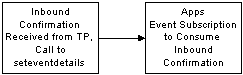
Oracle XML Gateway will process an inbound confirmation message received from a the Trading Partner in response to an outbound business document. It will notify the Oracle E-Business Suite that it has processed an inbound confirmation message.
The application event subscription defined for the inbound confirmation message is executed. The behavior of the event subscription will vary by application module and is dependent on whether the application module is interested in negative, positive, or both types of confirmations.
The application event subscriptions to create and send an outbound message or to consume an inbound message are delivered by the Oracle E-Business Suite application modules.
The seeded event name for the inbound or outbound Confirm BoD message is as follows:
ORACLE.APPS.<COMPONENT>.<TASK>.CONFIRM
COMPONENT is the internal transaction type entered on the Define Transactions form. It represents the product short name.
TASK is the internal transaction subtype entered on the Define Transactions form. It represents a description of the object.
An example of an event name for a confirmation event associated with an outbound purchase order is: ORACLE.APPS.PO.POO.CONFIRM.
The corresponding seeded event subscription is defined as enabled. Use the Oracle Workflow Administrator: Add Events/Event Group window to view or disable the seeded events and event subscriptions if you do not wish to implement the Confirm BoD message.
To implement the seeded event subscriptions, define the Trading Partner and enable the confirmation message as follows:
Define the Trading Partner using the XML Gateway Define Trading Partners form.
Enable the business document and set the Document Confirmation flag to one of the following:
1 = Send confirmation only if there are errors
2 = Always send confirmation
Attention: Ensure that for an outbound business document you enable an inbound confirmation document (Transaction Subtype CBODI); and for an inbound business document you enable an outbound confirmation document (Transaction Subtype CBODO).
Note: Make sure that the value for Source Trading Partner Location Code is the same for the original business document and its corresponding confirmation document.
Refer to Trading Partner Setup for more details on setting up the Trading Partner to implement the confirmation message.