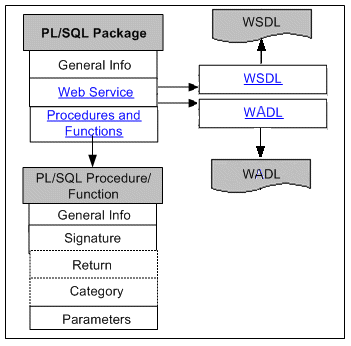
The following diagram illustrates the basic structure of the PL/SQL information page and its connection to the related PL/SQL procedure and function details:
PL/SQL interfaces can be exposed as both SOAP services and REST services. Therefore, the PL/SQL interface details page includes general section of a selected PL/SQL interface, the Overview tab, the SOAP Web Service tab, and the REST Web Service tab.
Users who have the Integration Administrator role can find an additional Grants tab displayed in the interface details page. This tab allows the administrator to create and revoke security grants. For more information on how to manage security grants, see Managing Grants.
For information on the general section, see Common Information.
Note: For more information about Web services, see Understanding Web Services.
Overview Tab
This tab displays read-only information about the selected PL/SQL API. It includes full description, interface source information, as well as methods (or procedures and functions) contained in the selected interface.
For more information on the interface source information, see Common Information on Interface Details.
SOAP Web Service Tab
This tab contains SOAP service information for a selected PL/SQL interface. This includes service status, WSDL description, interaction pattern, and authentication type information.
For more information about SOAP service, see Common Information on SOAP Web Services.
For information on viewing WSDL description, see Reviewing Web Service WSDL Source.
If a SOAP service has been successfully generated, the integration administrators can perform additional administrative tasks including deploying the generated service, regenerating the service, or clearing up the generated service artifact.
If a Web service has been successfully deployed as an active service in Oracle SOA Suite, the integration administrators can undeploy the active service, reset the deployed service to its initial state - 'Not Generated', retire the service, or activate the retired service so that it can become active again.
For more information on these administrative tasks, see Performing Administrative Activities for SOAP Web Services.
REST Web Service Tab
This tab contains REST service information for the selected PL/SQL API. This includes service alias, service status, WADL description, verb, and service operation information.
Please note that POST is the only HTTP verb supported in this release. For more information about REST service, see Common Information on REST Web Services.
All REST services are secured by HTTP Basic Authentication or Token Based Authentication at HTTP or HTTPS transport level. For more information on REST service security, see Managing Web Service Security.
Note: HTTPS is the recommended secure transport protocol while using HTTP Basic Authentication security to authenticate user credentials (username and password).
If a REST service has been successfully deployed to an Oracle E-Business Suite WebLogic server, the integration administrators can undeploy the service to reset the service to its initial state - 'Not Deployed'.
For more information on these administrative tasks, see Performing Administrative Activities for REST Web Services.
The PL/SQL method details page appears when you click a method name in the Overview tab, the SOAP Web Service tab, or the REST Web Service tab.
This page displays the signature of the selected method, and a table listing the parameters and their attributes.