Business service object (BSO) interface type, formerly known as service bean, provides the access to SOA services and facilitates integration between Oracle E-Business Suite and trading partners. This type of interfaces can be used directly or exposed as Web services. BSO interface type often employs service data objects as parameters to pass complex data.
A service data objects (SDO) defines a generic API for accessing and manipulating structured data. It is designed to simplify and unify the way in which applications handle data. The SDO API is independent of the actual data source. For example, SDO can be used to access XML data or SQL data. For more information about SDO, see Reviewing Service Data Objects.
Note: A business service object is not actually an interface type, but rather an object used by one or more Java service interfaces or other service data objects to pass data. Oracle Integration Repository includes it on list of interface types, so that you can browse or search for Java service interfaces based on the business service objects that they use.
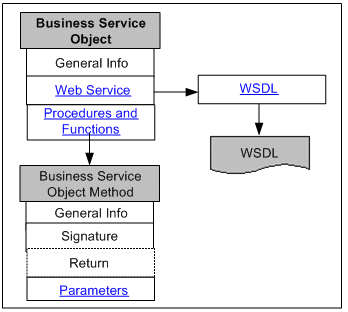
The following diagram illustrates the basic structure of the business service object interface information page and its connections to related pages:
The business service object interface details page contains general section of a selected BSO interface, the Web Service region, and Methods region.
The general section displays common information for the selected business service object interface, plus interface name, and the interface that extends.
For more common information shown in the interface details page, see Common Information on Interface Details
Web Service Region
The Web Service region contains interface or SOAP service information for a given interface. The service information includes service status, WSDL description, interaction pattern, and authentication type information, for the selected business service object interface.
For more information on each field in the Web Service region, see Common Information on SOAP Web Services.
If a Web service has been successfully generated, an integration administrator can perform additional administrative tasks including deploying the generated service, regenerating the service if needed, or clearing up the generated service artifact which changes the Web Service Status field from 'Generated' to 'Not Generated'.
If a Web service has been successfully deployed as an active service in Oracle SOA Suite, the integration administrator can undeploy the active service, reset the deployed service to its initial state - 'Not Generated', retire the service so that it is no longer ready to accept new SOAP requests, or activate the retired service so that it can become active again.
For more information on these administrative tasks, see Performing Administrative Activities for SOAP Web Services.
Methods Region
This interface details page includes a table listing the business service object interface methods. Click a method name to access the information page for that method.
For more information about the Methods region for business service object, see Business Service Object Interface Method Information.
Viewing WSDL description
Click the View WSDL link to view the WSDL file. The following sample shows the WSDL description for the Integration Repository Service:
<?xml version="1.0"?>
<definitions name="IntegrationRepositoryService"
targetNamespace="http://xmlns.oracle.com/oracle/apps/fnd/rep/ws/IntegrationRepositoryService"
  xmlns="http://schemas.xmlsoap.org/wsdl/"
  xmlns:xsd="http://www.w3.org/2001/XMLSchema"
  xmlns:soap="http://schemas.xmlsoap.org/wsdl/soap/"
  xmlns:tns2="http://xmlns.oracle.com/apps/fnd/ServiceBean"
  xmlns:tns1="http://xmlns.oracle.com/apps/fnd/rep/ws"
  xmlns:tns="http://xmlns.oracle.com/oracle/apps/fnd/rep/ws/IntegrationRepositoryService">
<types>
<xsd:schema>
  <xsd:import namespace="http://xmlns.oracle.com/apps/fnd/rep/ws" schemaLocation="http://<hostname>:<port>/ISG-ISG-context-root/isgapp/apps/bso/ws/IntegrationRepositoryService.xsd"/>
</xsd:schema>
<xsd:schema elementFormDefault="qualified" targetNamespace="http://xmlns.oracle.com/apps/fnd/ServiceBean" >
  <xsd:element name="ServiceBean_Header">
    <xsd:complexType>
      <xsd:element name="RESPONSIBILITY_NAME" minOccurs="0" type="xsd:string"/>
      <xsd:element name="RESPONSIBILITY_APPL_NAME" minOccurs="0" type="xsd:string"/>
      <xsd:element name="SECURITY_GROUP_NAME" minOccurs="0" type="xsd:string"/>
      <xsd:element name="NLS_LANGUAGE" minOccurs="0" type="xsd:string"/>
      <xsd:element name="ORG_ID" minOccurs="0" type="xsd:string"/>
     </xsd:sequence>
   </xsd:complexType>
  </xsd:element>
 </xsd:schema>
   . . .
Note: Values passed in the Responsibility Name, Responsibility Application Name, Security Group, NLS Language, and Organization ID elements listed under the ServiceBean_Header are used to set applications context during service execution.
Please note that NLS Language and Organization ID are optional values to be passed. However, if the execution of a Business Service Object interface is dependent on a particular organization, then you must pass the ORG_ID element in the ServiceBean_Header of that SOAP request.
For more information, see Setting Other Web Service Input Message Parts.
The username and password information is defined by the Web service security policy (such as oracle/wss_username_token_service_policy). Detailed instructions on how to pass the security headers along with the SOAP request, see Configuring Web Service Policies.
If error occurred, the following error message information appears under <Method>_Response:
...
<xsd: complexType name ="IntegrationRepositoryService_GetServiceDescription_Response">
		...
		<xsd:sequence>
 				<xsd:element name="serviceDescription" type="oans3:ServiceDescription" minOccurs="0" nillable="true"/>
				<xsd:element name="Message" type="oans1:ServiceMessage" minOccurs="0" maxOccurs="unbounded"/>

				<xsd:element name="ErrorMessage" type="oans1:ServiceMessage" minOccurs="0" maxOccurs="unbounded"/>
		</xsd:sequence>
</xsd: complexType name>
Note: The Message and ErrorMessage elements listed under <Method>_Response are used for error messages. The Message element will appear as warning messages in the SOAP response. It is used to display any warning message returned by the API. The ErrorMessage element corresponds to OAExceptions that were raised during the method invocation. In general, the response for any service method can contain any of the following:
The original output data
Warning messages if any (in <Message> element)
OAExceptions raised during the method invocation if any (in <ErrorMessage> element)
For more information about error messages, see Error Handling section, Building an OA Framework Application (the Basics) chapter, Oracle Application Framework Developer's Guide, available from My Oracle Support Knowledge Document 1315485.1.
The business service object interface method details page appears when you click a method name link in the Methods region.
In addition to common information, the general section of the method details page contains a link to the interface that uses this method.
The following regions also appear on the method details page:
Signature
The region describes the interface method, parameter type, value, and return information.
Return
If the return type is a service data object, click the link in the Type field to access the service data object details page.
Parameters
If a parameter is a service data object, click the link in the Type column to access the service data object details page. See: Reviewing Service Data Object.
Note: An XML schema describes the structure of an XML document with all input and output message definitions and data types. Click the XML schema link that is associated with your selected business service object to view the XML schema document displayed in a separate window.
Integration administrators have the privileges to create security grants by clicking Create Grant in the Methods region. This authorizes access permissions of selected methods to a user, a user group, or all users.
For more information on how to create security grants, see: Managing Grants.