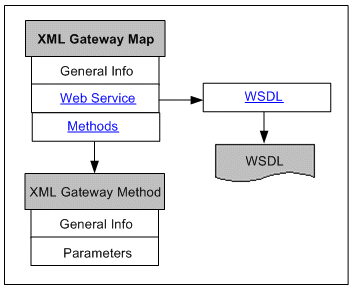
The following diagram illustrates the basic structure of the XML Gateway Map information page and its connections to related pages:
The XML Gateway Map information page includes standard fields shown in the common region of the selected XML Gateway interface along with the Web Service region and Method region.
For XML Gateway interface, it can be either inbound or outbound direction. An inbound XML Gateway map indicates that the interface receives incoming transactions or messages into the Oracle E-Business Suite. An outbound map indicates that the interface sends outgoing transactions or messages to another system. For more common information shown in the interface details page, see Common Information on Interface Details.
Web Service Region
The Web Service region appears only for inbound XML Gateway maps. It contains interface or service information for a given interface.
This region contains the SOAP service details, including service status, WSDL description, and authentication type information, for the selected XML Gateway map.
Please note that there is no Interaction Pattern table displayed for XML Gateway map. This is because each XML Gateway interface contains only one method, and this interface type can be service enabled only with synchronous operation pattern. If a selected XML Gateway interface is exposed as a Web service, the single method contained in the interface must be generated only with the support for synchronous pattern by default.
For more information on each field in the Web Service region, see Common Information on SOAP Web Services.
Generic XML Gateway Service Subregion
If your system is upgraded from a previous Oracle E-Business Suite release and if you have been using generic XML Gateway Web services, the generic XML Gateway service information can be displayed in the Web Service region for the selected XML Gateway map.
Setup Tasks
To successfully display the generic XML Gateway service and its WSDL URL in the Generic XML Gateway Service subregion, ensure the following tasks are in place:
The FND: XML Gateway Map Generic Service profile value must be set to 'Yes'.
Use this profile option to display or hide the Generic XML Gateway Service subregion for the selected XML Gateway interface. If it is set to 'Yes', the Generic XML Gateway Services subregion can be displayed within the Web Service region.
The generic XML Gateway service must be deployed. Otherwise, no WSDL URL is shown.
Once a generic XML Gateway service has been deployed, the deployed service WSDL URL is populated as the profile value for the ISG: Generic Service WSDL URL for XMLG profile option. The WSDL URL is also displayed in the Generic XML Gateway Service subregion.
If the generic XML Gateway service is not deployed, the profile value will not be shown. Therefore, no WSDL URL is displayed in the subregion and the Web Service Status field is marked as 'Not Deployed'.
For more setup information about generic XML Gateway services, see Installing Oracle E-Business Suite Integrated SOA Gateway, Release 12.2, available from My Oracle Support Knowledge Document 1311068.1 for details.
For information on setting profile options, see Setting Profile Options.
Displaying Generic XML Gateway Services
Click the Show Generic XML Gateway Service or Hide Generic XML Gateway Service link to display or close the Generic XML Gateway Service subregion for the selected XML Gateway interface.
This subregion contains the following fields:
Web Service Status: This field indicates the current state of the generic XML Gateway service.
If the setup is not configured for generic XML Gateway service, the Web Service Status field is displayed as 'Not Deployed'.
View Generic WSDL: Click the View Generic WSDL link to display the deployed generic WSDL URL for the selected XML Gateway interface.
The deployed generic WSDL URL has the following syntax:
http://<SOA server host>:<SOA Suite managed server port>/soa-infra/services/default/XMLGatewayService!<version chosen while deploying>XMLGateway?WSDL
<SOA Suite managed server port>: It is the port of the server where the SOA composite is deployed.
<version chosen while deploying>: At the time of deployment, deployement version will be asked. Default version value is 1.0.
For example, http://<SOA server host>:<SOA Suite managed server port>/soa-infra/services/default/XMLGatewayService!1.0/XMLGateway?WSDL.
Please note that after the upgrade to Oracle E-Business Suite Release 12.2, the deployed WSDL URL information has been changed from a previous release. Therefore, you may have to replace it with the new WSDL URL and service location or address accordingly in Web service clients while invoking the generic XML Gateway service.
The updated WSDL URL is also populated in the ISG: Generic Service WSDL URL for XMLG profile option by default if the setup tasks for generic XML Gateway services are configured properly.
Interaction Pattern: 'Synchronous' is displayed by default in read-only mode.
Authentication Type: 'Username Token' is displayed by default in read-only mode.
Performing Web Service Activities in the Web Service Region
If a Web service has been generated successfully, an integration administrator can perform additional administrative tasks including deploying the generated service, regenerating the service, or clearing up the generated service artifact which changes the Web Service Status field from 'Generated' to 'Not Generated'.
If a Web service has been successfully deployed as an active service in Oracle SOA Suite, the integration administrator can undeploy the active service, reset the deployed service to its initial state - 'Not Generated', retire the service so that it is no longer to accept new SOAP requests, or activate the retired service so that it can become active again.
For more information on these administrative tasks, see Performing Administrative Activities for SOAP Web Services.
Methods Region
The XML Gateway method details page appears when you click a method name in the Methods region.
The Methods region includes a table listing the XML Gateway method parameters, including each parameter's data type and whether the parameter is required or not.