Oracle E-Business Suite Integrated SOA Gateway supports custom integration interfaces and allows them to be published along with Oracle seeded ones through the Oracle Integration Repository where they can be exposed to all users.
Custom interface definitions can be created for various interface types, including custom interface definitions for XML Gateway Map, Business Event, PL/SQL, Concurrent Program, Business Service Object, Java APIs, Java Bean Services, Application Module Services, and Composite Service for BPEL type. Depending on your business needs, integration developers can create and annotate custom interface definitions based on Integration Repository Annotation Standards. The annotated definitions can then be validated and uploaded to Oracle Integration Repository.
Note: Please note that custom interface types of EDI, Open Interface Tables, Interface Views, and Java APIs for Forms interfaces are not supported in this release.
Oracle Integration Repository currently does not support the creation of custom Product Family and custom Business Entity.
After the upload, these custom integration interfaces are displayed in the Integration Repository based on the interface types they belong to. To easily distinguish them from Oracle integration interfaces, Interface Source "Custom" is used to categorize those custom integration interfaces in contrast to Interface Source "Oracle" for Oracle seeded interfaces in Oracle E-Business Suite. Custom integration interfaces can now seamlessly leverage the Oracle E-Business Suite Integrated SOA Gateway capabilities. Custom integration interfaces of service enabled interface types can be exposed as Web services. The administrator performs the same administrative tasks for custom integration interfaces as he or she does for native integration interfaces. These tasks include creating security grants, as well as generating and managing services throughout the deployment life cycle.
Usage Guidelines for Custom Web Services
While creating or developing custom Web services for your business needs, consider the following conditions:
| Requirement | Use |
|---|---|
| To enable existing or new Oracle E-Business Suite customizations built on native Oracle E-Business Suite technologies (such as PL/SQL, Business Service Objects, and other supported custom integration interface types described earlier), as Web services | Oracle E-Business Suite Integrated SOA Gateway |
| To integrate Oracle E-Business Suite with SOA application that requires rich service infrastructure and integration capabilities such as Business Rules, Business Activity Monitoring (BAM), Web service development and orchestration | Oracle SOA Suite in conjunction with Oracle E-Business Suite Integrated SOA Gateway |
| To develop custom Web services that are not associated with Oracle E-Business Suite | Oracle WebLogic Web service stack |
Enabling Custom Integration Interface Process Flow
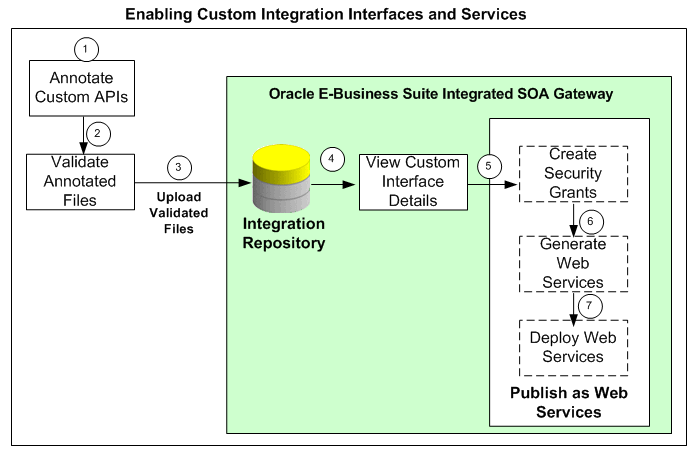
The following diagram illustrates the entire process flow of enabling custom integration interfaces:
Users with the Integration Developer role annotate custom integration interface definition based on the Integration Repository annotation standards for the supported interface types.
Users who have the Integration Administrator role validate the annotated custom interface definitions against the annotation standards. This validation is performed by executing the Integration Repository Parser (IREP Parser), a design time tool, to read the annotated files and then generate an Integration Repository loader file (iLDT ) if no error occurred. For more information, see:
Users who have the Integration Administrator role upload the generated iLDT file to Oracle Integration Repository.
All users can view the uploaded custom interfaces from the Integration Repository user interface.
(Optional) Users who have the Integration Administrator role then create necessary security grants for the custom integration interfaces if needed.
This is achieved by first locating the custom interface from the Integration Repository, and then selecting methods contained in the selected custom interface before clicking Create Grant. The Create Grants page is displayed where the administrators can grant the selected method access permissions to a user, user group, or all users.
(Optional) Users who have the Integration Administrator role can generate SOAP Web services if the custom interfaces can be service enabled.
This is achieved by first locating the custom interface, and then specifying the interaction pattern either at the interface level or the method level before clicking Generate in the selected custom interface details page. See: Generating Custom SOAP Web Services.
(Optional) Users who have the Integration Administrator role deploy the services from Oracle Integration Repository to the application server.
To deploy generated SOAP Web services, the administrators must first select one authentication type (Username Token or SAML Token) for each selected Web service and then click Deploy in the selected interface details page. This deploys the generated service with 'Active' state to Oracle SOA Suite where Oracle E-Business Suite services can be exposed as standard Web services for service execution at run time. See: Deploying and Undeploying SOAP Custom Web Services.
If the custom interfaces can be exposed as REST services, the administrators must enter a unique service alias for each selected custom interface, and specify the desired service operations before deploying the service. Additionally, the administrators need to specify HTTP methods for the service operations contained in the selected interface if it is an interface type of Java Bean Services or Application Module Services.
REST services are deployed to an Oracle E-Business Suite environment. For more information on how to deploy custom REST services, see Deploying Custom REST Web Services.
To better understand how to use Integration Repository Parser to validate and upload annotated custom interface definitions to Integration Repository, as well as perform administrative tasks on these uploaded custom integration interfaces, the following topics are discussed in this chapter:
For information on how to create and annotate custom integration interfaces, see Creating and Annotating Custom Integration Interfaces.