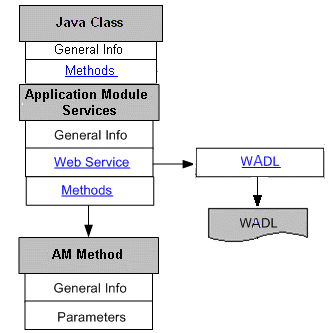
The following diagram illustrates the basic structure of the Application Module Services information page and its connection to the related Java method details:
Searching Application Module Services Interfaces
To quickly locate Application Module Services through the Search page, click Show More Search Options to display more search fields. Enter the following key search values as the search criteria:
Category: Interface Subtype
Category Value: Application Module Services
For information about category and category value fields, see Category and Category Value.
Viewing Application Module Services
Similar to Java Bean Services that can be exposed as REST services only, the interface details page contains the Overview tab and the REST Web Service tab. An integration repository administrator can find an additional Grants tab for managing security grants. For more information on how to manage security grants, see Managing Grants.
For information on the general section, see Common Information.
Note: For more information about Web services, see Understanding Web Services.
Overview Tab
This tab displays read-only information about the selected interface. It includes full description, interface source information, as well as methods contained in the interface.
For more information on the interface source information, see Common Information on Interface Details.
REST Web Service Tab
This tab contains REST service information for the selected interface. This includes service alias, service status, WADL description, verb, and service operation information.
For more information about REST service, see Common Information on REST Web Services.
For Application Module Services annotation information, see Annotations for Application Module Services.
Application Module Services are secured by HTTP Basic Authentication or Token Based Authentication at HTTP or HTTPS transport level. For more information on REST service security, see Managing Web Service Security.
Note: HTTPS is the recommended secure transport protocol while using HTTP Basic Authentication security to authenticate user credentials (username and password).
If a REST service has been successfully deployed, the administrator can undeploy the service to reset the service to its initial state - 'Not Deployed'.
For more information on these administrative tasks, see Performing Administrative Activities for REST Web Services.