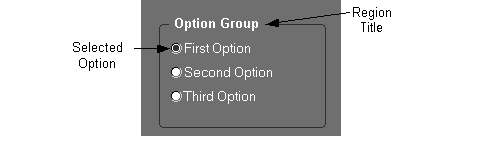
Used when only one value is applicable, there are only two to four possible values, and the list will be static throughout the life of the product. (OMS-74031)
For example, selecting sex or gender (with three choices: Male, Female, Unknown) is an appropriate use of an option group because it is a limited selection that would never change.
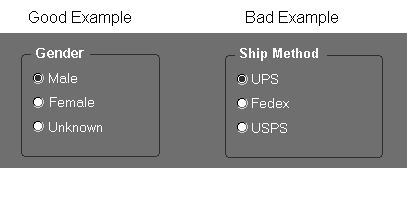
An inappropriate use of an option group would be as a Ship Method selection (with choices UPS, Fedex, USPS). This example is a bad use of an option group because it is inappropriate for customer-defined lookups (different customers will use different shipping methods).
Avoid using option groups for items that may ever appear in multi-record blocks.
An option group must always have a default value. (OMS-74032)
Use in place of a check box when the two states are not accurately modeled as yes/no.
An option group must always specify its title in the Hint Text property. This text must replicate any title drawn on the screen, and must exist even if no title is drawn.
Each single-row option button must specify a Label.
Each multi-row option button must specify a Prompt.
An option group can be used to set a "mode" of a form, such as what type of information should be displayed.
An option group can also be used to indicate progression of data through various states, such as a Sales Order moving from "Booked" to "Shipped" to "Billed" to "Paid."
An option button should have an access key. (OMS-74232)
[Translation] The minimum width of an option group button is 0.3," which displays just the button with no label. However, in a single-row display, the minimum width is the larger of 1.3" or 30% longer than the label to allow for translation. Always allow as much space as possible for expansion. (OMS-74033)
Draw the buttons of an option group in their own region, where the name of the item is the title, and the individual buttons are labeled elements within the region. (OMS-74034)
EXCEPTION: If the title of an option group is obvious, then the region title and boundary may be omitted. This should only be done if necessary, however, because the boundary helps to indicate that the options are mutually exclusive and visually different from check boxes.
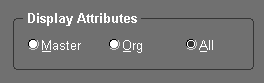
Option buttons may be laid out vertically or horizontally. (OMS-74234)
Vertical layout allows more space for translation and is easier to read.
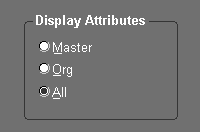
Horizontal layout requires less space and the keyboard access method is more intuitive (the left and right arrow keys are used).
For attributes modeled as option groups, there may be situations where a queried row will contain data that is not a valid choice of options. If such a situation may occur, create an additional option group button labeled "Other," and set it to be disabled. This allows the record to be queried, but prevents a user from setting the value to anything but a valid value. (OMS-74235)
For information on implementing Option Groups, see the Oracle Applications Developer's Guide.