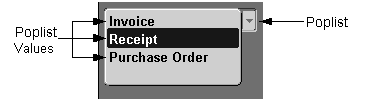
Use poplists when only one value is applicable, and the list of choices is never expected to grow beyond 15. (OMS-74023)
In exceptional cases, poplists may be used as field prompts in single-record blocks.
A poplist may act as a Query Control Poplist.
Do not use a dynamic poplist when possible values may become inactive. If a value is validated by an effective date or by an active flag and becomes inactive in a dynamic poplist, the user will not be able to retrieve records with that value until the value becomes active again. Use a Text Item field instead. (OMS-74523)
An attribute modeled with a poplist in an entry form may be modeled with a text item in an inquiry-only form. (OMS-74524)
In a Find window, include a blank row in the poplist to allow the user to specify that any value returned for the poplist during a search should be accepted. This blank row appears automatically if the poplist is made optional. (OMS-74024)
In a Find window, include "(No Value)" in the list of valid choices if the poplist was optional when it was used for entering values on the form. If "(No Value)" is a choice, it should be placed last in the list of choices and will then appear immediately before the blank "any value" choice (which automatically shows up at the bottom of the list). This allows the user to search for a "null-valued" row. (OMS-74025)
[Translation] A poplist requires a width of 0.5" just to support the cosmetics of the widget. To adhere to translation requirements, the actual minimum width of a poplist is therefore 1.5." An exception to this is a "Yes/No" poplist which can be 1" wide. (OMS-74026)
[Translation] A poplist is restricted to displaying 30 characters. To adhere to translation requirements, English text should not exceed 23 characters. (OMS-74027)
Poplists that hold data are displayed as follows (OMS-74028):
Height: 0.25"
Poplists that are used as field prompts in single-record blocks are displayed as follows (OMS-74030):
Height: 0.25"
Font Weight: Medium
A poplist that cannot currently be validated due to a dependency on another field, or cannot be currently entered for any other reason, must have its insert, update, and navigable properties turned off. (OMS-74130)
Poplist colors are as follows:
editable and required: yellow background
The yellow background only appears when the item is in the current record
all other cases: gray background
A Query Control Poplist must either be navigable, or its values must be presented in an LOV invoked from the Block Menu function.
For information on implementing Poplists, see the Oracle Applications Developer's Guide.