This chapter provides you with a conceptual overview of flexfields. You will learn about:
the general features of flexfields
flexfields terminology
the benefits of flexfields
the distinction between a key and descriptive flexfield
the overall setup process for flexfields
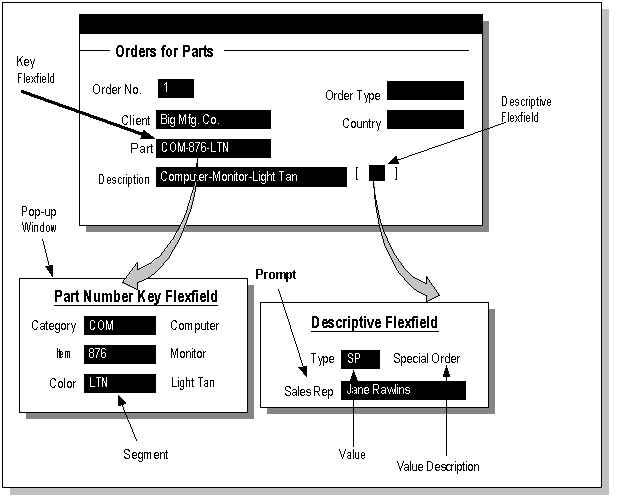
A flexfield is a field made up of sub-fields, or segments. There are two types of flexfields: key flexfields and descriptive flexfields. A key flexfield appears on your form as a normal text field with an appropriate prompt. A descriptive flexfield appears on your form as a two-character-wide text field with square brackets [ ] as its prompt. When opened, both types of flexfield appear as a pop-up window that contains a separate field and prompt for each segment. Each segment has a name and a set of valid values. The values may also have value descriptions.
Flexfields
