Oracle Workflow Business Event System is a workflow component that allows events to be raised from both PL/SQL and Java layers. Therefore, the service invocation from Oracle E-Business Suite can be from a PL/SQL or Java layer.
Service Invocation from PL/SQL
An application raises a business event using PL/SQL API WF_EVENT.Raise.
The event data can be passed to the Event Manger within the call to the WF_EVENT.Raise API, or the Event Manger can obtain the event data or message payload by calling the Generate Function for the event if the data or payload is required for a subscription.
Note: See the Oracle Workflow API Reference for information about WF_EVENT.Raise API.
Oracle Workflow Business Event System (BES) identifies that the event has a subscription with Java Rule Function oracle.apps.fnd.wf.bes.WebServiceInvokerSubscription.
The Business Event System enqueues the event message to WF_JAVA_DEFERRED queue. The Java Deferred Agent Listener then dequeues and executes the subscription whose Java rule function invokes the Web service.
If callback event and agent parameters are mentioned, the Web service response is communicated back to Oracle E-Business Suite using the callback information. The Java Deferred Agent Listener process that runs in Concurrent Manager (CM) tier invokes the Web service.
Service Invocation from Java
A Java application raises a business event using Java method oracle.apps.fnd.wf.bes.BusinessEvent.raise either from OA Framework page controller/AMImpl or Java code running on the Concurrent Manager tier.
Since the event is raised in Java where the subscription's seeded Java Rule Function oracle.apps.fnd.wf.bes.WebServiceInvokerSubscription is accessible, whether the rule function is executed inline or deferred is determined by the phase of the subscription.
If the invoker subscription is created with Phase >= 100, the event is enqueued to the WF_JAVA_DEFERRED queue.
If the invoker subscription is created with Phase < 100, the event is dispatched inline.
If the event is raised from OA Framework page, the dispatch logic executes within OACORE WebLogic Server.
Note: If the Web service invoker event is raised from Java code in the middle tier, and the invoker subscription is synchronous with subscription phase < 100, then the Web service is invoked as soon as the event is raised. If the invocation is successful, the response can be read by the calling application and is available immediately by using method BusinessEvent.getResponseData().
oracle.apps.fnd.wf.bes.BusinessEvent.raise throws oracle.apps.fnd.wf.bes.BusinessEventException if there are any issues while invoking a Web service inline. BusinessEventException object internally stores the underlying root cause exception within a linkedException object. In order to see the complete exception details, print the exception stack trace from BusinessEventException.getLinkedException();.
If the event is raised from Java code with the subscription phase is >= 100 or if the event is raised from PL/SQL, the event message will be enqueued to the WF_JAVA_DEFERRED queue. If the Web service has an output or a response message, callback event with callback agent is required to receive the output message into Oracle E-Business Suite.
The following sample Java code raises a business event that invokes Web service and reads the response in the same session:
package oracle.apps.fnd.wf.bes;
import java.sql.Connection;
import oracle.apps.fnd.common.AppsLog;
import oracle.apps.fnd.common.Log;
import oracle.apps.fnd.wf.bes.InvokerConstants;
import oracle.apps.fnd.wf.common.WorkflowContext;
public class InvokeWebService {
		static Log mLog;
		static WorkflowContext mCtx;
		public InvokeWebService() {
		}
		public static Connection getConnection(String dbcFile) {
			Connection conn = null;
			System.setProperty("dbcfile", dbcFile);
			WorkflowContext mCtx = new WorkflowContext();

			mLog = mCtx.getLog();
			mLog.setLevel(Log.STATEMENT);
			((AppsLog)mLog).reInitialize();
			mLog.setModule("%");

			return mCtx.getJDBCConnection();
		}
		public static void main(String[] args)
		{
			BusinessEvent event;
			Connection conn;
			conn = getConnection(args[0]);
			try {
					// Proxyt host and port requires to be set in Java options
					System.setProperty("http.proxyHost", args[1]);
					System.setProperty("http.proxyPort", args[2]);

					event = new BusinessEvent
					("oracle.apps.wf.IrepService.invoke", "eventKey1");
					// Input XML message for Web Service
					String input = null;
					input =
"<IntegrationRepositoryService_GetInterfaceFunctionByName
xmlns:=\"http://xmlns.oracle.com/apps/fnd/rep/ws\"> \n"+
<fullMethodName>SERVICEBEAN:/oracle/apps/fnd/rep/ws/IntegrationRepos
itoryService:getInterfaceFunctionByNameSERVICEBEAN:/oracle/apps/fnd/
rep/ws/IntegrationRepositoryService:getInterfaceFunctionByName</fullMethodName>\n"+
<IntegrationRepositoryService_GetInterfaceFunctionByName>";
					event.setData(input);

			String headerPartMsg = "<SOAHeader
xmlns:=\"http://xmlns.oracle.com/xdb/SYSTEM\" " +
"env:mustUnderstand=\"0\"
xmlns:env=\"http://schemas.xmlsoap.org/soap/envelope/\"> \n" +
			" <MESSAGE_TYPE>XML<MESSAGE_TYPE>\n" +
			" <MESSAGE_STANDARD>OAG<MESSAGE_STANDARD>\n" +
			" <TRANSACTION_TYPE>PO<TRANSACTION_TYPE>\n" +
 			" <TRANSACTION_SUBTYPE>PROCESS<TRANSACTION_SUBTYPE>\n" +
			" <PARTY_SITE_ID>>123<PARTY_SITE_ID>>\n" +
			" <DOCUMENT_NUMBER>4444<DOCUMENT_NUMBER>\n" +
			" <SOAHeader>\n"
businessEvent.setStringProperty("WFBES_INPUT_header",
headerPartMsg);
			event.raise(conn);
      	conn.commit();

			Object resp = event.getResponseData();
      	if (resp != null) {
						String respStr = resp.toString();
  					// Process web service response here
  	 	}
    		else {
						// Either web service invocation failed and no exception was thrown
                // or the web service is one-way or asynchronous and did not return
						// a valid response
      		 System.out.println("No response received");
    		}
  	}
  catch (BusinessEventException e) {
    // Use appropriate logging mechanism as per your coding standards
    // instead of System.out.println
    			System.out.println("Exception occured " + e.getLinkedException().getMessage());
    // Print the complete exception stack to log file for troubleshooting
	  // Most importantly, if an exception occured, do not proceed to process the
	  // response
e.getLinkedException().printStackTrace();
  }
	catch (Exception e) {
    // Use appropriate logging mechanism as per your coding standards
    // instead of System.out.println
    System.out.println("Exception occured " + e.getMessage());
    // Print the complete exception stack to log file for troubleshooting
	  // Most importantly, if an exception occured, do not proceed to process the
	  // response
 e.printStackTrace();
  }
 }
Attention: When invoking a Web service using Service Invocation Framework, the invoker business event is raised using oracle.apps.fnd.wf.bes.BusinessEvent.raise(Connection) method that requires a JDBC connection to be passed.
To get the JDBC connection, always use the current applications context object available for your scenario. For example, if service invocation is from an OA Framework page, then get the JDBC connection from OAPageContext object. If it is from a concurrent program, get the JDBC connection from CpContext object. You should not create a WorkflowContext in these situations. Otherwise, a duplicate applications context will be unnecessarily created. A new WorkflowContext should be created only if JDBC connection is not already available through other means.
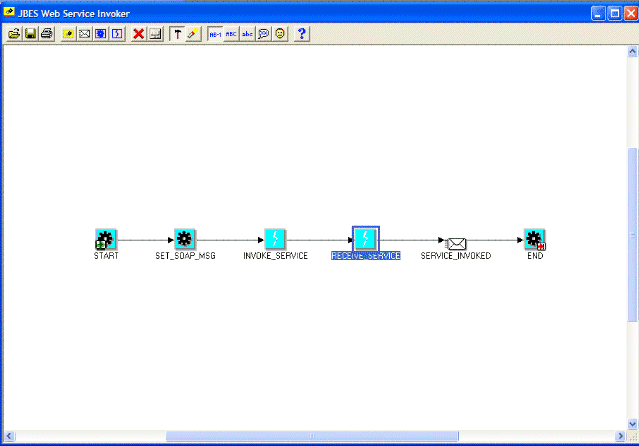
The following example is to invoke a Web service through launching a workflow process including the following nodes or activities:
An invoker business event to invoke a Web service.
For example, INVOKE_SERVICE is an event activity with event action "Raise".
A receive business event to receive a response or Web service output message.
For example, RECEIVE_SERVICE is an event activity with event action "Receive".
Other activities could be used in the process for XML message processing, notifying users of Web service invocation response, regular transaction processing and so on.
For example, SERVICE_INVOKED is a notification activity to send a notification message when a Web service is successfully invoked.
The following workflow process diagram illustrates the service invocation process flow:
Workflow Process Diagram to Invoke a Web Service
Defining Service Invocation Metadata
To define the service invocation metadata with the callback feature, you must have the following necessary events and subscriptions in place:
An invoker event, such as INVOKE_SERVICE in the workflow diagram.
This activity is used to pass the event XML payload as SOAP body and other event parameters required for Web service invocation.
Local and error event subscriptions to the invoker event. See: Creating Local and Error Event Subscriptions to the Invoker Event.
A receive event (such as RECEIVE_SERVICE in the workflow diagram) and the External subscription to the receive event.
Attention: The receive event is raised with the same event key as it is for the invoker event. It is important that the waiting workflow process's item key and the invoker event's event key are the same.
If callback event and agent parameters are set, this activity waits for the receive event to occur after a successful Web service invocation.
See: Creating a Receive Event and Event Subscription (Optional).
Verifying Workflow Agent Listener Status
In order to process a Web service response message from the inbound agent, you need to verify if a Workflow Agent Listener is running on that agent.
Use the following steps for verification:
Log in to Oracle E-Business Suite as a user who has the Oracle Workflow Web Administrator responsibility.
From the navigation menu, select Oracle Applications Manager > Workflow Manager.
Click the Agent Listener status icon to open the Service Components page.
Locate the Workflow Agent Listener that you use for the callback agent listener. For example, locate the 'Workflow Inbound JMS Agent Listener' for processing a Web service response message to ensure it is up and running.
After the verification, you can launch the workflow process to invoke a Web service with a callback response through Oracle Workflow. You can also validate the process by reviewing the progress status of each activity contained in your workflow process diagram.
When the Web service has been successfully invoked from the automated workflow process, you should receive a workflow notification message if the notification activity is included in the process.
For more information on how to create and launch a workflow, see the Oracle Workflow Developer's Guide.