If an interface is exposed as a Web service, the corresponding WSDL file is displayed in the interface details page.
Clicking the View WSDL link to launch a new window containing the associate WSDL document. This XML-based document describes the selected Web service and how the service can be used.
For example, click the deployed View WSDL link for the PL/SQL: Invoice Creation from the interface details page, the WSDL document appears.
Note: The http://<hostname>:<port>/soa-infra/services/default/<sid>_PLSQL_AR_INVOICE_API_PUB/AR_INVOICE_API_PUB_Service?wsdl address in the new window has the exact WSDL URL information that appeared in the interface details page. You can copy and use this address directly in any of the Web service clients, such as in a BPEL process during a partner link creation.
A WSDL document is simply a set of definitions. There is a definitions element at the root, and definitions inside. The definitions element defines the set of services that the Web service offers.
The definitions element often contains an optional TargetNamespace property, a convention of XML schema that enables the WSDL document to refer to itself.
For example, the definitions element in the WSDL document for the Invoice Creation API (AR_INVOICE_API_PUB) appears:
<definitions name="AR_INVOICE_API_PUB" targetNamespace="http://xmlns.oracle.com/apps/ar/soaprovider/plsql/ar_invoice_api_pub/"/>
This element specifies numerous namespaces that will be used throughout the remainder of the document.
In addition to the definitions element, Web services are defined using the following six major elements:
Types: It provides data type definitions used to describe the messages exchanged.
Message: It represents an abstract definition of the data being transmitted.
PortType: It is a set of abstract operations. Each operation refers to an input message and output message.
Binding: It specifies concrete protocol and data format specifications for the operations and messages defined by a particular portType.
Port: It specifies an address for a binding, thus defining a single communication endpoint.
Service: It is used to aggregate a set of related ports.
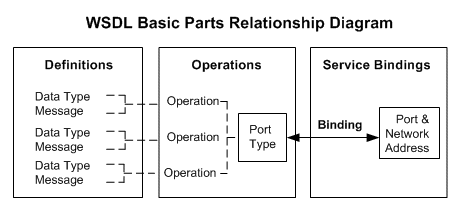
The following diagram illustrates the relationship of the basic parts of WSDL:
The types element contains all data types used in all method calls described in the WSDL. It can be used to specify the XML Schema (xsd:schema) that is used to describe the structure of a WSDL Part.
The structure of this Types element can be like:
<definitions...>
	<types>
  		<xsd:schema.../>*
   </types>
</definitions>
For example, the Invoice Creation Web service contains the following two functions:
CREATE_INVOICE
CREATE_SINGLE_INVOICE
Each function is described in the data type definition. WSDL prefers the use of XSD as the type of system mechanism to define the types in a message schema. As a result, the message schema location of the CREATE_INVOICE function with synchronous operation pattern is defined in the APPS_ISG_XX_AR_INVOICE_API_PUB-24CREATE_INV.xsd, and with asynchronous pattern is defined in the CREATE_INVOICE_ASYNCH.xsd. The message schema location of the CREATE_SINGLE_INVOICE function with synchronous operation pattern is defined in the APPS_ISG_XX_AR_INVOICE_API_PUB-24CREATE_SIN.xsd, and with asynchronous pattern is defined in the CREATE_SINGLE_INVOICE_ASYNCH.xsd.
Note: For a generated service that has not yet been deployed, the abstract WSDL description displays a temporary location for the schema location (such as <include schemaLocation="http://<hostname>:<port>/isgctx/isgapp/plsql/ar_invoice_api_pub/APPS_ISG_XX_AR_INVOICE_API_PUB-24CREATE_INV.xsd" />).
For a deployed service, a physical location of service endpoint where the service is hosted in soa-infra is displayed instead as shown here:
<types>
  <schema elementFormDefault="qualified"
   targetNamespace="http://xmlns.oracle.com/apps/ar/soaprovider/plsql/ar_invoice_api_pub/create_invoice/">
    <include schemaLocation="http://<soa_suite_hostname>:<port>/soa-infra/services/default/<jndi_name>_PLSQL_AR_INVOICE_API_PUB/AR_INVOICE_API_PUB_Service?XSD=xsd/APPS_ISG_XX_AR_INVOICE_API_PUB-24CREATE_INV.xsd" />
  </schema>
	  <schema elementFormDefault="qualified"
		targetNamespace="http://xmlns.oracle.com/apps/ar/soaprovider/plsql/ar_invoice_api_pub/create_single_invoice/">
		<include schemaLocation="http://<soa_suite_hostname>:<port>/soa-infra/services/default/<jndi_name>_PLSQL_AR_INVOICE_API_PUB/AR_INVOICE_API_PUB_Service?XSD=xsd/APPS_ISG_XX_AR_INVOICE_API_PUB-24CREATE_SIN.xsd"/>
  </schema>
  <schema elementFormDefault="qualified"
    targetNamespace="http://xmlns.oracle.com/apps/ar/soaprovider/plsql/ar_invoice_api_pub/">
    <element name="SOAHeader">
     ...
    </element>
  </schema>
   <schema elementFormDefault="qualified"
   targetNamespace="http://xmlns.oracle.com/apps/ar/soaprovider/plsql/ar_invoice_api_pub/create_invoice/">
    <include schemaLocation="http://<soa_suite_hostname>:<port>/soa-infra/services/default/<jndi_name>_PLSQL_AR_INVOICE_API_PUB/AR_INVOICE_API_PUB_Service?XSD=xsd/APPS_ISG_XX_AR_INVOICE_API_PUB-24CREATE_INV.xsd" />
  </schema>
	  <schema elementFormDefault="qualified"
		targetNamespace="http://xmlns.oracle.com/apps/ar/soaprovider/plsql/ar_invoice_api_pub/create_single_invoice/">
		<include schemaLocation="http://<soa_suite_hostname>:<port>/soa-infra/services/default/<jndi_name>_PLSQL_AR_INVOICE_API_PUB/AR_INVOICE_API_PUB_Service?XSD=xsd/APPS_ISG_XX_AR_INVOICE_API_PUB-24CREATE_SIN.xsd"/>
  </schema>
  <schema elementFormDefault="qualified"
   targetNamespace="http://xmlns.oracle.com/apps/ar/soaprovider/plsql/ar_invoice_api_pub/create_invoice_asynch">
    <include schemaLocation="http://<soa_suite_hostname>:<port>/soa-infra/services/default/<jndi_name>_PLSQL_AR_INVOICE_API_PUB/AR_INVOICE_API_PUB_Service?XSD=xsd/CREATE_INVOICE_ASYNCH.xsd" />
  </schema>
	  <schema elementFormDefault="qualified"
		targetNamespace="http://xmlns.oracle.com/apps/ar/soaprovider/plsql/ar_invoice_api_pub/create_single_invoice_asynch/">
		<include schemaLocation="http://<soa_suite_hostname>:<port>/soa-infra/services/default/<jndi_name>_PLSQL_AR_INVOICE_API_PUB/AR_INVOICE_API_PUB_Service?XSD=xsd/CREATE_SINGLE_INVOICE_ASYNCH.xsd"/>
  </schema>
</types>
In addition to message schema locations and schema elements that help to define Web messages, the Types element can take complex data type as input.
For example, the Responsibility, Responsibility Application, Security Group, NLS Language, and Organization ID complex types listed under the "SOAHeader" as shown below are used in passing values to set applications context during service invocation.
...
<schema elementFormDefault="qualified"
 targetNamespace="http://xmlns.oracle.com/apps/ar/soaprovider/plsql/ar_invoice_api_pub/">
			<element name="SOAHeader">
			 	<complexType>
					<sequence>
						<element name="Responsibility" minOccurs="0" type="string"/>
      			<element name="RespApplication" minOccurs="0" type="string"/>
      			<element name="SecurityGroup" minOccurs="0" type="string"/>
      			<element name="NLSLanguage" minOccurs="0" type="string"/>
               <element name="Org_Id" minOccurs="0" type="string" />
 				</sequence>
				</complexType>
  		</element>
	</schema>
...
The Message element defines the name of the message. It consists of one or more Part elements, which describe the content of a message using Element or Type attributes.
Parts describe the logical abstract content of a message. A binding may reference the name of a part in order to specify binding-specific information about the part.
The structure of this element can be like:
<definitions...>
	<message name="nmtoken"> *
 		<part name="nmtoken" element="qname"? type="qname"? />
	</message>
</definitions>
A typical document-style Web service could have a header and body part in the input message and output message as well. For example, the Message element for the Invoice Creation Web service appears:
<message name="CREATE_INVOICE_Input_Msg">
  	<part name="header" element="tns:SOAHeader"/>
   <part name="body" element="tns1:InputParameters"/>
</message>
<message name="CREATE_INVOICE_Output_Msg">
   <part name="body" element="tns1:OutputParameters"/>
</message>
<message name="CREATE_SINGLE_INVOICE_Input_Msg">
  	<part name="header" element="tns:SOAHeader"/>
   <part name="body" element="tns2:InputParameters"/>
</message>
<message name="CREATE_SINGLE_INVOICE_Output_Msg">
  	<part name="body" element="tns2:InputParameters"/>
</message>
<message name="CREATE_INVOICE_ASYNCH_Input_Msg">
  	<part name="header" element="tns:SOAHeader"/>
   <part name="body" element="tns1:InputParameters"/>
</message>
<message name="CREATE_SINGLE_INVOICE_ASYNCH_Input_Msg">
  	<part name="header" element="tns:SOAHeader"/>
   <part name="body" element="tns2:InputParameters"/>
</message>
<message name="CREATE_INVOICE_ASYNCH_Output_Msg">
   <part name="body" element="tns1:OutputParameters"/>
</message>
<message name="CREATE_SINGLE_INVOICE_ASYNCH_Output_Msg">
  	<part name="body" element="tns2:InputParameters"/>
</message>
Each message defined by the associated schema includes input message and output message parts. For example, the Invoice Creation Web service has two functions:
CREATE_INVOICE
The input message of this function is defined by CREATE_INVOICE_Input_Msg for synchronous operation pattern and CREATE_INVOICE_ASYNCH_Input_Msg for asynchronous pattern.
The output message of this function which gives its result is defined by CREATE_INVOICE_Output_Msg for synchronous operation pattern and CREATE_INVOICE_ASYNCH_Output_Msg for asynchronous pattern.
The schema of input and output messages is defined in the APPS_ISG_XX_AR_INVOICE_API_PUB-24CREATE_INV.xsd for synchronous pattern, and in the CREATE_INVOICE_ASYNCH.xsd for asynchronous pattern.
CREATE_SINGLE_INVOICE
The input message of this function is defined by CREATE_SINGLE_INVOICE_Input_Msg for synchronous operation pattern and CREATE_SINGLE_INVOICE_ASYNCH_Input_Msg for asynchronous pattern.
The output message of this function which gives its result is defined by CREATE_SINGLE_INVOICE_Output_Msg for synchronous operation pattern and CREATE_SINGLE_INVOICE_ASYNCH_Output_Msg for asynchronous pattern.
The schema of input and output messages is defined in the APPS_ISG_XX_AR_INVOICE_API_PUB-24CREATE_SIN.xsd for synchronous pattern, and in the CREATE_SINGLE_INVOICE_ASYNCH.xsd for asynchronous pattern.
The value of body part of each message will be set as SOAP body; the value of header part will be set in the SOAP header which is required for Web service authorization.
For more information, see Understanding Web Service Input Message Parts.
The portType element combines multiple message elements to form a complete one-way or round-trip operation supported by a Web service.
For example, a portType element can combine one request (input message element) message and one response (output message element) message into a Synchronous Request - Response operation, most commonly used in SOAP services.
If it is for one-way operation, then the operation would contain an Input element only.
The structure of this element can be like:
<wsdl:definitions...>
	<wsdl:portType name="nmtoken">*
   		<operation name="nmtoken"/>
    			<wsdl:input name="nmtoken"? message="qname">?
				</wsdl:input>
				<wsdl:output name="nmtoken"? message="qname">?
				</wsdl:output>
				<wsdl:fault name="nmtoken"? message="qname">?
				</wsdl:fault>
			</wsdl:operation>
	</wsdl:portype>
</wsdl:definitions>
Note: An optional Fault element can be used for error handling in both request-response and solicit response operation models. This feature is not supported in this release.
In this Invoice Creation Web service example, corresponding to the above two functions, AR_INVOICE_API_PUB_PortType has the following two operations:
CREATE_INVOICE
Input: CREATE_INVOICE_Input_Msg
Output: CREATE_INVOICE_Output_Msg
CREATE_SINGLE_INVOICE
Input: CREATE_SINGLE_INVOICE_Input_Msg
Output: CREATE_SINGLE_INVOICE_Output_Msg
For Synchronous Request-Response operation pattern, input and output messages appear as follows:
<portType name="AR_INVOICE_API_PUB_PortType">
   		<operation name="CREATE_INVOICE">
    		<input name="tns:CREATE_INVOICE_Input_Msg" />
				<output name="tns:CREATE_INVOICE_Output_Msg" />
			</operation>
			<operation name="CREATE_SINGLE_INVOICE">
    		<input name="tns:CREATE_SINGLE_INVOICE_Input_Msg" />
				<output name="tns:CREATE_SINGLE_INVOICE_Output_Msg" />
			</operation>
</portype>
For Asynchronous Request-Response operation pattern, to distinguish it from the rest of operations generated synchronously, ASYNCH appears in both input and output (response) messages.
For example, if 'CREATE_INVOICE' operation is generated asynchronously, ASYNCH appears specifically for the 'CREATE_INVOICE' operation in both input and output (response) messages.
...
<portType name="AR_INVOICE_API_PUB_PortType">
   <operation name="CREATE_INVOICE_ASYNCH">
     <input name="tns:CREATE_INVOICE_Input_Msg"/>
   </operation>
</portType>
<portType name="AR_INVOICE_API_PUB_Callback_PortType">
   <operation name="CREATE_INVOICE_ASYNCH_RESPONSE">
     <input name="tns:CREATE_INVOICE_Output_Msg"/>
   </operation>
</portType>
<portType name="AR_INVOICE_API_PUB_CallBack_PortType>
   <operation name="CREATE_INVOICE_ASYNCH_RESPONSE">
     <input message="tns:CREATE_INVOICE_ASYNCH_Output_Msg"/>
   </operation>
   <operation name="CREATE_SINGLE_INVOICE_ASYNCH_RESPONSE">
     <input message="tns:CREATE_SINGLE_INVOICE_ASYNCH_Output_Msg"/>
   </operation>
</portType>
A binding defines message format and protocol details for operations and messages defined by a particular portType. It provides specific details on how a portType operation will actually be transmitted over the Web.
A port defines an individual endpoint by specifying a single address for a binding.
The structure of this element can be like:
<wsdl:definitions...>
	<wsdl:binding name="nmtoken" type="qname">*
   	<wsdl:operation name="nmtoken"/>
    		<wsdl:input> ?
      	</wsdl:input>
			<wsdl:output>?
			</wsdl:output>
			<wsdl:fault name="nmtoken"? message="qname">?
			</wsdl:fault>
		</wsdl:operation>
	</wsdl:binding>
</wsdl:definitions>
In the same example, the binding element as shown below describes the SOAP binding for PortType AR_INVOICE_API_PUB_PortType.
<binding name="AR_INVOICE_API_PUB_Binding" type="tns:AR_INVOICE_API_PUB_PortType">
 	<soap:binding style="document" transport="http://schemas.xmlsoap.org/soap/http"/>
     <wsp:PolicyReference URI="#wss_username_token_service_policy" wsdl:required="false"/>
     <operation name="CREATE_INVOICE">
			<soap:ooperation soapAction="CREATE_INVOICE" />
			<input>
					<soap:header message="tns:CREATE_INVOICE_Input_Msg" part="header" use="literal" />
					<soap:body parts="body" use="literal" />
 		</input>
			<output>
					<soap:body use="literal" />
	 		</output>
			</operation>
			<operation name="CREATE_SINGLE_INVOICE">
    		<soap:operation soapAction="CREATE_SINGLE_INVOICE" />
				<input>
					<soap:header message="tns:CREATE_SINGLE_INVOICE_Input_Msg" part="header" use="literal" />
					<soap:body parts="body" use="literal" />
 			</input>
				<output>
					<soap:body use="literal" />
	 			</output>
			</operation>
      <operation name="CREATE_INVOICE_ASYNCH">
    		<soap:operation soapAction="CREATE_INVOICE_ASYNCH" />
				<input>
					<soap:header message="tns:CREATE_INVOICE_ASYNCH_Input_Msg" part="header" use="literal"/>
					<soap:body parts="body" use="literal" />
 			</input>
			</operation>
      <operation name="CREATE_SINGLE_INVOICE_ASYNCH">
    		<soap:operation soapAction="CREATE_SINGLE_INVOICE_ASYNCH" />
				<input>
					<soap:header message="tns:CREATE_SINGLE_INVOICE_ASYNCH_Input_Msg" part="header" use="literal"/>
					<soap:body parts="body" use="literal" />
 			</input>
			</operation>
	</binding
For Asynchronous Request-Response operation pattern, the binding element as shown below describes the SOAP binding for PortType AR_INVOICE_API_PUB_CallBack_PortType:
<binding name="AR_INVOICE_API_PUB_CallBack_Binding" type="tns:AR_INVOICE_API_PUB_CallBack_PortType">
 <soap:binding style="document" transport="http://schemas.xmlsoap.org/soap/http"/>
   <operation name="CREATE_INVOICE_ASYNCH_RESPONSE">
     <soap:operation soapAction="CREATE_INVOICE_ASYNCH_RESPONSE"/>
       <input>
         <soap:body use="literal" namespace="http://xmlns.oracle.com/apps/ar/soaprovider/plsql/ar_invoice_api_pub/CREATE_INVOICE_ASYNCH"/>
       </input>
     </operation>
     <operation name="CREATE_SINGLE_INVOICE_ASYNCH_RESPONSE">
     <soap:operation soapAction="CREATE_SINGLE_INVOICE_ASYNCH_RESPONSE"/>
       <input>
         <soap:body use="literal" namespace="http://xmlns.oracle.com/apps/ar/soaprovider/plsql/ar_invoice_api_pub/CREATE_SINGLE_INVOICE_ASYNCH"/>
       </input>
     </operation>
</binding>
The binding is always document style for SOAP over HTTP binding. It also defines the content of SOAP header and SOAP body.
Note: Because it is a document-style service (style="document"), the request and response messages will consist of simply XML documents, instead of using the wrapper elements required for the remote procedure call (RPC-style) Web service. The transport attribute indicates the transport of the SOAP messages is through SOAP HTTP.
The soap:operation element indicates the binding of a specific operation (such as CREATE_INVOICE) to a specific SOAP implementation. The soapAction attribute specifies that the SOAPAction HTTP header is used for identifying the service.
The soap:header element allows header to be defined that is transmitted inside the Header element of the SOAP Envelope. The SOAHeader comprises of Responsibility, RespApplication, SecurityGroup, NLSLanguage, and Org_Id complex types within the Types element.
The soap:body element enables you to specify the details of the input and output messages for a specific operation.
The service element defines the Web service. It consists of one or more Port elements. A port defines an individual endpoint by specifying a single address for a binding.
The service binding is commonly created using SOAP.
The structure of this element can be like:
<wsdl:definitions...>
	<wsdl:service name="nmtoken">*
   		<wsdl:port name="nmtoken" binding="qname"> *
      	</wsdl:port>
	</wsdl:service>
</wsdl:definitions>
For a deployed service, the Service element AR_INVOICE_API_PUB_Service defines a physical location of service endpoint where the service is hosted in soa-infra for the portType AR_INVOICE_API_PUB_PortType.
<service name="AR_INVOICE_API_PUB_Service">
		<port name="AR_INVOICE_API_PUB_Port" binding="tns:AR_INVOICE_API_PUB_Binding">
			<soap:address location="http://<soa_suite_hostname>:<port>/soa-infra/services/default/<jndi_name>_PLSQL_AR_INVOICE_API_PUB/AR_INVOICE_API_PUB_Service/"/>
		</port>
	</service>
Note: For a generated service that has not yet been deployed, 'Not_Deployed' is shown in the soap:address location element (such as <soap:address location="#NOT_DEPLOYED#"/>).