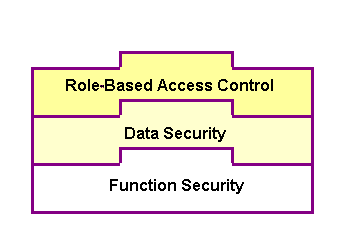
To allow only authorized users to perform certain administrative tasks, Oracle E-Business Suite Integrated SOA Gateway leverages Oracle User Management Role-Based Access Control (RBAC) security to build another layer of security. This RBAC security is enforced through user roles. As a result, whether a user can perform certain tasks, such as downloading a composite service from the application server, is determined by the roles granted to the user.
This approach builds upon Data Security and Function Security, but it goes beyond both of them.
Role-Based Access Control Security
As described earlier, function security is the base layer of access control in Oracle E-Business Suite. It restricts user access to individual menus and menu options within the system, but it does not restrict the access to the data contained within those menus. Data security provides access control on the application data, and the actions a user can perform on the data.
With RBAC, access control is defined through roles, and a role can be configured to consolidate the responsibilities, permissions, permission sets, and function security policies that users require to perform a specific function. This simplifies mass updates of user permissions because changes can be done through roles which will inherit the new sets of permissions automatically. Based on the job functions, each role can be assigned a specific permission or permission set if needed. For example, an organization may include 'Analyst', 'Developer', and 'Administrator' roles. The 'Administrator' role would include a permission set that contains all administrative related tasks or functions allowing the administrator role to perform a job function while the Analyst and Developer roles may not have the access privileges.
In Oracle E-Business Suite Integrated SOA Gateway, each administrative function is considered as a permission. Relevant permissions are grouped into a permission set that will then be associated with appropriate function roles and assigned to appropriate users through security grants.
Oracle E-Business Suite Integrated SOA Gateway uses the following seeded permission sets to restrict administrative privileges only to authorized users:
Integration Administrator Permission Set (FND_REP_ADMIN_PERM_SET)
Integration Repository Download Composite Service (FND_REP_DOWNLOAD_PERM_SET)
The Integration Administrator Permission Set (FND_REP_ADMIN_PERM_SET) contains almost all administrative tasks performed by the users who have the Integration Administrator role. It consists of the following administrative permissions:
Integration Administrator Permission Set
| Privilege | Permission | Permission Display Name |
|---|---|---|
| Generate/Regenerate | FND_REP_GENERATE | Generate Web Service |
| Deploy | FND_REP_DEPLOY | Deploy Web Service |
| Undeploy | FND_REP_UNDEPLOY | Undeploy Web Service |
| Subscribe to Agent | FND_REP_SUBSCRIBE | Subscribe to Agent |
| Create Grants | FND_REP_METHOD_GRNT | Grant execute privileges to methods |
Users with an appropriate privilege can download composite services and that privilege is associated with a permission set called Integration Repository Download Composite Service Permission Set (FND_REP_DOWNLOAD_PERM_SET) which is separated from the Integration Administrator Permission Set described earlier. This approach allows the download feature to be granted separately to users through the Integration Administrator role, the Integration Developer role, or the Integration Analyst role if necessary.
Integration Repository Download Composite Service Permission Set
| Privilege | Permission | Permission Display Name |
|---|---|---|
| Download Composite Service | FND_REP_DOWNLOAD_CS | Download Composite Service |