With the Account Hierarchy Manager you can graphically create, maintain, and review account structure hierarchies. You can define new parent and child segment values, as well as change parent/child dependencies. You can also create new rollup groups from the Account Hierarchy Manager and have your changes reflected automatically in both the Key Segment Values and Rollup Groups windows.
Note: When you change parent/child relationships that affect existing summary accounts, run the Incremental Add/Delete Summary Templates program to update your summary account balances.
Note: The Account Hierarchy Manager allows you to graphically create and modify account hierarchies and related information stored in General Ledger. You can only use the Account Hierarchy Manager for segments with value sets using Independent validation.
Note: There are two applications that allow you to graphically create and modify account hierarchies and related information stored in General Ledger. The Account Hierarchy Manager is accessed through the General Ledger Navigator. Applications Desktop Integrator's Account Hierarchy Editor is a client server application accessed from your desktop.
Prerequisites
Define the profile option TCF: Host.
Define the profile option TCF: Port.
(Optional) Define the profile option GL AHM: Allow User to Modify Hierarchy.
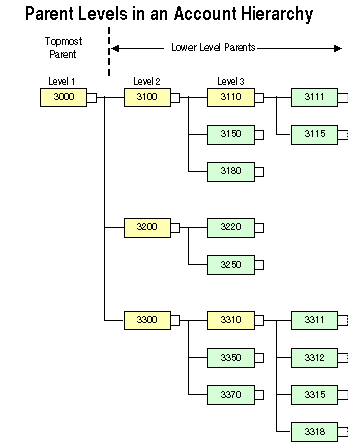
The diagram below illustrates the concept of parent levels in an account hierarchy. This concept is used throughout the remainder of this chapter.
A parent level contains a parent segment value that has one or more child segment values associated with it. Parent levels are displayed in Account Hierarchy Manager in a top-down fashion. The level 1 parent is always the topmost parent, as shown in the diagram. The remaining parent levels, starting with level 2, are referred to as lower level parents.
As illustrated in the diagram, a parent value can be a child of a higher level parent. For example, in the diagram, parent value 3110 has two child segment values, 3111 and 3115. The parent is itself a child of the higher level parent value 3100, which also includes the child values 3150 and 3180. Parent value 3100 is, in turn, a child of the topmost parent value, 3000, which also includes the lower level parent values 3200 and 3300, as well as all of their child values.
When you select a parent level in the Account Hierarchy Manager, you are selecting the parent segment value plus all of its child values, which include lower level parents and their associated child values. For example, if you select the parent value 3300 from the hierarchy shown in the diagram above, you are selecting the values 3300, 3310, 3311, 3312, 3315, 3318, 3350, and 3370.
