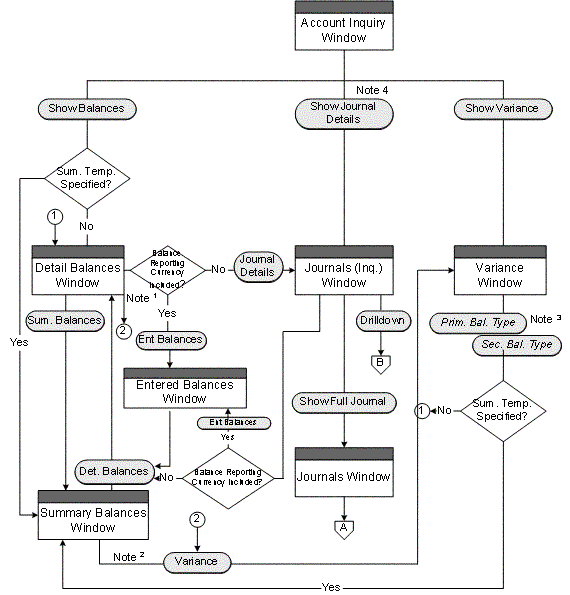
The following diagrams illustrate General Ledger's online account and journal inquiry features:
For a text description of this flowchart, see: Online Inquiry Drilldown Flows.
The Variance button appears on the Detail Balances window only when you enter the process flow via the Show Variance button.
The Variance button appears on the Summary Balances window only when you enter the process flow via the Show Variance button after first specifying a summary template.
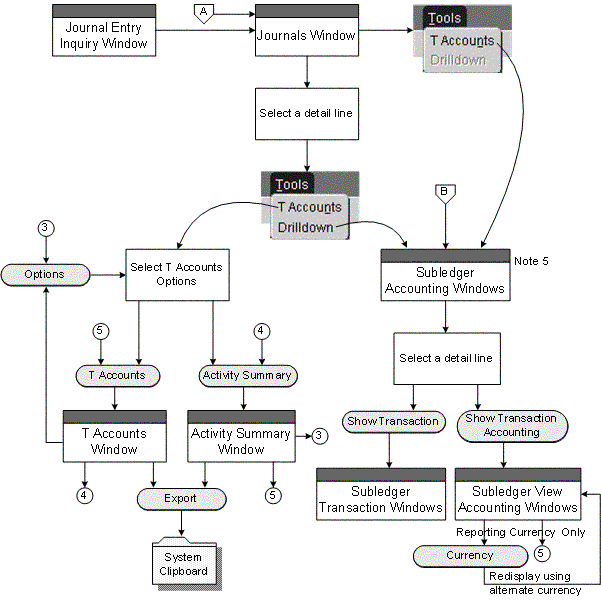
For a text description of this flowchart, see: Online Inquiry Drilldown Flows.
The button names will vary depending on the primary and secondary balance types you select for the account inquiry operation
Show Journal Details button is hidden from the Account Inquiry window if querying Total balances for a balance-level reporting currency.
Drilling down to subledger transactions is supported for those Oracle subledgers that use Oracle Subledger Accounting (SLA), such as Oracle Receivables, Payables, Assets, Projects, Purchasing, Inventory, Work in Process (WIP), Property Manager, and Lease Management if you have installed these products.
Note: To find all Oracle subledgers that integrate with Subledger Accounting, you can query each subledger source in the Subledger Application window from the Subledger Accounting Setup menu.
The following describes General Ledger's drilldown capabilities for account inquiry:
Account: review specific account balances and compute variances from a secondary balance type
Journal: review information about specific journal batches and journal entries
You can also perform the following types of online inquiries with General Ledger:
Average Balance: review information about the average or end-of-day summary or detail balances of any balance sheet account, if you have enabled average balance processing in your ledger
Budget: review master and detail budgets, compare summary balances between your master and detail budgets, and check for budget variances and violations
Consolidation: review specific consolidated account balances in your parent ledger
Reporting Currency: review balances that have been converted to your journal-level or subledger-level reporting currency when you posted balances in the source ledger, such as the primary or secondary ledger
For more information on reporting currencies, see Overview of Reporting Currencies.
Secondary Ledger: review balances and journals that have been transferred to your secondary ledger
For more information on secondary ledgers, see Secondary Ledgers.
Translated Balance: review balances that have been translated to your balance-level reporting currency
After performing an online query, you can drill down to see additional details. For example:
Summary to Detail: after querying a summary account, drill down to the detail balances that comprise the summary account balance for a ledger. For budgets, drill down from master budgets to detail budgets.
Detail Balances to Journals: from any detail account balance you can drill down to the journals that contribute to the balance. If you drill down to summary journals, you can drill down further to detail journals.
Journals to Subledger Detail: from detail journals you can drill down further to see the Oracle subledger transactions that comprise the journal. You can also view subledger transactions as balanced journal entries or in the form of T-accounts.
Note: Drilling down to subledger transactions is supported for those Oracle subledgers that use Oracle Subledger Accounting (SLA), such as Oracle Receivables, Payables, Assets, Projects, Purchasing, Inventory, Work in Process (WIP), Property Manager, and Lease Management if you have installed these products.
Note: To find all Oracle subledgers that integrate with Subledger Accounting, you can query each subledger source in the Subledger Application window from the Subledger Accounting Setup menu.
Parent to Subsidiary: after querying a parent account balance, you can drill down to the subsidiary balances that comprise the parent balance.
Reporting Currency to Source Ledger: after querying an account balance from the journal-level or subledger-level reporting currency, you can drill down to the full journal entry of the source ledger, such as the original journal that was posted in the primary or secondary ledger.
For more information on reporting currencies, see Overview of Reporting Currencies.
Secondary Ledger to Primary Ledger: after querying an account balance from the secondary ledger, you can drill down to the original journal that was posted in the primary ledger.
For more information on secondary ledgers, see Secondary Ledgers.
Translated Balance to Source Ledger: after querying a translated account balance using the balance-level reporting currency, you can drill down to the journal details and original journal entry of the source ledger.
Most inquiry windows are folders. You can customize folders to show the account or journal information you need.
When you perform an inquiry, you use the button on the left side of most inquiry windows to drill down to more detailed information. You use the button on the right side to drill up to summarized information.
All of the inquiry windows follow segment value security rules and data access set security that restrict user access to specific ledgers, balancing segment values, management segment values, and other segment values in your accounting flexfield as follows.
For segment value security rules, you cannot view balances for secured values.
For data access sets, you must have read access to the ledger and balancing segment value or management segment value to view account balances.
Note: To view summary account balances, you must have read access to the parent value, such as "T", used in the summary account.
Entered Ledger Currency Balances are only available if you have upgraded your system to track balances entered in the ledger currency. See Upgrading Balances to Track Balances Entered in the Ledger Currency.
