Some standard General Ledger activities require new steps or additional information when Reporting Currencies are used. Also, certain activities must be performed in both your ledger and reporting currencies. These activities include opening and closing periods and running Revaluation.
Since these activities are performed separately in your ledger and reporting currencies, you can close out your ledger for a specific accounting period while keeping the period open in your reporting currencies. Holding the reporting currencies' period open provides you with more time to reconcile the reporting balances and make adjusting entries.
You must open and close accounting periods in your ledger and in each of your reporting currencies separately. You may use ledger sets to enable you to open and close accounting periods simultaneously for your ledger and reporting currencies.
See: Opening and Closing Accounting Periods and Defining Ledger Sets.
Some journals are automatically converted to reporting currencies, while others are not.
Converted Journals
GL Posting automatically generates and posts converted journals in your reporting currencies when you post the original journals in the source ledger for the following types of journals:
Manual journals you enter on the Enter Journals window
Recurring journals and MassAllocations
Unposted journals from a non-Oracle feeder system
Unposted journals from an Oracle subledger that does not support Reporting Currencies
Note: Optionally, revaluation journals may be converted. See: Revaluation.
Unconverted Journals
Journals from an SLA-supported subledger are not converted by General Ledger. These are converted by SLA, and SLA transfers both the original journal and the reporting currency journal to General Ledger for import and posting.
See:
Retain Journal Creator from Source Ledger
You can specify which user is saved as the Created By person for a reporting currency journal using the profile option GL/MRC Journals: Inherit the Journal Creator from the Primary Book's Journal. The following values are available to you:
Yes: When you post a journal in your ledger, the same username of the individual who created the journal will be used as the creator of the reporting currency journal.
No: When you post a journal in your ledger, the username of the person posting the journal will be used as the creator of the reporting currency journal.
Notes:
If you enter a journal directly in your reporting currency, you can only reverse it in your reporting currency.
When Journal Approval is Enabled: Any reversing journals that are generated in your reporting currencies as a result of reversing an original journal in the source ledger will not require approval, regardless of whether Journal Approval has been enabled in your reporting ledgers. Once the reversal of the original journal for the source ledger is approved, the reporting currency's reversal journal will not require approval.
See: Defining Reverse Journal Entries
As discussed earlier in this chapter, you should generally exercise caution over entering or importing new journals in a reporting currency. As a result, you may wish to use General Ledger's Journal Approval feature to ensure that a reporting currency's journals are processed through your organization's approval hierarchy.
You can enable Journal Approval separately in your source ledger and reporting currencies. Journals are approved as noted in the table below:
| Ledger | Reporting Currency | Approval Processing |
|---|---|---|
| Enabled | Enabled | Journal entered and approved in source ledger: Approval required based on Journal Approval settings in source ledger. Approval status carried over to corresponding converted journal in reporting currency. Separate approval not needed in reporting currency. Journal entered directly in reporting currency: Approval required based on Journal Approval settings in reporting currency. No approval needed in source ledger. |
| Not Enabled | Enabled | Journal entered in source ledger: Associated converted journal in reporting currency not required to be approved, regardless of Journal Approval settings in reporting currency. Approval status set to N/A. Journal entered directly in reporting currency: Approval required based on Journal Approval settings in reporting currency. No approval needed in source ledger. |
| Enabled | Not Enabled | Journal entered and approved in source ledger: Approval required based on Journal Approval settings in source ledger. Not applicable to reporting currency. Journal entered directly in reporting SOB: No approval needed in source ledger or reporting currency. |
When you perform an account balance inquiry for a reporting currency, you can drill down to the journal detail that comprises the reporting currency balance. If the journal detail is a converted journal, i.e., one that was converted automatically when the original journal was posted in the source ledger, you can drill down further to see the source ledger currency journal amounts.
When you enter a journal in your ledger, the document number assigned to the journal is determined by the ledger and the converted journal in the reporting currency is assigned the same document number. However, if you enter a journal in the reporting currency, the document number assigned to the journal is determined by the reporting currency.
See: Entering Journals
In Reporting Currencies, budget amounts or budget journals are not converted from your ledger to your reporting currency. If you need to report budget amounts in your reporting currencies, you can choose from two methods for each reporting currency:
Maintain Translated Budget Amounts in Ledger: In this case, you translate the budget amounts in your ledger to your reporting currency and maintain the converted amounts in the ledger. You can then create FSG reports using these translated budget amounts. For example, a budget variance report can take the translated budget amounts from the ledger and the reporting currency actual amounts from the related reporting currency.
Manually Enter the Reporting Currency Budget Amounts: In this case, you maintain reporting currency budget amounts in a separate budget. To use this method, you must set up a new budget and manually enter the reporting currency budget amounts.
See:
For General Ledger, you can automatically create converted encumbrance journals in your reporting currencies when you post the associated encumbrance journal in your ledger.
Note: Encumbrance journals are created in your reporting currencies as journals entered in the reporting currency, not as foreign-currency journals.
To use Reporting Currencies with encumbrance accounting and/or budgetary control, enable budgetary control for your ledger in Accounting Setup Manager, then perform the standard setup tasks in General Ledger.
Note: You cannot enable budgetary control directly for a reporting currency.
See:
Overview of Encumbrance Accounting
Budgetary Control and Online Funds Checking
When you use Multiple Reporting Currencies, you must periodically run Revaluation in your ledger and reporting currencies as necessary to satisfy the accounting regulations of the country in which your organization operates. Revaluation is a process that adjusts account balances denominated in a foreign currency using a one time, daily, or period-end exchange rate. Revaluation amounts, based on changes in conversion rates between the date of the journal entry and the revaluation date, are posted to the underlying account with the offset posted to an unrealized gain or loss account. All debit revaluation adjustments are offset against the unrealized gain account and all credit adjustments are offset against the unrealized loss account. If the same account is specified in the gain and loss fields, the net of the revaluation adjustments is derived.
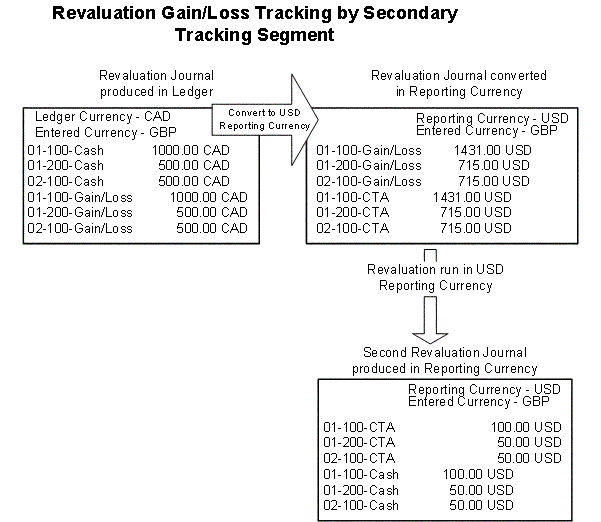
You can track Revaluation by balancing segment and a secondary tracking segment. This revalues foreign currency denominated balances for specific accounts and currencies; the resulting unrealized gain/loss amounts are balanced by the balancing segment value and secondary tracking segment value and are posted to the unrealized gain/loss account.
To enable the secondary tracking segment, assign the Secondary Tracking Segment qualifier to a segment in your chart of accounts. The secondary segment cannot be the balancing, intercompany, or natural account. Enable the Secondary Tracking Segment option in the ledger.
The ledger's revaluation journal entries will be automatically converted and balanced by balancing segment value and secondary tracking segment value pair, to the reporting currency. In the reporting currency, instead of exactly replicating each line of the revaluation journal from the ledger, the revaluation journal is modified to consist of the unrealized gain/loss journal lines from the original revaluation journal, with offsetting lines against the cumulative translation adjustment account. The offsetting cumulative translation adjustment accounts (journal lines) are also balanced by balancing segment value and secondary tracking segment value pair.
If there are exchange differences between the reporting currency and the transaction currency, run revaluation in the reporting currency on the foreign currency denominated balances. The offset applies to the cumulative translation adjustment accounts, again balanced by balancing segment value and secondary tracking segment value pair. Select the cumulative translation adjustment account as the GL account for this second revaluation.
See:
Revaluation supports the following SFAS #52 Methods:
SFAS #52 Temporal Method
Revaluation processing supports the remeasurement standards of SFAS #52 (the Temporal translation method). Under the Temporal method, you must revalue foreign currency-denominated accounts in the currency of the statement to be translated. This process generates gains or losses that you record in your local bookkeeping currency. Consistent with SFAS#52 and other Temporal method standards, you must remeasure those gains and losses in the currency of the financial statement to which you are translating. You must also revalue the underlying asset and liability accounts in the target currency, and record the resulting gains and losses in the Cumulative Translation Adjustment account of the reporting currencies.
To facilitate this process, General Ledger can automatically convert and replicate your revaluation journal entries from your ledger to each of your reporting currencies, directing revaluation gains or losses to the appropriate gain/loss or cumulative translation adjustment account. This speeds the closing and consolidation process, and provides for consistent accounting treatment across multiple ledgers.
SFAS #52 Translation Method
Under the SFAS #52 Translation method, you revalue both monetary and non-monetary account balances using the ledger currency balances of the ledger to create revaluation entries for the reporting currency.
Set the profile option GL/MRC Revaluation: Use Primary Currency instead of Entered Currency to Yes to comply with SFAS #52 Translation Method.
Only amounts that exist in the ledger will be processed. Any posting that has occurred directly to the reporting currency without an associated posting in the ledger will be ignored when calculating revaluation amounts.
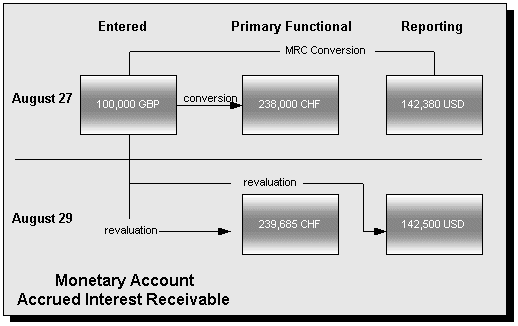
In the monetary asset example, Accrued Interest Receivable, the entered balance is revalued to both the ledger currency and the reporting currency. Whether the reporting currency balance is revalued from the entered currency or the ledger currency results in no material difference.
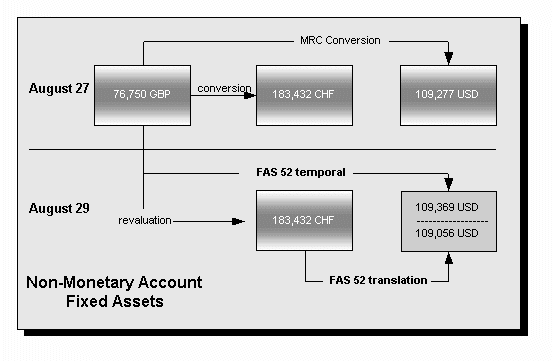
In the non-monetary asset example, Fixed Assets, the ledger balance is not revalued. Revaluing the reporting currency balance against the entered balance (remeasurement) results in a material difference when compared to revaluing against the ledger currency (translation).
There are two ways in which you can set up General Ledger to enhance revaluation processing and support SFAS #52:
set up period-to-date (PTD) revaluation for income statement accounts
set up reusable revaluation ranges
You can use the General Ledger profile option, GL Income Statement Accounts Revaluation Rule, to specify whether you want to revalue income statement accounts using period-to-date (PTD) or year-to-date (YTD) balances. If you choose to revalue PTD balances for income statement accounts, the program continues to appropriately revalue YTD balances for balance sheet accounts. Revaluing the PTD balance of your income statement accounts creates weighted average YTD balances using period rates from each corresponding period, and produces more accurate results in compliance with SFAS No. 52 standards.
When you select the PTD option for revaluing your income statement accounts, revaluation produces two separate journal entries; one that revalues your balance sheet accounts and another for your income statement accounts. You will not need to reverse the PTD revaluation journal entry for your income statement accounts in the subsequent period since that revaluation only applied to last period's activity.
Note: Regardless of which option you choose, balance sheet accounts are revalued in accordance with their year-to-date balances. Income statement accounts are revalued using either their period-to-date or year-to-date balances, as defined by profile option set in GL: Income Statement Accounts Revaluation Rule.
You can only review this profile option at the user level. Your System Administrator can set this profile option at the site, application, or responsibility level.
See: Setting General Ledger Profile Options.
You can define new revaluations, update existing revaluations and delete revaluations. You can also group revaluations into a Request Set that can be launched once or scheduled to launch periodically.
See: Revaluing Balances
There are two methods for revaluing in Reporting Currencies:
Don't Convert: gains and losses arising from revaluation in the ledger are NOT converted to your reporting currencies.
Convert: gains and losses arising from revaluation in the ledger are converted to your reporting currencies
You select the method you want to use for a reporting currency when you define your currency conversion rules during the Reporting Currency setup process in Accounting Setup Manager, as follows:
Make sure there is no conversion rule that allows revaluation journals to be converted.
Caution: A conversion rule with the Convert option set to Yes, a Category of Other, and a Source of Other will result in revaluation gains and losses being converted.
Optionally, or if there is a conversion rule that will result in revaluation gains and losses being converted, create a conversion rule that specifically prevents revaluation journals from being converted, by using the following parameters:
Convert option: No
Category: Revaluation
Source: Revaluation
Create a conversion rule using these parameters:
Convert option: Yes
Category: Revaluation
Source: Revaluation
Note: A conversion rule with the Convert option set to Yes, a Category of Other, and a Source of Other will result in the same behavior.
If you choose not to convert revaluation gains and losses, the process to revalue balances requires that you run Revaluation separately in your ledger and your reporting currencies. You also post the resulting revaluation journals in both your ledger and reporting currencies. When the revaluation journal is posted in the ledger, there will be no impact on the reporting currency.
This approach represents standard General Ledger functionality, operating independently in each ledger and reporting currency. You only need to run revaluation in a reporting currency if there are foreign currency entered transactions in it.
See: Revaluing Balances
The second revaluation method - to convert revaluation gains and losses-is more complicated. The following flowchart depicts the revaluation process:
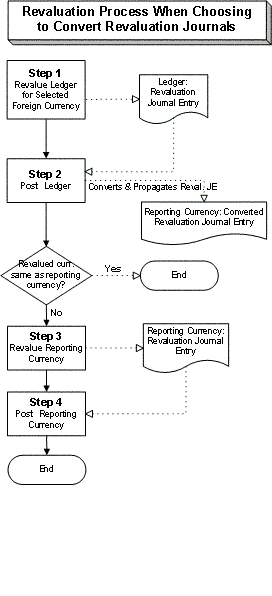
For a text description of the flowchart, see: Revaluation Process When Choosing to Convert Revaluation Journals.
The remainder of this section describes each of the steps in the flowchart in detail, including the accounting entries generated in both the ledger and reporting currency. Use this information to determine which steps to use to satisfy the accounting requirements of the country in which your organization operates.
Run revaluation in your ledger for selected, foreign currencies. This process computes gains and losses from changes in exchange rates for account balances in your ledger that are denominated in a foreign currency. There is no immediate effect in the reporting currency.
See: Revaluing Balances
This process generates revaluation journal entries by currency for the ledger.
Note: If there are no foreign currency-denominated balances in the ledger, no revaluation journal entries are generated (there is nothing to revalue).
Each revaluation journal includes:
Lines to adjust the converted amounts of the foreign currency account balances, to reflect the exchange rate as of the balance sheet date.
The amount needed to balance the journal is recorded as an entry to the exchange gain/loss account you select.
Entered amounts are set to zero.
If the revaluation journal in the ledger created no gain/loss lines because the accounts being revalued offset each other, the converted revaluation journal in the reporting currency will have a header, to indicate that the conversion took place, but no journal lines.
Example:
For example, consider the following scenario:
Ledger currency: EUR
Reporting currency: USD
Foreign transactional currencies: CAD, USD
Exchange rates are as follows:
| Date | CAD to EUR | CAD to USD | EUR to USD |
|---|---|---|---|
| 9/5/99 | .632 | .670 | 1.06 |
| 9/20/99 | .652 | .678 | 1.04 |
| 9/30/99 | .639 | .680 | 1.06 |
Also assume that you defined a currency conversion rule to have revaluation journals converted using the rates for the reporting conversion type "Period-Avg". The related Period-Avg rate for Sep-1999 is 1.053.
There are four transactions during September:
| Date | Account | Entered | Accounted |
|---|---|---|---|
| 9/5 | AR | 1000 CAD | 632.00 EUR |
| 9/20 | AP | 1250 CAD | 822.50 EUR |
| 9/20 | AP | 500 EUR | 500.00 EUR |
| 9/20 | AR | 500 USD | 480.77 EUR |
When Revaluation is run at the end of September for the foreign transactional currencies, CAD and USD, the new accounted amounts will be:
| Date | Account | Entered | Accounted |
|---|---|---|---|
| 9/5 | AR | 1000 CAD | 639.00 EUR |
| 9/20 | AP | 1250 CAD | 798.75 EUR |
| 9/20 | AP | 500 EUR | 500.00 EUR |
| 9/20 | AR | 500 USD | 471.70 EUR |
Revaluation is computed by currency.
For CAD Revaluation
When the CAD transactions are revalued in EUR, (AR 632.00 - 639.00) (AP 822.50 - 798.75) there will be an increase of 7 EUR in AR (debit), and a decrease of 23.75 in AP (debit). This will result in the following revaluation journal in the ledger:
| Account | Debit | Credit |
|---|---|---|
| Accounts Receivable | 7.00 | |
| Accounts Payable | 23.75 | |
| Exchange Gain/Loss | 30.75 |
For USD Revaluation
When the USD transaction is revalued in EUR (480.77-471.70), there will be a decrease of 9.07 EUR in AR (credit). This will result in the following revaluation journal in the ledger:
| Account | Debit | Credit |
|---|---|---|
| Exchange Gain/Loss | 9.07 | |
| Accounts Receivable | 9.07 |
If you combine the results of both journal entries, (30.75-9.07) the net exchange gain/loss for the month is a 21.68 credit to the account. We will continue to build on this example through the remaining discussion in this section.
In the ledger, post the revaluation journals generated by Step 1.
Upon posting, revaluation journals are converted to the currency of your reporting currency.
For the converted revaluation journals:
The exchange gain or loss of the ledgers' revaluation journal is converted using the related rate for the reporting conversion type you specified for the conversion rule. Typically, you will use a period average rate.
For example, assume you use the reporting conversion type "Average" for your period average rates and you created the following conversion rule when you set up your reporting currency:
Convert option: checked Yes
Category: Revaluation
Source: Revaluation
Reporting Conversion Type: Average
If the ledger currency is EUR, the reporting currency is USD, and you run Revaluation for Sep-1999, your revaluation journals will be converted using the Average rate type you defined for Sep-1999.
The balancing amount of the reporting currency's revaluation journal is made to the Cumulative Translation Adjustment account. No adjustments are made to other balance sheet accounts.
Example:
Continuing the example introduced in Step 1, the euro ledger's EUR revaluation journals will be converted to the USD reporting currency as follows:
For CAD Revaluation
The gain is computed as 30.75 (gain from ledger's revaluation journal) times the "Period-Avg" rate for Sep-1999 of 1.053 (EUR to USD):
30.75 EUR X 1.053 = $ 32.38
This results in the following journal entry:
| Account | Debit | Credit |
|---|---|---|
| Cumulative Translation Adjustment | 32.38 | |
| Exchange Gain/Loss | 32.38 |
For USD Revaluation
The loss is computed as 9.07 (loss from ledger's revaluation journal) times the "Period-Avg" rate for Sep-1999 of 1.053 (EUR to USD):
(9.07) EUR X 1.053 = ($ 9.55)
This results in the following journal entry:
| Account | Debit | Credit |
|---|---|---|
| Exchange Gain/Loss | 9.55 | |
| Cumulative Translation Adjustment | 9.55 |
The net result of both revaluations is a gain of $22.83 in the Exchange Gain/Loss account.
Caution: Perform the remaining steps ONLY if the currency of the original entered amount in the ledger is different from the currency of the reporting currency. Otherwise, no further action is needed in the reporting currency.
Example:
In our continuing example, the currency of the original entered amounts are USD, CAD and EUR. The reporting currency is USD. Since the currencies for some transactions are different, we would proceed with the remaining steps for the CAD and EUR transactions. It is not necessary to revalue the USD transactions since the reporting currency is in USD.
Run Revaluation in the reporting currency if the currency of the original entered amount in the ledger is different from the currency of the reporting currency. Choose to record any exchange gains or losses to the cumulative translation adjustment account.
This process computes gains and losses from changes in exchange rates for account balances in your reporting currency that are denominated in a foreign currency (i.e., a currency other than the reporting currency).
This process generates revaluation journal entries by currency for the reporting currency.
Each revaluation journal includes:
Lines to adjust the converted amounts of the foreign currency account balances, to reflect the exchange rate as of the balance sheet date.
The amount needed to balance the journal is recorded as an entry to the account you select. You should choose the cumulative translation adjustment account.
Entered amounts are set to zero.
Example:
Continuing our example from the previous steps, we will look at the USD reporting currency. Note that the four original transactions would have been converted to USD, using daily rates as follows:
| Date | Acct. | Entered | Daily Rate | USD Accounted in Reporting Currency |
|---|---|---|---|---|
| 9/5 | AR | 1000 CAD | .670 | $ 670.00 |
| 9/20 | AP | 1250 CAD | .678 | $ 847.50 |
| 9/20 | AP | 500 EUR | 1.04 | $ 520.00 |
| 9/20 | AR | 500 USD | n/a | $ 500.00 |
Since the original entered currency for the first three transactions is different from USD, we must revalue these currencies as of 9/30 to compute any related translation adjustment. The last transaction was entered in USD, so it does not need to be revalued, and remains at the entered amount of 500 USD in the reporting currency.
When Revaluation is run, the new accounting amounts in the reporting currencies will be:
| Date | Acct. | Entered | Period End Rate | USD Accounted in Reporting Currency |
|---|---|---|---|---|
| 9/5 | AR | 1000 CAD | .680 | $ 680.00 |
| 9/20 | AP | 1250 CAD | .680 | $ 850.00 |
| 9/20 | AP | 500 EUR | 1.06 | $ 530.00 |
| 9/20 | AR | 500 USD | n/a | $ 500.00 |
Revaluation is computed separately for each currency.
For CAD Revaluation
When the CAD transactions are revalued in USD using the period end rate, (AR 670.00 - 680.00) (AP 847.50 - 850.00) there will be a increase of $ 10.00 in AR (debit), and a increase of $ 2.50 in AP (credit). This will result in the following revaluation journal in the USD reporting currency:
| Account | Debit | Credit |
|---|---|---|
| Accounts Receivable | 10.00 | |
| Accounts Payable | 2.50 | |
| Cumulative Translation Adjustment | 7.50 |
For EUR Revaluation
When the EUR transaction is revalued in USD using the period end rate, (520.00 - 530.00), there will be a decrease of $ 10.00 in AR (credit). This will result in the following revaluation journal in the USD reporting currency:
| Account | Debit | Credit |
|---|---|---|
| Cumulative Translation Adjustment | 10.00 | |
| Exchange Gain/Loss | 10.00 |
The entered amounts for all three journal lines is zero.
The net effect of the revaluation for both currencies is no increase or decrease in AR, and a net credit in AP of $ 2.50. This results in a net debit of $2.50 to the cumulative translation adjustment account. (Note that the transaction originally entered in USD is not revalued in the USD reporting currency)
In the reporting currency, post the revaluation journals generated by Step 4.
For Translation and Consolidation Information, see: Translation versus Reporting Currencies
You must run Move/Merge and Move/Merge reversal in your ledger. The changes are automatically made in each of your reporting currencies.
See: Mass Maintenance
If you are using sequential numbering and wish to maintain the same numbering in your reporting currency and source ledger for journals (other than those generated by Receivables, Payables, Purchasing, Projects, and Assets) do not create separate sequences for your reporting currencies. If you do, the sequence defined for the reporting currencies will be used and may cause document numbers not to be synchronized between the ledger and reporting currencies.
