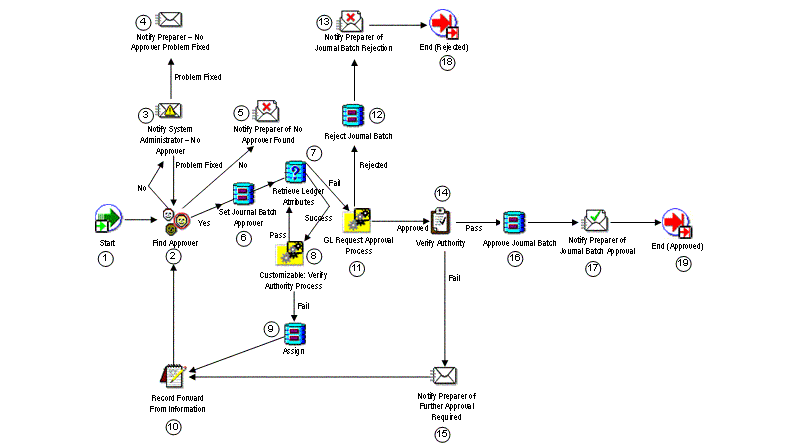
The GL Approval Process finds an appropriate approver, seeks journal batch approval, and sends notifications of approval or rejection.
To determine the appropriate approver, this process will compare each potential approver's authorization limit to the largest net journal line amount for each ledger that requires approval in the entire batch. In determining the largest net journal line amount, the process looks at absolute values. For example, assume the multiple ledger journal batch includes the following three journals:
Ledger A and Ledger C have journal approval enabled.
Ledger B does not have journal approval enabled.
Ledger A:
Journal #1 (Misc Cash Receipt)
Debit 10 Cash 10,000
Credit 20 Misc. Revenue 10,000
Ledger B:
Journal #2 (Accrual Adjustment)
Debit 10 Deferred Income 20,000
Debit 10 Rent Expense 15,000
Credit 30 Misc. Revenue 20,000
Credit 40 Prepaid Expenses 15,000
Ledger C:
Journal #3 (Consolidation Entry)
10 Intercompany Payables 80,000 40,000
20 Intercompany Receivables 15,000 35,000
The largest net absolute amounts for each ledger requiring journal approval are 10,000 for Ledger A and 40,000 for Ledger C. Forty-thousand is the net of the intercompany payables amounts. Therefore, 10,000 and 40,000 are the amounts that will be compared to each potential approver's authorization limit for Ledger A and Ledger C respectively. Authorization limits will not be compared for Ledger B since this ledger does not require approval. The potential approver must have sufficient authorization limits for Ledger A and Ledger C to approve the journal batch.
The process has a result type of Approval that gives one of two results:
Approved: The journal batch was approved by all necessary approvers.
Rejected: The journal batch was rejected by an approver.
The process consists of 18 unique activities, some of which are reused, to comprise the 19 activity nodes that appear in the workflow diagram:
General Ledger Approval Process
This standard activity marks the start of the process.
| Function | WF_STANDARD.NOOP |
| Result Type | None |
This function activity determines who the next approver is for the journal batch by checking the approval hierarchy and the approver method. If an approver is found, the procedure returns a value of 'Yes'. If an approver is not found, the procedure returns a value of 'No'.
| Function | GL_WF_JE_APPROVAL_PKG.FIND_APPROVER |
| Result Type | Yes/No |
This activity notifies your System Administrator if no approver can be found for the journal batch. The message includes 'Send' or 'Respond' attributes that display the batch name, the preparer's name, the monitor URL, and a note by the System Administrator that the problem has been resolved.
| Message | No Approver Found |
| Result Type | GL Problem Has Been Fixed |
Note: This activity's performer is set to the SYSADMIN user when you first install Journal Approval. You can change this to any other user as follows:
Using Oracle Workflow Builder, choose File > Load Roles from Database from the main menu, then load your system administrator role.
Select the GL Approval Process and open the process detail diagram.
Choose the Notify System Administrator - No Approver activity to open the control properties window.
Change the Performer as needed.
This activity notifies the preparer when the no approver problem has been fixed by the system administrator. The message includes a 'Send' or 'Respond' attribute to display the batch name.
| Message | Notify Preparer - No Approver Problem Fixed |
| Result Type | None |
This activity notifies the preparer if no approver can be found for the journal batch. The message includes 'Send' or 'Respond' attributes that display the batch name, the preparer's name, the monitor URL.
| Message | Notify Preparer That No Approver was Found |
| Result Type | None |
This function activity sets the journal batch's approver name.
| Function | GL_WF_JE_APPROVAL_PKG.SET_JE_APPROVER |
| Result Type | None |
This function activity retrieves various attributes of the ledgers in the journal batch.
| Function | GL_WF_JE_APPROVAL_PKG.GET_SOB_ATTRIBUTES |
| Result Type | Success/Fail |
This activity is a subprocess. If your organization has unique needs, use this activity to customize the process of verifying an approver's authority to approve the journal batch. To view the subprocess, choose Customizable: Verify Authority Process under the Processes branch of the Workflow Builder navigator tree. See: Customizable: Verify Authority Process.
| Result Type | GL Pass or Fail Result Type |
This function activity resets the SET_OF_BOOKS_ID attribute value.
| Function | WF_STANDARD.ASSIGN |
| Result Type | None |
If a selected approver is not authorized to approve the journal batch, this procedure saves the selected approver's name and other information. The saved information is used internally within Oracle Workflow.
| Function | GL_WF_JE_APPROVAL_PKG.RECORD_FORWARD_FROM_INFO |
| Result Type | None |
This activity is a subprocess that seeks journal batch approval from the selected approver. To view the subprocess, choose GL Request Approval Process under the Processes branch of the Workflow Builder navigator tree. See: GL Request Approval Process.
| Result Type | Approval |
This function activity updates the journal batch's approval status to Rejected.
| Function | GL_WF_JE_APPROVAL_PKG.REJECT_JE |
| Result Type | None |
This activity notifies the preparer that the journal batch was rejected. The message includes 'Send' or 'Respond' attributes that display the batch name, the approver's name, the monitor URL, the Enter Journals window, and the approver's comment.
| Message | Notify Preparer of Rejection of Journal Batch |
| Result Type | None |
This function activity verifies that a selected approver is authorized to approve the journal batch. If the approver is authorized, the procedure returns a value of 'Pass'. If the approver is not authorized, the procedure returns a value of 'Fail'.
| Function | GL_WF_JE_APPROVAL_PKG.VERIFY_AUTHORITY |
| Result Type | GL Pass or Fail Result Type |
This activity notifies the preparer that further approval is required beyond the currently selected approver. The message includes 'Send' or 'Respond' attributes that display the batch name, the approver's name, and the monitor URL.
| Message | Verification of approval authority failure |
| Result Type | None |
This function activity updates the journal batch's approval status to Approved.
| Function | GL_WF_JE_APPROVAL_PKG.APPROVE_JE |
| Result Type | None |
This activity notifies the preparer that the journal batch has been approved. The message includes 'Send' or 'Respond' attributes that display the batch name, approver's name, monitor URL, enter journals window, and approver's comment.
| Message | Notify Preparer of Approval |
| Result Type | None |
This function activity marks the end of the process. Although the activity itself does not have a result type, each node of this activity in the process must have a process result assigned to it. The process result is assigned in the property page of the activity node. Since the GL Approval process activity has a result type of Approval, each End activity node must have a process result matching one of the lookup codes in the Approval lookup type.
| Function | WF_STANDARD.NOOP |
| Result Type | None |
