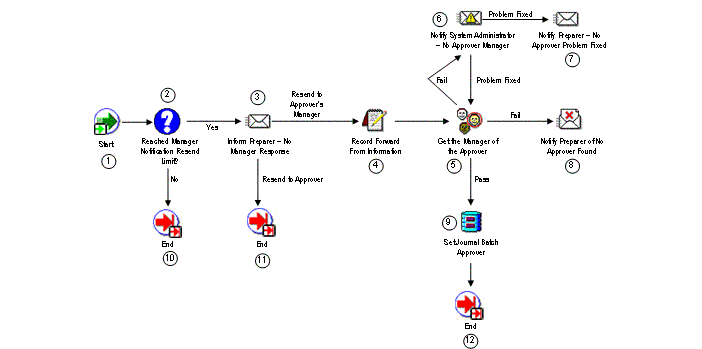
The GL No Approver Response Process provides handling options and actions to take when the approving manager has not responded to a journal batch approval request. This includes resending the request until a certain limit is reached, then providing the preparer with the option to resend the approval request to the approver or to send the request to the approver's manager.
The process has no result type.
The process consists of 10 unique activities, some of which are reused, to comprise the 12 activity nodes that appear in the workflow diagram:
General Ledger No Approver Response Process
This standard activity that marks the start of the process.
| Function | WF_STANDARD.NOOP |
| Result Type | None |
This function activity determines if the number of request approval notifications sent to the approver has reached a predetermined limit. If the limit has been reached, the procedure returns a value of 'Yes'. If not, the procedure returns a value of 'No'.
| Function | GL_WF_JE_APPROVAL_PKG.NOTIFYPREP_NOAPRVRESP |
| Result Type | Yes/No |
Note: The default resend limit for this activity is 1 notification. You can customize this value to meet your organization's specific needs. Use Oracle Workflow Builder to open to activity's property sheet, then select the Node Attributes tab. Choose the 'Number of times to notify manager' attribute, then change the Value as needed.
This activity notifies the preparer that the selected approver has not responded to the request for journal batch approval. The message includes 'Send' or 'Respond' attributes that display the batch name, approver's name, the monitor URL, and two options for further action.
| Message | No Manager Response |
| Result Type | Employee Action For Manager |
This function activity saves the approver's name and other information. The saved information is used internally within Oracle Workflow.
| Function | GL_WF_JE_APPROVAL_PKG.RECORD_FORWARD_FROM_INFO |
| Result Type | None |
This function activity determines who is the approver's manager. If the approver's manager is found, the procedure returns a value of 'Pass'. If not, the procedure returns a value of 'Fail'.
| Function | GL_WF_JE_APPROVAL_PKG.GET_APPROVER_MANAGER |
| Result Type | GL Pass or Fail Result Type |
This activity notifies your system administrator if the approver's manager cannot be found. The message includes 'Send' or 'Respond' attributes that display the batch name, the approver's name, the monitor URL, and any note by the system administrator that the problem has been resolved.
| Message | Approver's Manager Not Found |
| Result Type | GL Problem Has Been Fixed |
Note: This activity's performer is set to the SYSADMIN user when you first install Journal Approval. You can change this to any other user as follows:
Using Oracle Workflow Builder, choose File > Load Roles from Database from the main menu, then load your system administrator role.
Select the GL Approval Process and open the process detail diagram.
Choose the Notify System Administrator - No Approver Manager activity to open the control properties window.
Change the Performer as needed.
This activity notifies the preparer when the no approver problem has been fixed by the system administrator. The message includes a 'Send' or 'Respond' attribute to display the batch name.
| Message | Notify Preparer - No Approver Problem Fixed |
| Result Type | None |
This activity notifies the preparer if no approver can be found for the journal batch. The message includes 'Send' or 'Respond' attributes that display the batch name, the preparer's name, the monitor URL, and any notification by the System Administrator that the problem has been resolved.
| Message | Notify Preparer That No Approver was Found |
| Result Type | None |
This function activity sets the journal batch's approver name.
| Function | GL_WF_JE_APPROVAL_PKG.SET_JE_APPROVER |
| Result Type | None |
This function activity marks the end of the process. The activity does not have a result type and no process result is returned.
| Function | WF_STANDARD.NOOP |
| Result Type | None |
