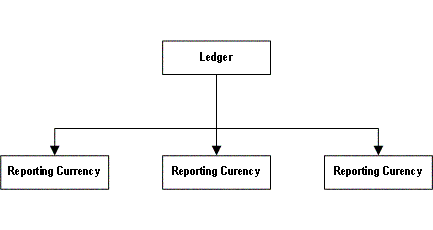
In General Ledger, you record routine daily transactions in your organization's ledger currency, either directly in General Ledger or from your subledgers.
To use reporting currencies, you must define reporting currencies for a ledger. From the primary ledger, you can report on your account balances in your ledger currency or any of your reporting currencies.
For example, a U.S. multinational company with a Canadian subsidiary may elect to set up two primary ledgers; one for the U.S. Parent, one for the Canadian Subsidiary. One reporting currency is set up for the Canadian Subsidiary to report in US dollars.
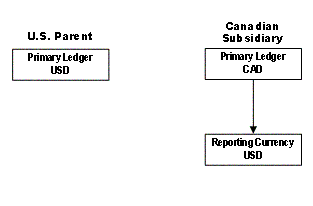
Routine parent transactions are recorded in the parent's ledger currency, in U.S. Dollars, and routine subsidiary transactions are recorded in the subsidiary's ledger currency, in Canadian Dollars. The associated accounting entries are converted to the subsidiary's reporting currency, in U.S. Dollars. The subsidiary can thus report its transactions and General Ledger balances in both Canadian Dollars and U.S. Dollars.
Note: Many General Ledger functionalities available to a ledger are also available to a reporting currency. You can post journals, convert balances, query account balances, submit standard General Ledger reports, define custom financial reports, and perform consolidations.
Journal entries that originate in General Ledger, such as manual journals, recurring journals, and MassAllocations, as well as journals that you import from sources other than Oracle Applications subledgers, can be converted to your reporting currencies when you post the journals to your ledger. When you post a journal in a ledger that has one or more reporting currencies defined, the posting process creates new journals converted to each of your reporting currencies and includes them in the same batch as the original journal with a status of Posted.
Each General Ledger report or inquiry that normally displays information in the ledger currency can also be displayed in any of the associated reporting currencies. To inquire or report on the account balances of a reporting currency, you log into the associated General Ledger reporting responsibility that has access to the reporting currency.
When you inquire on account balances and journals in a reporting currency, you can drill down to the subledger details (in your reporting currency), using General Ledger's integrated drilldown features to provide complete and consistent views of underlying subledger transactions.
See: Drilling Down to Journal Detail
See: Drilling Down to Subledger Detail
For reconciliation purposes, you can use the Financial Statement Generator (FSG) to create a custom comparison report that lists balances from your ledger and reporting currencies in separate columns. Use this report as the basis for reconciling your ledger and reporting currencies.