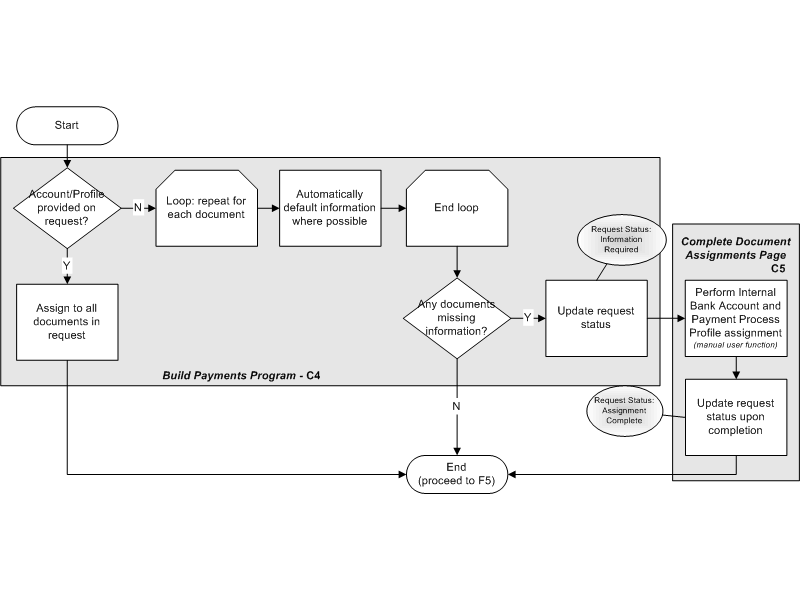
The Account/Profile Assignment Flow assigns required payment information to the Payment Process Request. This information is needed for further payment processing, including validations in the Document Validation Flow. All steps in this flow are performed as part of the Build Payments program until you take action in the Complete Document Assignments page (C5).
The diagram below shows the steps performed in the Account/Profile Assignment Flow (F4).
Account/Profile Assignment Flow
The table below describes the steps performed in the Account/Profile Assignment Flow (F4).
Account/Profile Assignment Flow
| Action | Description |
|---|---|
| Account/Profile Provided on Request? | The Build Payments program determines if the Payment Process Request has the internal bank account and payment process profile assigned to it. |
| (Yes) Assign to all Documents in Payment Process Request | If the bank account or payment process profile is provided, then it is assigned to all the documents payable within the Payment Process Request. The payment process proceeds to the document validation phase (F5). |
| (No) Loop: Repeat for Each Document | If no bank account or payment profile is provided (or only one of these is provided), then a loop process is performed for each document payable. |
| Automatically Default Information Where Possible | Oracle Payments attempts to default the required bank account and payment process profile information where possible. An example of when defaulting occurs is when a payment method is set up and linked to only one payment process profile. Default of an internal bank account may be possible if only one account is available for use by the operating unit that owns the transactions in a Payment Process Request. |
| Any Documents Missing Information? | Once the defaulting process is complete for each document in the Payment Process Request, Oracle Payments determines if any documents are missing the required information. (No). If all documents are complete, then the flow is complete and the payment process proceeds to the document validation phase (F5). |
| Update Request Status | If any documents are missing information, then the Payment Process Request is updated with a status of Information Required - Pending Action. This status enables you to access a page where you can assign the required information. You must complete the assignment of missing information to enable the payment process to continue. |
All steps in the Account/Profile Assignment Flow are performed as part of the Build Payments program until you assign accounts and the payment process profile to the documents payable in the Complete Document Assignments page. Oracle Payments owns the Build Payments program component. The Build Payments program performs the following steps in the payment process:
assigns bank accounts and payment process profiles to a Payment Process Request
validates the documents payable sent in the Payment Process Request
builds documents within a Payment Process Request into proposed payments
validates the proposed payments in a Payment Process Request
optionally presents the proposed payments to the payment administrator for review
The Complete Document Assignments Page Component provides a user interface for you to manually assign required information to documents payable as needed. The information that must be assigned is an internal bank account and/or a payment process profile. You can also optionally change information in this page.
The Complete Document Assignments Page handles all validations of the entered values. When you access the page to assign missing information, the Payment Process Request status is Information Required - Pending Action. Once you have assigned all missing information, the page updates the Payment Process Request status to Assignment Complete. Requests with a status of Assignment Complete are available for further payment processing.