The Validation Failure Handling Flow begins when a payment instruction fails validation. The two kinds of errors that cause a payment instruction to fail are system errors and user-defined errors.
The diagram below shows the possible user actions that can be performed in the Payment Instruction Validation Failure Handling Flow (F9).
Payment Instruction Validation Failure Handling Flow
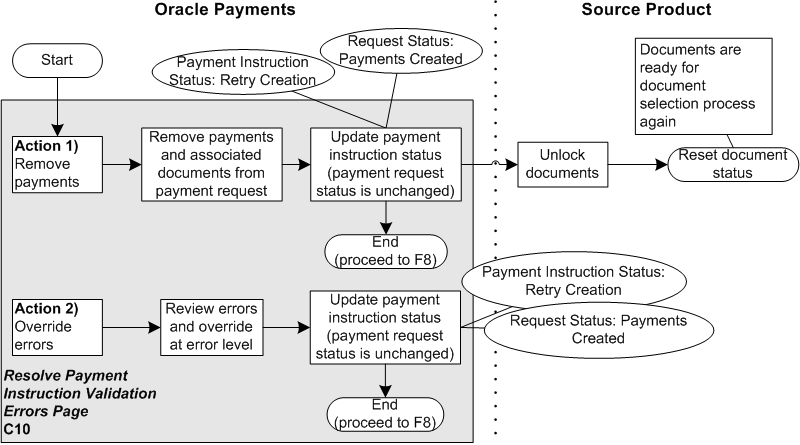
The information below describes the steps performed in the Resolve Payment Instruction Validation Errors Page Component (C10), which is within the Payment Instruction Validation Failure Handling Flow (F9).
The Resolve Payment Instruction Validation Errors Page Component (C10) is a user interface that supports review and management of payment instructions and their validation errors. From the context of a payment instruction, you can drill into detail and see the payments that make up the instruction. You can also drill down on the payments and see their constituent documents payable. The user interface enables you to take two possible actions.
The Resolve Payment Instruction Validation Errors Page Component supports the following actions:
Action 1: Remove payments
Action 2: Override errors
As in the case of the Resolve Document Validation Errors page and the Resolve Payment Validation Errors page, there is another action you can take, which is not explicitly supported by this component. You may leave the Resolve Payment Instruction Validation Errors page and update the setup of bank accounts, third party payees, payment methods, or payment formats to allow the payment instruction to pass validation. You may then return to this page, follow one of the two actions listed above, and then continue the payment process. When the payment instruction is revalidated, any setup changes you have made are taken into account. Note that you cannot change details of the documents payable or payments, such as amounts or currencies.
You can remove one or more payments. You may decide to take this action when a payment instruction exceeds a defined amount limit. Removing payments can result in lowering the payment instruction amount below the limit. When this action is taken, Oracle Payments removes the payment and associated documents from the Payment Instruction. Oracle Payments informs the source product that the documents in the payment are not being paid. The source product unlocks the documents and resets the document status. This enables the documents to be selected in a new Payment Process Request.
Next, the status of the payment instruction is updated to Retry Creation. The Create Payment Instructions program Component (C 9) looks at this status to determine whether to attempt to validate the payment instruction again.
For some errors, you can choose to override the error and force the Create Payment Instructions program Component to ignore it when the payment instruction is revalidated. Oracle Payments stores your action so that the next time the Create Payment Instructions program Component processes the payment instruction, the errors will be ignored. This action can only be performed on user-defined errors. User-defined errors are those that result from instruction-level validations that are assigned to the payment method or payment format.