Lead-times are portions of the span of time from recognizing the need for an order to receiving the goods to inventory.
This topic reviews the lead-times that Oracle Advanced Supply Chain Planning uses to plan and schedule. It also explains concurrent processes, profile options, plan options, and planning parameters that affect lead-time calculations.
Set lead-time values for the planning engine to use in the following source system forms:
Oracle Inventory > Organization items form > Item attributes > Lead-time tabbed region
Oracle Purchasing > Approved Supplier List form
The planning engine does not use subinventory lead-times from Oracle Inventory. These values are for the Oracle Inventory Min-Max planning process.
This topic describes the lead-time item attributes. You define them:
For each organization and not for the master organization
In work days from the manufacturing calendar
For more information, see Oracle Inventory User's Guide.
You can enter the following lead-time item attributes:
Preprocessing: The time required to place a purchase order or create a discrete job or schedule. This is also known as the paperwork or planning time.
Fixed: The time required to complete the tasks to make an assembly that are independent of order quantity, for example, setup, fixed run time, or teardown times.
Variable: The time required to complete the tasks to make an assembly that depend on order quantity, for example, run time. Oracle Bills of Material concurrent processes calculate this time.
Lead Time Lot Size: The typical quantity of the item that you buy, make or transfer. The default value is item attribute Standard Lot Size (set by Oracle Cost Management).
Oracle Bills of Material concurrent process Calculate Manufacturing Lead Time uses this value to compute Processing.
Processing: The time required for a supplier or your transfer from facility to deliver an item to your receiving dock or for you to manufacture an item. For make items, this is also known as manufacturing lead-time. For buy and transfer items, it includes in-transit time to your facility.
For transfer items, the planning engine only takes this lead time into account if the item is not planned at your source organization, If the item is planned at the source organization, the planning engine uses the lead times from the source organization.
Postprocessing: The time required to receive a buy or transfer item from the receiving dock to inventory.
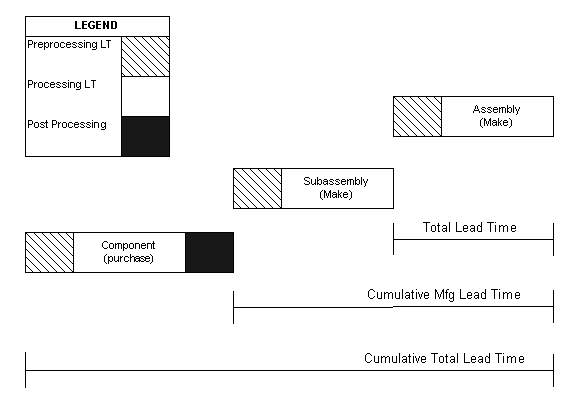
Cumulative Manufacturing: For make items, the time required to make the item if you have all of the buy items in inventory and have to make all subassemblies and the item itself.
Cumulative Total: For make items, the time required to make the item if you have to purchase all of the buy items, make all subassemblies, and make the item itself.
The lead-times define dates that are associated with planned orders and scheduled receipts for these items:
Order date: The beginning of Preprocessing the date you should begin the processing to release the order.
Start date: The end of Preprocessing and beginning of Processing; the date you, your supplier, or your ship from facility should begin work on the order.
Dock date: For buy and transfer orders, the end of Processing and the beginning of Postprocessing; the date that the material should be on your receiving dock.
For make orders, dock date is the same as due date.
Due date: For buy and transfer orders, the end of Postprocessing and for make orders, the end of Processing; the date that the material should be in your inventory.
If you run the following Oracle Bills of Material concurrent processes, they can update lead-time values that you may have manually set:
Calculate Manufacturing Lead Time
Calculate Cumulative Lead Time
Rollup Cumulative Lead Time
These concurrent processes update the following lead-time item attribute fields:
Fixed: Oracle Bills of Material concurrent process Calculate Manufacturing Lead Time calculates this time and update your manual entry for make items. It sums the values in field Usage for lot-based, scheduled resources.
Variable: Oracle Bills of Material concurrent process Calculate Manufacturing Lead Times calculates this time and update your manual entry for make items. It sums the values in field Usage for item-based, scheduled resources.
Processing: The Oracle Bills of Material lead-time concurrent process Calculate Manufacturing Lead Time calculates this time and replaces your manual entry for make items. It uses calculation Fixed + (Variable * Lead Time Lot Size); if Lead Time Lot Size does not have a value, it uses 1.
Cumulative Manufacturing: The Oracle Bills of Material lead-time concurrent processes Calculate Cumulative Lead Time and Rollup Cumulative Lead Time calculates this time and replace your manual entry. For an assembly, they take each component's cumulative lead-time and subtract its operation lead-time offset in the assembly's routing. Then, they take the manufacturing lead-time of the assembly and add the largest adjusted cumulative manufacturing lead-time of its components.
Cumulative Total: The Oracle Bills of Material lead-time concurrent processes Calculate Cumulative Lead Time and Rollup Cumulative Lead Time calculate this time and replace your manual entry. For an assembly, they take each component's cumulative lead-time and subtract its operation lead-time offset in the assembly's routing. Then, they take the manufacturing lead-time of the assembly, add the largest adjusted cumulative manufacturing lead-time of its components, and add the longest buy part lead-time of its components.
Decimal lead-time quantities denote times less then one day and are the result of the lead-time divided by 24 hours.
For more information, see Oracle Bills of Material User's Guide.
Safety lead-time is a lead-time that you add to the normal lead-time of make and buy items. You use it to instruct the planning engine to schedule supplies in advance of the demand due dates that peg to them for the purposes of:
Having an inventory buffer to protecting against fluctuations in lead-time, demand (for example, forecast error), and supply (for example, variable supplier lead times and irregular operation yields)
Providing a time buffer to recover from fluctuations by taking longer to manufacture the original units or by manufacturing more units either to handle increased demand or to replace unsuitable parts from the original supply run
Safety lead-time is sometimes referred to as protection time or safety time
You can also complete supplies earlier than the demands that peg to them using transient safety stock levels. See Safety Stock. Use safety stock lead-time instead of transient safety stock if you want to have:
Lower average inventory level: Safety lead-time creates less excess supply because it creates safety stock from supplies pegged to actual demands rather than to additional safety stock level demands
Less late-satisfied demands: There are no supplies pegged to additional safety stock level demands that compete against actual demands for manufacturing and supplier capacity
Safety stock lead-time is:
Used in constraint-based planning and is not available for unconstrained planning
A soft constraint. If hard constraints prevent moving the supply due date to honor the safety lead-time, the planning engine will not honor the safety lead-time
To set safety lead time:
Set profile option MSO: Use Safety Lead Time to Yes
For each item-organization, set item attribute Safety Stock Method to MRP Planned % then, in item attribute Safety Stock Percent, enter safety lead-time in days.
When the planning engine schedules a supply subject to safety lead-time, it:
Creates planned orders based on demands
Pegs demands to these supplies and uses them to cover transient safety stock requirements
Ignores safety lead-time in forward scheduling so as to meet demand due date
Inflates the lead-time by the safety lead-time in backward scheduling to plan for receipt to stock.
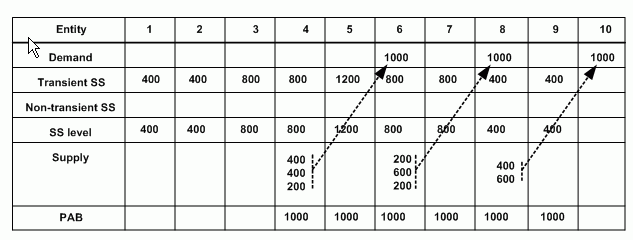
This example shows how to analyze plan information for items subject to safety lead-time:
In the diagram, SS means safety stock and PAB means projected available balance.
Profile option MSO: Use Safety Lead Time = Yes
Item attribute Safety Stock Method = MRP Planned %
Item attribute Safety Stock Bucket Days = 5
Item attribute Safety Stock Percent = 200% = 2 days
The planning engine ignored transient safety stock, pegged supplies to actual demands, and scheduled supplies two days earlier than the demand due dates of the demands that peg to them.
Planned orders on day 4 are for quantities 400, 400, and 200.
The first planned order of quantity 400 on day 4 is against the transient safety stock of quantity 400 on day 1.
The second planned order of quantity 400 is against the increase in the transient safety stock to quantity 800 on day 3.
A third planned order of quantity 400 is against the increase in the transient safety stock to quantity 1200 on day 5. The planning engine splits the planned order of quantity 400 into two planned orders of quantity 200 (according to profile option MSO: Demand Size Tolerance Before Splitting Planned Orders). The demand on day 6 pegs to one planned order of quantity 200; the demand on day 8 pegs to the other planned order of quantity 200.
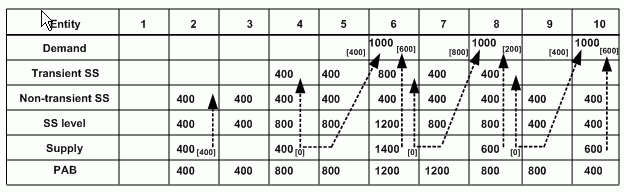
This example shows the plan information for the same demand position but using non-transient/transient safety stock planning. In the diagram, SS means safety stock and PAB means projected available balance.
If you use safety lead-time:
You might accumulate too much material too early. However, resource constraints reduce the possibility. By using safety lead-time planning, the risk of accumulation should be lower than by using non-transient/transient safety stock planning.
The planning engine might suggest that you delay lower priority demands in order to meet safety lead-time
You can also view Preprocessing, Processing, Postprocessing, Fixed, and Variable in the Collections Workbench Items window and the Planner Workbench Items window.
The planning engine does not use Cumulative Manufacturing and Cumulative Total values. You may see them in lists of values when you are entering lead-times, for example, item attribute Planning Time Fence.
Total lead-time is not an item attribute. The planning engine calculates it in unconstrained plans to determine an order's Order Date. It:
Begins with the order's Due Date
Calculates total lead-time for the order as item Fixed + (Variable * Order quantity)
Adds Preprocessing to calculate the order's Order Date
The Calculate Manufacturing Lead-time concurrent process uses the same general calculation for Processing as the planning engine uses for Total Lead-time. The Calculate Manufacturing Lead-time concurrent process uses item attribute Lead-time Lot Size to calculate item attribute Processing. The planning engine uses actual order quantity to calculate the processing time for a specific planned order or scheduled receipt.
This diagram shows the relative use of Total Lead-time, Cumulative Manufacturing, and Cumulative Total.
Calculations of Cumulative Lead-time Attributes
For all plan types, the planning engine schedules planned orders and scheduled receipts based on Demand Due Date of the demand that the supply is pegged to. It calculates these dates:
Need By Date: The earliest demand due date of all demands pegged to a supply.
Suggested Due Date: The date by which the supply is available for use by its demand. In an Unconstrained or Constrained - Enforce demand due dates plan this is the same as Need By Date. In a Constrained - Enforce capacity constraints plan this is the scheduled availability date of the supply.
Suggested Dock Date: For buy or transfer orders, the date the order arrives on your receiving dock.
Suggested Ship Date: For transfer orders, the date of departure from the source organization of the last transport used for the transfer.
Suggested Start Date: The date that you, your supplier, or your ship from facility should begin work on the order
Suggested Order Date: The date by which you need to place the order. For a scheduled receipt, this field displays the date the date that it was created.
Old Due Date, Old Dock Date, and Original Need By Date are the original dates from the source system for scheduled receipts.
You can view these dates in the Planner Workbench from among the Supply/Demand, Supply, and Demand windows.
Oracle Advanced Supply Chain Planning takes into account the actual requirement date and the lead-times for calculating the planned order demand due dates. This provides more accurate lead-time offsets in aggregate planning time buckets.
The planning engine allows you to plan at aggregate time bucket levels like periods and weeks. It provides you easy identification of aggregate supply/demand mismatches and helps you make strategic decisions related to equipment and labor acquisition, sourcing etc. without generating needless details.
The planning engine's Memory Based Planner calculates the planned order demand due dates for dependent demands based on the actual requirement date with respect to lead-time. It saves the calculated requirement date based on the lead-time value for subsequent calculation.
The planning engine aligns all dates to the ends of time buckets. You can get more accurate dates by first performing dependent demand explosion followed by alignment.
ExampleConsider an organization with an assembly A, which has components B and C.
Assembly
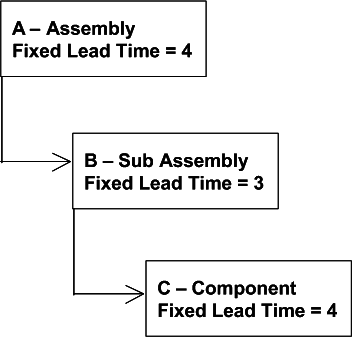
The quantity per assembly for components B and C is 1.
The lead-time for assembly A = 4
The lead-time for sub-assembly B = 3
The lead-time for component C = 4
The organization follows a weekly planning bucket and working days are Monday through Friday.
An order quantity of 1 is placed for item A on Friday February 28.
The planning engine generates the following planned order demands:
Planned Order Demand Due Date Calculation
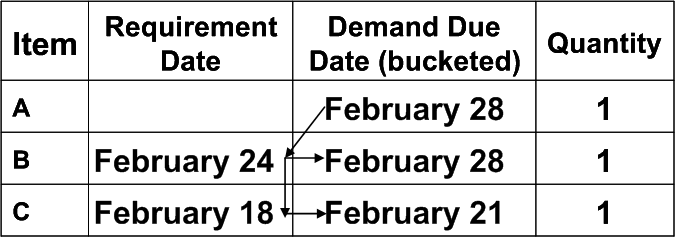
Explanation:
Calculated requirement date for B
= Demand Due Date for A - LT
= February 28 - 4 days
= February 24 (Monday)
Demand Due Date for B
= Calculated requirement date for B after bucketing into planning bucket
= February 28 (weekly demands are bucketed into Friday)
Calculated requirement date for C
= Calculated requirement for B - LT
= February 24 - 4 days
= February 18 (Monday)
Demand Due Date for C
= Calculated requirement date for C after bucketing into planning bucket
= February 21 (weekly demands are bucketed into Friday)
The planning engine uses work days from the manufacturing calendar to calculate dates for manufactured supplies, unless otherwise indicated.
Need By Date: The date that the material should ship or be in inventory for a next-higher level assembly. The earliest demand due date that the supply is pegged to.
Suggested Due Date: In an Unconstrained or Constrained - Enforce demand due dates plan this is the same as Need By Date. In a Constrained - Enforce capacity constraints plan this is the scheduled availability date of the supply. If the supply is constrained, the planning engine forward schedules from the constraint.
Suggested Dock Date: Demand Due Date. Dock Date is the day by which all shop floor operations are complete. Manufactured supplies do not have a Postprocessing lead-time.
Suggested Ship Date: Blank
Suggested Start Date: Suggested Due Date - Production duration. The day that you should begin shop floor operations.
lead-time offsetting begins only on a workday of the workday calendar. For example:
The workday calendar shows the week of 15 January as 5 workdays (Monday 15 January to Friday 19 January) followed by 2 non-workdays (Saturday 20 January to Sunday 21 January).
The planning engine creates a planned order against item A for quantity 45 with suggested ship date 20 January. Processing lead-time for item A is 5 days.
Since 20 January is a non-workday, the planning engine moves to 19 January to begin lead-time offsetting and calculates Suggested Start Date 12 January.
Sunday 21 January (non-workday)
Monday 20 January (non-workday) > Suggested Ship Date
Friday 19 January > Beginning of lead-time offsetting
Thursday 18 January > -1
Wednesday 17 January > -2
Tuesday 16 January > -3
Monday 15-January > -4
Sunday 14 January (non-workday)
Saturday 13 January (non-workday)
Friday 12 January > -5 and Suggested Start Date
Thursday 11 January
Production Duration:
Unconstrained plans: Fixed + (Variable * Order quantity)
Constrained plans: Calculated resource and material duration. If the item does not have a routing, the planning engine uses the unconstrained calculation.
Suggested Order Date: Planned order Start Date - Preprocessing. The date on which you should place the order. For a scheduled receipt, this field displays the date the date that it was created.
This diagram shows dates calculated for manufacturing supplies.
Dates Calculated for Manufacturing Supplies

The planning engine calculates the component due dates of a manufacturing supply order according to your setting of the plan option Material Scheduling Method.
For value Order Start Date, the component due date is the supply Start Date.
For value Operation Start Date:
Unconstrained plans: The planning engine determines the operation that uses the component. It begins with the supply Start Date and increases it by lead-time % of that operation.
Constrained plans: Operation Start Date for the operation which uses it
If the item of the purchased supply has an Approved Supplier List, the planning engine:
Uses its Processing Lead-time value instead of the item attribute Processing lead-time
Adjusts Dock Date to conform to its Delivery Calendar value
You can view Approved Supplier List planning attributes in the Collections Workbench and the Planner Workbench, Items window, Sources tabbed region, and select Supplier Capacity.
The planning engine uses work days from the receiving organization calendar to calculate dates for purchased supplies, unless otherwise indicated.
Need by Date: Date that the material is required to satisfy demand.
Suggested Due Date:
Unconstrained plans: Need by Date
Constrained plans: The available date of the supply by forward scheduling
Suggested Dock Date:
Unconstrained plans: Due Date - Postprocessing
Constrained plans: The latest delivery day for which the capacity is available and the material is needed
If the purchased supply item has an Approved Supplier List delivery calendar: The planning engine verifies that the Suggested Dock Date is a work day on the delivery calendar. If it is not, the planning engine changes Suggested Due Date to the next earliest working day of the delivery calendar.
Suggested Ship Date: Dock Date - Production duration
Production Duration:
If the purchased supply item has an Approved Supplier List Supplier Processing lead-time: Approved Supplier List Supplier Processing lead-time
If the purchased supply item does not have an Approved Supplier List Supplier Processing lead-time: Item attribute Processing
Suggested Start Date: Ship Date
Suggested Order Date: Start Date - Preprocessing. For a scheduled receipt, this field displays the date the date that it was created. In Collections Workbench, purchase order create date. The planning engine calculates this date using the organization manufacturing calendar.
This diagram shows the calculations for purchased supplies.
Calculated Dates for Purchased Supplies

The planning engine uses work days from the receiving organization calendar and shipping organization calendar to calculate dates for transfer supplies.
Need By Date (receiving organization calendar): Date material is required to satisfy demand.
Demand Due Date (receiving organization calendar):
Unconstrained plans: Need By Date
Constrained plans: Forward scheduling from the constraint.
Suggested Dock Date (receiving organization calendar): Due Date - Postprocessing
Suggested Ship Date (shipping organization calendar):
Unconstrained plans: Dock Date - Intransit Time
Constrained plans: Dock Date - Intransit Time, considering constrained transportation duration. The planning engine considers transportation constraint maximum transfer quantity per day
Intransit Time is calendar days.
Suggested Start Date (shipping organization calendar):
Unconstrained plans: Ship Date - Processing
Constrained plans: Ship Date. The planning engine does not consider a build time because the supply may be on-hand.
Suggested Order Date (receiving organization calendar):
Unconstrained plans: Planned order Start Date - Preprocessing
Constrained plans: Ship date in the receiving organization, if the shipping organization is a planned organization. The constrained plan uses material and resource constraints in the shipping organization.
For a scheduled receipt, this field displays the date the date that it was created.
This diagram shows calculated dates for transfer supplies in an unconstrained plan. The planning engine calculates production duration differently for the source organization and the destination organizations; therefore, the dates in your plan may not line up as accurately as they appear in this diagram. If material is scheduled inside of these lead-times, planners can determine what action to take on the compression messages.
Calculated Dates for Transfer Supplies, Unconstrained Plan
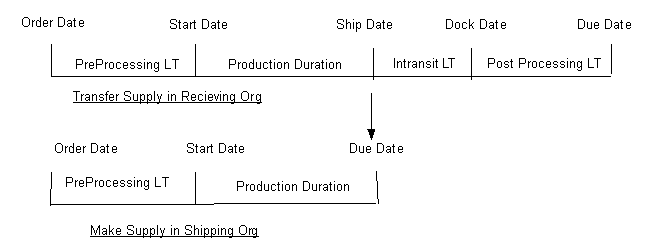
This diagram shows that, in constrained plans, Need By Date and Demand Due Date in the shipping organization should be the same as planned order Ship Date in the shipping organization.
Calculated Dates for Transfer Supplies, Constrained Plan