Organization hierarchies show reporting lines and other hierarchical relationships in your agency.
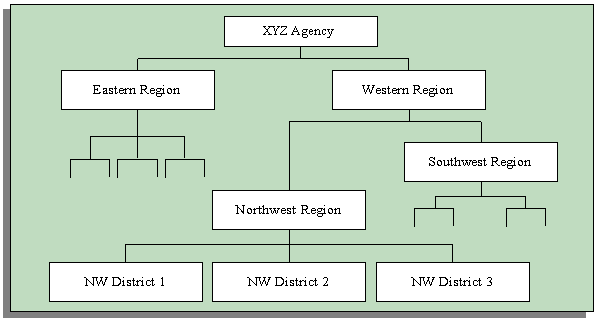
You set up a primary reporting hierarchy reflecting the main reporting lines in your agency, as established in an organization chart. Below is an example of an organization chart showing the reporting lines of a single agency.
Chart Showing Primary Reporting Lines
In addition to the primary reporting hierarchy, you can set up as many other organization hierarchies as you need.
Your organization may have a matrix management structure in which organizations have more than one reporting line. You can set up additional hierarchies to reflect secondary reporting relationships within your organization.
As well as constructing hierarchies to reflect reporting lines, you use hierarchies to control access to information. For example, in a decentralized organization you might want to give each regional manager access to the records of the employees in the organizations in his or her region.
When you run some of the standard reports, you can specify an organization hierarchy to determine which organizations and employees the report covers. You can also use this approach in your own standard or ad hoc reports. You can create additional organization hierarchies just for analysis and inquiry purposes.
Changing your hierarchies to reflect simple changes in reporting lines is easy. You create a new version of your existing hierarchy and modify parts of its structure. Oracle HRMS retains earlier versions of hierarchies for historical information.
However, when you experience a major restructuring, it is often best to create new work structures, including new organizations and reporting lines.
Suggestion: You can create future-dated versions of your organization structures and use these to prepare for reorganization in advance. You retain previous versions of your hierarchies for historical information.
If you want to read more information about dated information and hierarchy versions, see Managing Change Over Time
Global organization hierarchies enable you to work on organizations in multiple business groups and provide standard functionality for global reporting. In a multinational enterprise with organizations in multiple business groups, for example, global hierarchies enable you to set up a single global reporting hierarchy for management or approvals. In other words, you maintain only one hierarchy instead of several.
A global hierarchy can contain organizations from any business group on your database. By associating a global organization hierarchy with a global security profile you can create a security hierarchy that gives users access to organizations across business groups.
For more information about security profiles, see Security Profiles
If you use the Oracle HRMS forms interface, then you cannot access data across business groups using one responsibility, even if you associate a global security profile to your responsibility. Your access is limited to organizations in the business group defined in the HR:Business Group profile option.