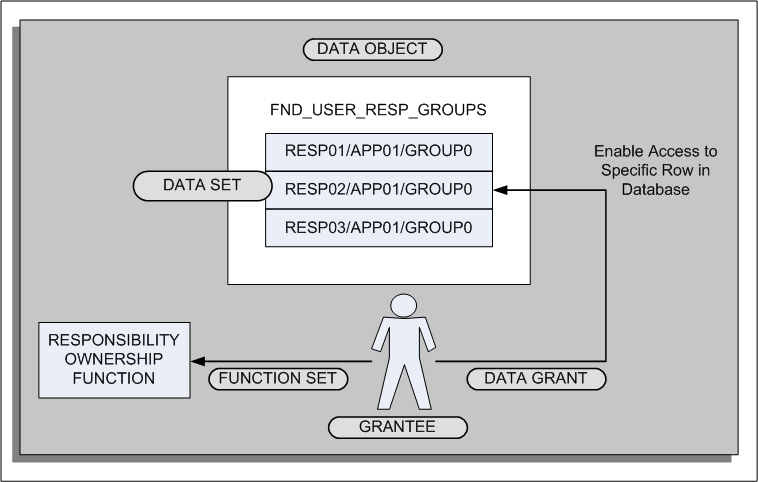
Data grants enable you to control access to data in the data security system. When you create a data grant, you grant access to a database object to a user. In the case of the Responsibility Ownership function, you use data grants to grant responsibility ownership to a user. The following graphic illustrates the concept of data grants:
Data Grants for Responsibility Ownership:
The data grant links the user (grantee) to a specific data set instance (row in the data object). In addition, you link a function set to the user which enables the user to access particular functionality (in this case, the Responsibility Ownership functionality).
For information on using data grants for other purposes, see: Overview of Data Security (Oracle Applications System Administrator's Guide).
 To create a data grant for the Responsibility Ownership:
First identify which users should be granted ownership of responsibilities. These users would have an administrative role, for example, an HR Manager, Finance Manager, or System Administrator.
Use the Functional Administrator responsibility to create grants.
Select the Grants tab.
From the Grants page, click Create Grant to initiate the creation process and define the data grant.
In the Name field, enter a descriptive name for the grant, for example, <responsibility name>-Ownership. You can also enter a description.
Specify the effective date for the grant.
Navigate to the Security Context region to define the context for applying the grant.
In the Grantee Type field, select Specific User.
In the Grantee field, enter the user ID of the person who you are designating as the owner of the responsibility.
Navigate to the Data Security region.
In the Object field, enter the following delivered object:
FND_USER_RESP_GROUPS
Note: Oracle provides this object for use with the Responsibility Ownership functionality.
For the purpose of the Responsibility Ownership function, you must create a data set that grants access to a specific instance in the object table. Select this option (Instance) and continue to the next page to enter the instance information.
The data set instance comprises three segments of information. Enter the information, leaving the remaining fields blank:
| Primary Key | Example |
|---|---|
| Responsibility ID | 50101 |
| Application ID | 800 |
| Security Group ID | 0 |
Note: To determine the information for the data set, query the user in the Users window and select Help > Diagnostics > Examine from the Responsibilities block. Query the following fields in the Examine Field and Variable Values window:
RESPONSIBILITY_ID
RESPONSIBILITY_APPLICATION_ID
SECURITY_GROUP_ID
In the Set field, enter the delivered set PRIMARY_OWNER.
Note: Oracle provides this function set for use with the Responsibility Ownership functionality.
In this case, a function set is a data security menu containing the Responsibility Ownership function.
Click Finish to complete the data grant creation process. The desginated owners can now log on to SSHR and use the Responsibility Ownership function to administer and control access to their responsibilities.
You should repeat steps 1 through 11 for each responsibility that you want to review and maintain.