When you create an objective in the Objectives Library, you can specify who will receive the objective automatically by associating the objective with an eligibility profile. To create the eligibility profile, you use the Eligibility Profiles function.
When you publish a Performance Management Plan (PMP), members of the plan population automatically receive the objective in their personal scorecards if:
They satisfy the objective's eligibility requirements.
The objective's validity dates are the same as or wholly within the PMP dates.
In some circumstances, Performance Management can allocate objectives to eligible workers after you first publish a plan. That is, if you define an objective with eligibility criteria and the objective's dates are the same as or wholly within those of a published, ongoing plan, the application assesses the eligibility of the plan population for the new objective and automatically adds it to the personal scorecards of eligible workers if you republish the plan.
If you have access to the Objectives Library function, you can:
View all objectives in the Objectives Library.
Use any existing eligibility profile, regardless of business group, in an objective definition in the Objectives Library.
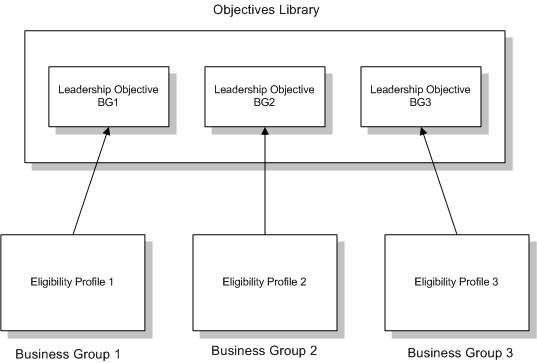
As eligibility profiles are business-group specific, an eligibility profile you define in one business group is unavailable for use in other enterprise business groups. Therefore, when you associate an objective with an eligibility profile, you effectively restrict automatic allocation of that objective to a single business group.
To allocate an objective automatically to workers in multiple business groups, you create a version of the objective for each business group by duplicating the objective in the Objectives Library. In each version of the objective, identify an appropriate eligibility profile. Remember also to ensure that each combination of objective name and validity dates is unique in the Objectives Library. As you can see all objectives in the Objectives Library and all enterprise eligibility profiles, you can perform this task without switching responsibilities.
The following figure shows the relationship between business-group-specific eligibility profiles and objectives in the Objectives Library.
Automatic allocation results for this objective appear in the following table:
The objective name is Attend Retail Management Seminar Level 3.
The objective validity dates are 01/01/2007 to 12/31/2007.
Workers whose job title is department manager are eligible for this objective.
| Employee | Job | PMP | Plan Start | Plan End | Receives Objective? |
|---|---|---|---|---|---|
| A | Department Manager | Performance Plan 2007 | 01/01/2007 | 12/31/2007 | Yes |
| B | Supervisor | Performance Plan 2007 | 01/01/2007 | 12/31/2007 | No |
| C | Department Manager | Objectives Plan 2006 - 2008 | 09/01/2006 | 03/31/2008 | Yes |
| D | Department Manager | Objectives Plan 2006 - 2007 | 06/01/2006 | 05/31/2007 | No |
Employee A receives this objective automatically because he is a department manager and the objective's validity dates are the same as those of the PMP to which he belongs.
Employee B does not receive this objective because, even though she belongs to the same PMP as Employee A, she is not a department manager and therefore fails to meet the eligibility criteria.
Employee C receives this objective automatically because he is a department manager and the objective's validity dates are wholly within those of the PMP to which he belongs.
Employee D does not receive this objective because, although she is a department manager, the objective's validity dates are outside those of the PMP to which she belongs.