When you define your SSHR functions, you can decide whether they require approval before they are submitted to the HR tables. You can define different approval requirements for different transactions and vary the approval requirements as required. For example, you can configure the workflow processes so that the Address part of Personal Information requires approval but the Phone Numbers part does not. Alternatively, you can vary the Approvals requirements by responsibility so that records changed by employees would need approval but records changed by managers would not.
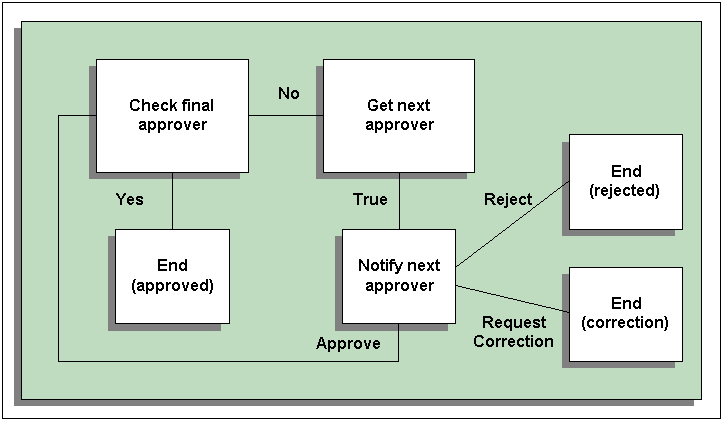
All approvals mechanisms used in SSHR follow a basic approval loop. The logic checks whether the current approver is the final approver in the hierarchy. If the current approver is not the final approver, the application fetches the next approver who then receives the approval notification. The next approver can either reject the transaction, approve the transaction, reassign the transaction, or send the transaction for correction to anyone in the approvals chain. The approver may also be able to update the transaction, depending on the system configuration.
The Basic Approvals Loop
Within the approvals process, the application uses rules to generate a list of approvers for the SSHR transaction. The way in which the list is generated depends on the approvals mechanism you are using (see Approvals in SSHR).
The application uses dynamic approvals by default. The dynamic approvals functionality comprises:
A self-service user interface which enables the initiating manager to add additional approvers an notification recipients, display the approvers list, and limit the number of approval levels.
An application which generates the default approvers. The standard tool is Oracle Approvals Management (AME). Alternatively, you can use the customizable PL/SQL packages.
The dynamic approval workflow processes send notifications to approvers and notification recipients identified in the approver list.