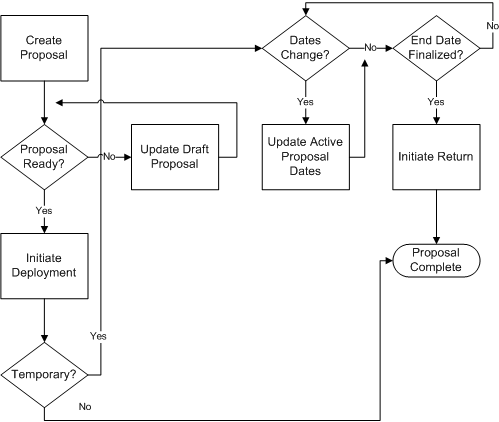
The changes that you can make to a deployment proposal depend on the proposal status. When you initiate a deployment proposal, its status changes from Draft to:
Active, if the deployment is temporary
Complete, if the deployment is permanent
When you initiate a return from secondment, the proposal status changes from Active to Complete.
The following figure shows the stages of a deployment proposal and indicates where updates are possible. The remainder of this topic discusses the changes that you can make at each stage.
Stages of a Deployment Proposal
While the deployment proposal is in Draft status, you can update it as often as necessary. You can update any part of the proposal except:
The name of the employee to be deployed
The deployment type
The name of the destination business group, which sets the context for all other information in the proposal
Once a deployment proposal for a secondment is Active, you can change its start and end dates. If you change the start date of a secondment, HRMS updates:
All date fields containing the deployment start date in the destination business group
The date of the assignment-status change in the source business group
Note: If the new start date is in the past, and you have made other changes to the employee records since then, DateTrack rules may prevent HRMS from updating these dates.
If you change the end date of a secondment, HRMS updates:
The Projected Assignment End Date in the destination business group
This change is effective on the date that you make the change.
The Projected Termination Date of the period of service in the destination business group
The employee record in the source business group is unaffected by a change to the deployment end date.
You cannot update a deployment proposal that has a status of Complete. To change the dates of a permanent transfer, you must:
In the source business group, manually reverse the employment termination and terminate the employment again on the revised date.
In the destination business group, change the employee's start date.
You can delete Draft and Complete deployment proposals, but you cannot delete an Active deployment proposal.
Note: When you initiate a permanent transfer, HRMS terminates the employee's record in the source business group. The employee's manager in the destination business group can view this terminated record using the SSHR My Employee Information function only if the deployment proposal is available. Therefore, although you can delete proposals for completed deployments, Oracle recommends that you do not delete those for permanent transfers.