You can update a published Performance Management Plan (PMP) and republish it to disseminate relevant changes to plan members. For example, if you update a published plan to include objective setting, the application generates personal scorecards and objectives-related tasks when you republish the plan. However, some restrictions apply to the changes that you can make.
On the Update Plan: General Information page, you can change the plan end date.
On the Update Plan: Process page, you can:
Select, but not deselect, any of the following options:
Include Objective Setting in Process
Sharing and Alignment (if Include Objective Setting in Process is also selected)
Include Appraisals in Process
Allow Changes Outside This Period
Automatic Allocation
Notify Plan Population
Change the objective-setting start date, provided that neither the current date nor the new date is in the past.
Change the objective-setting deadline date, provided that the new date is before the task-start date of the next appraisal.
Change Appraisal Task start date when objective setting deadline is extended.
Attention: If the Mass Appraisal Creation program is scheduled to run automatically, then ensure that you cancel the program when you make this change and republish the plan.
The Mass Appraisal Creation program includes the Delete Pending Transactions parameter with a default value of No. When you publish a plan, the program, if scheduled to run automatically uses the default value. You can set the value to Yes, if you want to delete pending transactions for any scorecards, and proceed with the appraisal creation.
Extend the Appraisal task end date beyond the PMP end date. By default, the appraisal task is disabled after the PMP end date. Enterprises may have certain business requirements, such as, enabling workers who go on long leave to update appraisals after the PMP end date. To meet such requirements, you can enter an appraisal task end date, which is later than the PMP end date. When you republish the PMP, the application enables the Appraisal task icon on the Performance Management home pages of appraisal participants.
Add, update, or delete an appraisal until the plan start date, if Create Appraisals is set to Yes (indicating that the application is scheduling appraisal creation). If Create Appraisals is set to No, then you can add or delete an appraisal provided that you have not already run the Mass Appraisal Creation program for that appraisal task. After the plan start date you can only update the Task End Date of the appraisal, regardless of the appraisal period and tasks dates.
Change the Period Start Date, Period End Date, Task Start Date, Create Appraisals, and Days Before Tasks Start, if the Include Objective Setting in Process check box is selected, and if you want to extend the objective-setting deadline date.
On the Update Plan: General Information page, you can update the flexfield and any attachments. If the Publish to Catalog feature is available when you update any attachments, exercise caution while using this feature. For more information, see: Publish to Catalog
You cannot update the Create Plan: Population page in a published plan.
When you republish the plan, the application can include additional objectives in personal scorecards for which workers have become eligible since you last published the plan.
See: Updating Objectives
When you change the objective-setting deadline date in a published PMP, the application needs to determine whether you are simply extending the current deadline or specifying a new objective-setting period.
If your new objective-setting deadline is before the first appraisal-task period following the previous objective-setting deadline, the application assumes that you are extending the current objective-setting period. In this case:
If you do not select Reset Scorecard Statuses, then the new objective-setting deadline applies only to plan members who have not yet completed the objective-setting task; the application makes no changes to scorecard statuses.
If you select Reset Scorecard Statuses, then the application resets the status of all personal scorecards to either With Worker or With Manager when you republish the plan so that all plan members can set objectives during the extended objective-setting period.
If your new objective-setting deadline is after the first appraisal task period following the previous objective-setting deadline (and that appraisal task is complete), the application assumes you are specifying a new objective-setting period for a subsequent appraisal task. In this case, the application automatically selects Reset Scorecard Statuses and resets the status of all personal scorecards to With Worker or With Manager when you republish the plan. Workers can then set objectives for the next appraisal task.
Note: You cannot change the objective-setting deadline to a date that is after a future appraisal task.
For example, assume your published PMP is as follows:
| Activity | Date |
|---|---|
| Objective-Setting Start Date | 01 January 2007 |
| Objective-Setting Deadline | 31 January 2007 |
| Midyear Appraisal Task Start Date | 15 June 2007 |
| Midyear Appraisal Task End Date | 30 June 2007 |
| Full-Year Appraisal Task Start Date | 15 December 2007 |
| Full-Year Appraisal Task End Date | 31 December 2007 |
If you change the objective-setting deadline on 7th February, 2007 to 31 March, 2007, then, as the new deadline is still before the midyear appraisal (15 June through 30 June), Performance Management assumes you are extending the objective-setting period for the midyear appraisal. If you also select Reset Scorecard Statuses, the application extends the objective-setting period for all plan members when you republish the plan. Otherwise, the new deadline applies only to workers who have not yet completed setting their objectives.
If you change the objective-setting deadline on 2 July, 2007 to 31 July, 2007, then, as the new deadline is after the completed midyear appraisal, Performance Management assumes you are specifying a new objective-setting period for the next appraisal in this plan (the full-year appraisal). The application automatically resets scorecard statuses to With Worker or With Manager when you republish the plan so that all workers can set objectives for the next appraisal task.
As an HR Professional or a plan administrator, when you update and republish a plan, you can select a specific republish option, a combination of options, or all of the republish options. The Republish Options are available in the Update Plan: Review page.
See: Using the Performance Management Plan Republishing Options
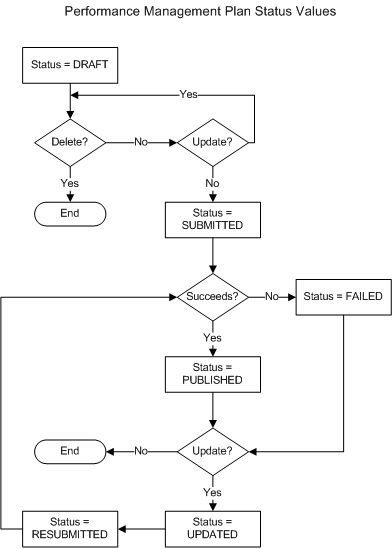
The following figure summarizes the Performance Management Plan's status values:
When you create a PMP, its status is Draft. You can update a plan in draft status as often as necessary. You can also delete a draft plan.
When you first publish a draft plan, its status changes immediately to Submitted. A concurrent program performs the publication process, and the plan status remains Submitted until the program completes.
When the publication process completes successfully, the plan status changes to Published. At this point, the plan takes effect. You cannot delete a published plan.
When the publication process is unsuccessful, the plan status is Failed. After updating the plan to correct any errors, you can submit it for publication again. However, you cannot delete a plan in Failed status.
If you update a published or failed plan, its status changes to Updated. The status remains Updated until you publish the plan again.
When you publish an updated plan, its status changes to Resubmitted. When the republication process completes, the plan status changes to Published.
When the plan administrator republishes a performance management plan, the application does not delete appraisals and scorecards of workers if they are no longer part of the published plan population, for example, because of termination or transfer to another plan. The application changes the status of these appraisals and scorecards to Transferred from Plan. This status is displayed for all scorecards and appraisals of workers who are either terminated or transferred from the published plans. You can view the scorecards and appraisals with the Transferred from Plan status on the Monitor Plan page using the HR Professional or HRMS Manager responsibilities. You cannot view or access the scorecards or appraisals with Transferred from Plan status using Employee or Manager Self-Service responsibilities.
Note: The plan administrator can reevaluate plan population and republish a plan at a future date. In such a scenario, a worker whose appraisal or scorecard status is set to Transferred from Plan may be found eligible to become part of plan population again. If the application finds that the worker is eligible to become part of the plan population again, then appraisals and scorecards with the Transferred from Plan status are reopened so that the previously worked details are available to view and update using the Employee Self-Service or Manager Self-Service responsibilities.