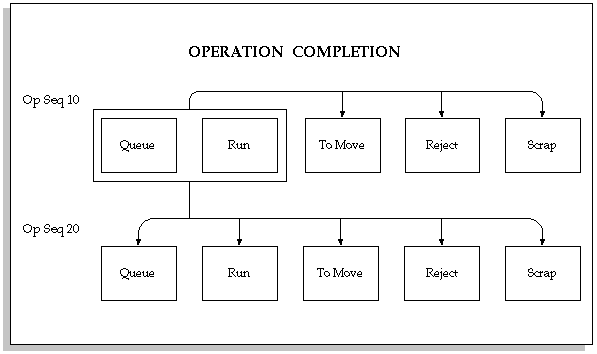
You can complete assemblies at operations by:
Moving assemblies from the Queue or Run intraoperation step of an operation to the To Move, Scrap or Reject intraoperation steps of the same operation
Moving assemblies from the Queue or Run intraoperation steps of an operation to the To Move, Scrap or Reject intraoperation steps of a subsequent operation
Assemblies are not completed at Operations by:
Moving assemblies between the To Move, Scrap, and Reject intraoperation steps of the same operation
Moving assemblies from the To Move, Scrap, or Reject intraoperation steps of the one operation to the Queue or Run intraoperation step of a subsequent operation
You can complete any number of assemblies from any operation in a routing. For example if you have 49 assemblies at operation 10, and 51 at operation 20 you can complete the assemblies at operation 10 before completing those at operation 20 and vice versa. You also can over-complete assemblies
You also can over-complete assembly quantities if they are within the defined tolerance limit, if you have selected the Overcompletion check box on the Move Transaction window, which enables this functionality. See: Assembly Over-completions.
If there are WIP Move resources at an operation that is being completed, the system automatically charges these resources at their standard rate. If there are Operation Pull components at this operation, these components are automatically pulled from inventory. If there are Manual resources at the operation that is being completed, the system notifies you that Manual resources exist at the operation so that you can manually charge them. If you perform a move transaction that reverses an operation completion, the system automatically reverses any associated material and resource charges. See: Resource Charge Types.
