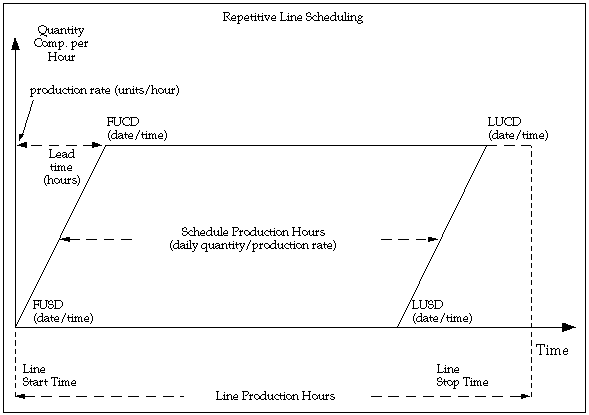
Repetitive line scheduling is used to schedule repetitive production. When you define repetitive schedules you must specify the line on which you plan to produce the repetitive assembly and the quantity you plan to build. Then, repetitive line scheduling uses the line start and stop times, production rate, and lead time, along with the workday calendar to schedule your repetitive schedules.
When you define lines you must specify the start and stop times of the line. You must also specify the minimum and maximum hourly rate on the line.
The repetitive line scheduling method uses line start and stop times to calculate how long the line runs each day. For example, if you run the line from 8:00 am to 5:00 pm, you would enter a start time of 08:00 and a stop time of 17:00. The repetitive line scheduling method does not use the shift calendar dates and times you defined in Oracle Bills of Material. The repetitive line scheduling method does use the days on and days off from the workday calendar.
When you associate a line and assembly you must set the hourly production rate. In other words, you define the hourly production run rate used to schedule that assembly on that line. For line/assembly associations with a fixed lead time rate line, all assemblies should use the same production rate. For variable rate lines, you need to specify different rates for each assembly. The production rate cannot be greater than the maximum rate on the line.
Daily Quantity
The daily quantity is the number of completed assemblies you plan to produce on the schedule each day. The daily quantity can only be a positive number including decimals, such as 1.25. A warning message displays if you define a daily quantity for a schedule that is greater than the line's maximum hourly rate times the production hours.
You can choose a daily quantity that is less than or equal to the daily line capacity:
production rate X (line stop time - line start time)
In that case, you build the entire daily quantity for that schedule in less than a full day. For example, if the production rate is 100 per hour for 10 hours and the daily quantity for a schedule is 500 per day, you can build the 500 in half a day. The remaining line capacity of 500 is then free for other production.
First Unit/Last Unit Start and First Unit/Last Unit Completion Dates
The first unit start date (FUSD) is the date and time you plan to begin production on the first assembly on a repetitive schedule. You can enter a start date and time earlier than the current date to maintain relative priorities.
The LUSD (last unit start date) is the date and time you plan to begin production of the last assembly on a repetitive schedule.
The FUCD (first unit completion date) is the date and time you plan to complete production of the first assembly on a repetitive schedule. This date equals the FUSD plus the lead time.
The LUCD (last unit completion date) is the date and time you plan to complete production of the last assembly on a repetitive schedule.
Lead Times
For lines with a lead time basis of Fixed, you must enter a fixed lead time for the line. For lines with a lead time basis of Routing-based, the lead time is calculated by applying the detailed scheduling algorithm to the routing of the assembly. The lead time for a repetitive schedule is the amount of time it takes to complete the first unit.
Over-schedule Line By Daily Quantity
You can temporarily over-schedule a production line to simulate overtime or a production rate increase. You can choose a daily quantity greater than the daily line capacity. For example, if the production rate is 100 units per hour for 10 hours, the daily line capacity is 1000 units. You can define a schedule for 1200 units, thereby over-scheduling the line. The system warns you that you are over-scheduling the line and interprets this over-schedule as an increase in the production rate, not a change in start and stop times. In this example, the system would assume a production rate of 120 units per hour for 10 hours to get 1200 units per day.
Processing Days
Processing days are the number of days you plan to work on the repetitive schedule. Processing days can be any positive number including decimal (partial) days. A full processing day for the schedule on a line may not require the entire capacity of the line if the daily quantity is less than the daily line capacity. For example, a full processing day on a schedule at a daily quantity of 500 on a line with a production rate of 100 per hour and 10 available hours can be built with a half day of line capacity.
The total quantity is the number of completed assemblies you plan to produce on the repetitive schedule. The total quantity equals the daily quantity multiplied by the processing days. The total quantity can only be a positive number including decimal quantities.
When you manually define a repetitive schedule, you can enter either the daily quantity or the total quantity. You can enter both if you choose. If you enter either quantity and processing days information, the system automatically calculates the other quantity for you.
Repetitive Schedule Quantities
You define the daily production quantity, processing days, and total production quantity when you manually define a schedule.
Repetitive Schedule Dates and Days
You enter dates First Unit/Last Unit Start and First Unit/Last Unit Completion Dates and times, and processing days when you manually define a repetitive schedule.
For repetitive schedules with routings, if you enter FUSD or FUCD and times, the system uses forward scheduling to calculate the other dates. If you enter FUCD or LUCD and time, the system uses backward scheduling to calculate the other dates. If you do not have a routing for an assembly on a line with a lead time basis of Routing based, you must manually schedule the lead time. In other words, if you enter the FUSD and time, you must enter the FUCD and time to set the lead time for the schedule.
If you do not have a routing for an assembly on a line with a lead time basis of Routing based, you must manually schedule the lead time. In other words, if you enter the FUSD and time, you must enter the FUCD and time to set the lead time for the schedule.
You can also forward or backward schedule a schedule if its assembly has either a fixed or variable lead time or both. If the assembly has both a fixed and variable lead time, the lead time for the repetitive schedule is calculated as follows:
(job or schedule quantity x variable lead time) + fixed lead time
The following diagram illustrates repetitive schedule dates.
You cannot overlap repetitive schedules for the same assembly on the same line. In other words, you cannot have the FUSD of one schedule fall between the FUSD and LUSD of a prior schedule. For example, if the LUSD on the prior schedule is 24-MAY at 12:00, then the FUSD of the next schedule for that assembly on that line must be at least 24-MAY at 12:01.
If you do not have a routing for an assembly on a line with a lead time basis of Routing based, you must manually schedule the lead time. In other words, if you enter the FUSD and time, you must enter the FUCD and time to set the lead time for the schedule.
If you build multiple repetitive assemblies on a single production line, you can sequence production to maximize efficiency and customer service. You can then query all schedules defined for an assembly on the line and check the sequencing based on the schedule dates. You can then reschedule the schedules.
To further assist you with sequencing, the system provides several additional features. For example, you can define all schedules for an assembly on a single line.
Furthermore, because the system uses both dates and times to schedule repetitive production, you can decide the proper scheduling sequence then schedule production to the minute to match your sequence.
Lastly, you can use the Open Job and Schedule Interface to import sequence optimized repetitive planning suggestions. For example, if you have an automated sequencing program, you can insert output records from this program into the Open Job and Schedule Interface table. These records can then be imported into Work in Process.
