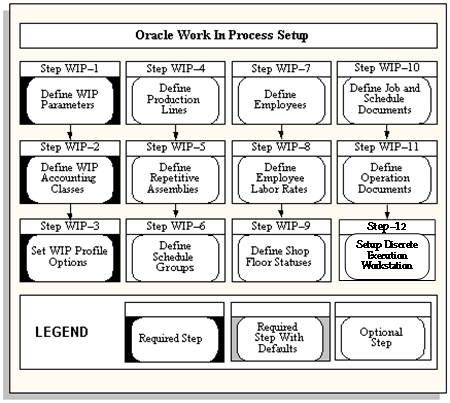
The following flowchart diagrams the steps that you need to perform to set up work in Process. Some of the steps outlined in this flowchart and in the setup checklist are Required and some are Optional. "Required Step with Defaults" refers to setup functionality that comes with pre-seeded, default values. You should review the defaults and decide whether or not to change them to suit your business needs. If you change the defaults, you should perform the setup step. You need to perform Optional steps only if you plan to use the related feature or complete certain business functions.
The following table lists setup steps and a reference to their location within Oracle Applications. After you log on to Oracle Applications, complete the required steps to implement Work in Process:
| Step | Description | Discrete | Repetitive | Projects | Reference |
|---|---|---|---|---|---|
| 1 | Define Work in Process Parameters | Required | Required | Required | Oracle Work in Process |
| 2 | Define Work in Process Accounting Classes | Required | Required | Required | Oracle Work in Process |
| 3 | Set Work in Process Profile Options | Required | Required | Required | Oracle Work in Process |
| 4 | Define Production Lines | Optional | Required | Optional | Oracle Work in Process |
| 5 | Define Repetitive Assemblies | N/A | Required | N/A | Oracle Work in Process |
| 6 | Define Schedule Groups | Optional | N/A | Optional | Oracle Work in Process |
| 7 | Define Employees (optional if using resources) | Optional | Optional | Optional | Oracle Work in Process |
| 8 | Define Labor Rates (optional if using resources) | Optional | Optional | Optional | Oracle Work in Process |
| 9 | Define Shop Floor Statuses (optional if using resources) | Optional | Optional | Optional | Oracle Work in Process |
| 10 | Define Job and Schedule Documents | Optional | Optional | Optional | Oracle Work in Process |
| 11 | Define Operation Documents | Optional | Optional | Optional | Oracle Work in Process |
| 12 | Setup Discrete Execution Workstation | Optional | Optional | Optional | Oracle Work in Process |