Pick methodologies refer to the different ways in which you might select to perform picking tasks. For example, you might select to pick an order by itself, or to pick multiple orders at the same time. The type of picking methodology that a warehouse uses depends on the kinds of operations that they run. For example may opt to use cluster picking in order to pick multiple orders in one pass.
Oracle Warehouse Management supports the following pick methodologies:
Discrete picking: The system dispatches discrete groups of tasks, grouped by pick slip grouping rules.
Order picking: The system assigns picks for one order or job/schedule at a time to a user. Thus, when a user accepts a task for the first line of a job/schedule or sales order, all other picking tasks associated with that job/schedule or order are automatically assigned to the user as well, regardless of the task type or subinventory.
Wave picking: The system dispatches tasks line by line, regardless of the subinventories where those tasks are picked from, or to whom other lines on the order have been dispatched.
Pick and pass/label picking: LPNs are generated by the system during cartonization and the labels are printed prior to picking. To pick, the user scans the LPN and is dispatched the picking task associated with that LPN. The user can then "pass" the LPN to the next user or continue picking all material for the LPN and will not be prompted to drop the LPN in the staging lane, until all the lines have been picked.
Note: If you select order picking as the pick release methodology, and specify an order picking rule type at pick release, the system bypasses all bulk picking checks at the subinventory and the item and does not bulk pick any material as part of that pick release.
Bulk picking: The system groups tasks to pick the same items that are sourced from the same locator so you only see one task that might represent picks for several order lines. Deconsolidation of order lines occur at pick drop. Oracle Warehouse Management automatically splits bulk tasks based on equipment constraints during the pick release process. You can choose to bulk pick items at pick release via the pick slip grouping rules, or choose to use the concurrent program to bulk pick across pick waves after pick release. You can also bulk pick within a delivery or across deliveries. The following bulk pick exceptions apply:
The system does not allow bulk picking for cartonized items
The bulk picked item must be the same revision.
Case picking: The case labels printed at order release can be assigned to pick operators. The operator can perform case picks and either perform Pick to Belt or Pick to Pallet by scanning multiple case labels. This enables warehouse workers to simply scan a case already packed with items and move it directly onto a pallet or belt.
To streamline the data entry process, Oracle Warehouse Management will create a single task if multiple cases from a single location need to be picked to fulfill an order.
Paper-based picking: Users pick according to a paper pick slip that is printed at pick release. This enables a user to dispatch tasks to themselves when working in a paper-assisted environment.
Cluster picking: A specified number of clusters is dispatched to a single user at once. A cluster is defined as all the tasks related to a sales order delivery, or a manufacturing job or schedule. The number of clusters can be set for the organization, or controlled by each user individually. Cluster picking offers significant levels of optimization by enabling a user to pick multiple orders at a time by interleaving the pick tasks for various orders and sequencing them in ascending locator/optimal travel sequence. This enables the user to pick orders in its entirety before proceeding to pick more orders.
Cluster picking by labels: Enables you to pick directly into shipping cartons by picking into cartonized LPNs. The pick labels are generated at order release, and are manually assigned to pick operators. A cartonized LPN is also generated for each pick slip grouping (for example, by order, delivery, zone). The operator scans the LPN barcode in each assigned label and the tasks for the cartonized LPN are displayed just like the regular cluster pick.
Zone Picking: Zone picking enables you to utilize all of the picking methodologies but restricts to a specific subinventory. You designate the subinventory before you begin your picking tasks.
User-defined pick grouping: See: Defining Pick Slip Grouping Rules.
Note: Multiple device sign-on is only allowed for discrete and wave picking.
For more information on specifying the maximum number of clusters, see Warehouse Organization Setup.
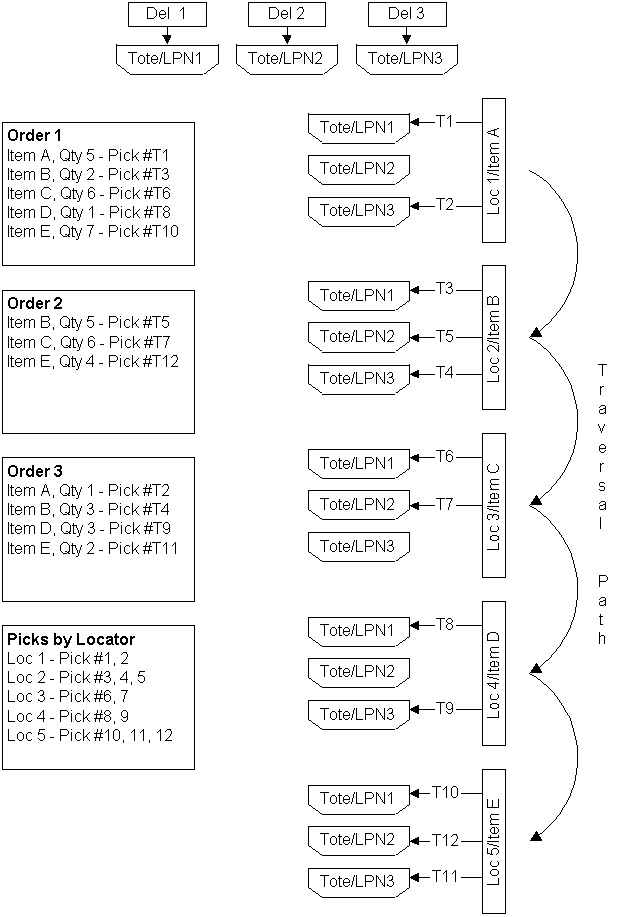
Example of Cluster PickingThe following figure shows an example of cluster picking. There are three sales orders SO 1, SO 2, and SO 3 for items A,B,C,D, and E. All three sales orders are to be delivered against different deliveries: Del 1, Del 2, and Del 3.
Individual deliveries needs to be shipped against individual LPNs. Delivery 1 needs to be dispatched against Tote/LPN 1. Delivery 2 needs to be dispatched against Tote/LPN 2. Delivery 3 needs to be dispatched against Tote/LPN 3.
Oracle Warehouse Management will generate 5 tasks for SO 1, 3 tasks for SO 2, and 4 tasks for SO 3.
Tasks are sequenced as shown in the figure based on the minimal traverse path to collect material for SO 1, SO 2, and SO 3 from locations 1,2,3,4,5.
Pick Item A against SO 1: Task T1, Del 1, Tote/LPN1
Pick Item A against SO 3: Task T2, Del 3, Tote/LPN3
Pick Item B against SO 1: Task T3, Del 1, Tote/LPN1