Bulk picking will reduce the number of times goods are processed and returned to a user. After pick release occurs for both outbound sales orders and internal orders, or for manufacturing component picks, Oracle Warehouse Management consolidates tasks of similar characteristics into a single bulk task. This process can be initiated either at the time of pick release, or through a concurrent program separate from the pick release process.
An advantage to bulk picking is that a typical warehouse operation will benefit from a reduced replenishment effort once bulk picking is employed. Replenishment is the process by which material from a packed or overstock bulk location refills the forward or fast picking area for high velocity items.
Bulk picking only works effectively if the same item is picked repeatedly from the forward pick location causing frequent replenishments. You must perform analysis to determine how many times each item is picked from the forward stock location and the size of those picks per pick release batch. If in a single pick release the same item is ordered over 100 times, and the size of the entire forward pick face only holds 20 items, then bulk picking the item eliminates 5 replenishment transactions and numerous picks transactions depending on the quantity ordered per order or job.
If picking requires device integration, such as a carousel or ASRS, then the actual movement of the device is far more costly than the cost of deconsolidation. Bulk picking is an effective pick methodology to prevent the device performing the same operation repeatedly. For example, imagine that 101 customers each order 1 of the same item, and that the carousel takes approximately 30 seconds to arrive at a particular location. Then by bulk picking the entire 100 quantity at once, the picker has eliminated 100*0.5min = 50 minutes of unusable carousel travel time - time in which the worker cannot perform other tasks. While deconsolidating the bulk pick would require extra time, another person who is not dependent on the movement of the carousel can perform the deconsolidation.
If the warehouse is very large, and requires pickers to travel long distances to take material from the forward pick locations to the outbound staging or manufacturing staging locations, then it is important to evaluate whether or not the deconsolidation of material can be delayed as late as possible in the movement flow. The advantage is that employees need not traverse the same lengthy path through the warehouse over and over when transporting the same item.
If a particular business has value added services, such as repackaging or kitting, it makes sense to bring a large bulk quantity of material to the value added service work stations so each station does not have to travel far to pick the item. This way, the deconsolidation is done automatically and left to the packager or kitting employee.
The bulk picking grouping criteria defines which tasks are candidates for bulking together. The following are hard rules of when bulking can occur. Anything outside this is not a candidate for bulk picking.
Same source subinventory
Same source locator
Same item
Same revision
All of the four above criteria must be satisfied in order for a particular task to be part of a bulk pick task. Thus if two different items need to be picked, the two corresponding tasks cannot be bulked together. Furthermore, any task that does not satisfy the following restrictions list is immediately excluded as a bulk picking candidate.
Item is not cartonized
Allocated tasks have the same operation plan
An LPN is not allocated for the pick
Once a task has satisfied the above criteria, the task is ready to be grouped with other tasks.
The Pick Slip Grouping Rules window enables a warehouse to setup bulk picking. The entire organization can have only a single bulk picking setup rule, and this rule is the default that is used throughout the warehouse. On the setup window, there are three values that the bulk picking setup can take: Bulk entire wave, Honor item/sub, and Disable bulk picking. For a given pick slip grouping rule, bulk picking can take on one of the three values above. If at time of pick release, you select Bulk entire wave, every line in a pick wave is a candidate for bulk picking. If you select Honor item / sub only items and subinventories that are bulk pick enabled are candidates. If you select disable bulk picking, bulk picking does not occur.
Delivery is the only criteria you can configure. If the box is checked, then bulking of tasks does not occur across deliveries. If the box is unchecked, then two tasks with the same item that occur in two different deliveries can be bulked together as one task.
If you select the grouping rule of order picking, bulk picking cannot be enabled. This ensures that material released with order picking as the pick slip grouping rule is not bulked with other tasks that are not part of the same order.
Material that is grouped together into a bulk pick task has a parent and child relationship. The associated lines that are grouped together are the "child" lines and the final bulk task is often referred to as the "parent" line.
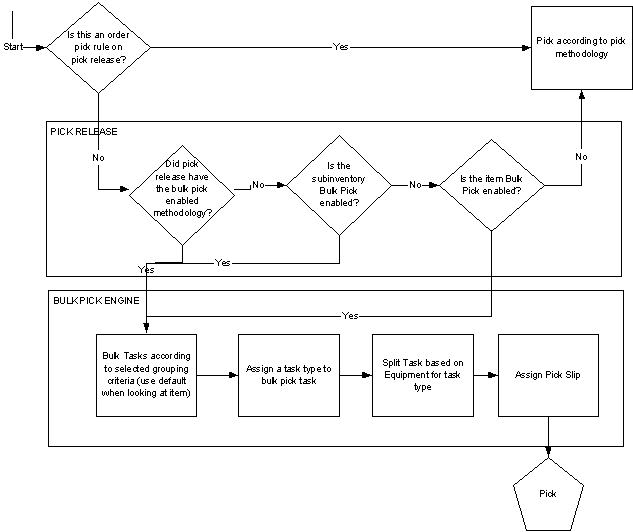
Bulk picking can be invoked via pick release or via a concurrent program independent of the pick release process. When run during pick release, the system first examines the configuration setup and thus determines which lines are candidates for bulk picking. These lines are then bulked and a new parent task is created. This parent task corresponds to the unit of work that needs to be performed
Oracle Warehouse Management allows the flexibility to support bulk picking at the time of pick release, or as a separate concurrent program that can be run independently from the pick release process. Bulk picking should be selected at the time of pick release if the release batch size is very large. The profile options INV Pick Slip Batch Size and INV Component Pick Batch Size determine the amount of order lines that are processed together. See: If the number is set very low, say 5 or 10, then only 5 or 10 lines will be considered together as candidates for bulk grouping. Thus, if the batch size is low, then the concurrent program should be used after all of pick release has run. However, if the batch size is fairly large, such as 10,000, then it is safe to bulk at the time of pick release because all 10,000 can be considered as candidates for bulking. Please note however that enabling bulk picking at the time of pick release will increase the time required for pick release to complete.
The following diagram depicts the pick release process and the picking process. If the bulk picking engine is run at the time of pick release, the above flow executes. If the bulk picking engine is run as a concurrent program after pick release has completed, then the bottom portion of the diagram will occur separately and will occur across pick release batches. Please note that if run separately, pick release still incurs a cost of assigning task types and pick slip numbers to all the children lines even if later they become merged together.
An item can be bulk pick enabled, and thus the item is always a candidate for bulk picking. That does not imply that it will always be bulk picked, but it will always be considered. This is useful if a business has seasonal items where the cost of deconsolidation is less than the cost of travel and picking. Thus, these items should be bulk pick enabled during the peak season and disabled when velocity is low.
A subinventory can be bulk pick enabled, and thus all items that are present in that subinventory are candidates for bulk picking. Subinventories that are the source of replenishments to the forward pick should be candidates for bulk picking, and thereby reducing the necessity to replenish the forward pick zone.
There are instances where printing paper pick slips is still a desired form option, either to supplement the mobile screens or to facilitate user movement. In order to print the pick slip after pick release, the Move Order Pick Slip Report should be added to the pick release document set. For both bulk and non bulk pick tasks, the move order pick slip report will be printed. Please note that by performing bulk picking, a distribution center automatically forgoes the usage of the pick slip report as the packing slip report, primarily because bulk picking is most commonly used with bulking across delivery lines.
