If you enter invoices for expenses or asset purchases for more than one balancing segment, you might want to use Automatic Offsets to keep your Payables transaction accounting entries balanced.
If you do not use Automatic Offsets, Payables creates a single liability accounting entry for invoice transactions (if you use accrual basis accounting) and a single cash type accounting entry for payment transactions.
When you use Automatic Offsets, Payables automatically creates balancing accounting entries for your transactions. The GL account that each of the offsetting accounting entry is charged to depends on which method you use, Balancing or Account:
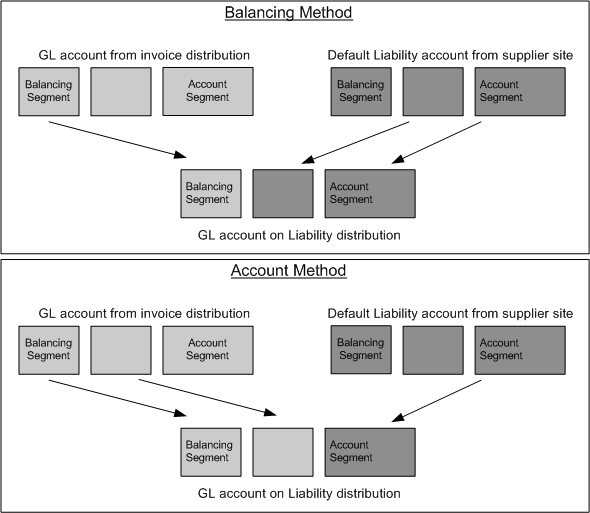
Balancing. Payables builds the offsetting GL account by taking the balancing segment (usually the cost center code) from the invoice distribution and overlaying it onto the appropriate default GL account, for example the Liability account from the supplier site.
Account. The Account method takes the opposite approach with one segment (the designated account segment) being retained from the default GL account and all other segments being retained from the invoice distribution.
Although Payables builds the GL account to which amounts are charged differently depending on the method you use, in either case Payables automatically allocates the amount across the following accounting entries for an invoice:
Liability
Withholding Tax (if you apply the withheld amount at Invoice Validation time)
Payables also allocates the following entries for a payment:
Cash (if you use a pooled bank account)
Cash Clearing (if you use a pooled bank account, and if you account for payments at clearing time)
Discount
Exchange Gain/Loss
Future Dated Payment
Rounding
Withholding Tax (if you apply the withheld amount at Payment time)
Bank Charges
Bank Errors
Automatic Offsets affects only accounts listed above. For accounts other than these, for example, Interest Liability, you must make manual journal entries in your general ledger to keep the entries balanced at the balancing segment level.
The following diagram illustrates how Payables builds a GL account on a liability distribution using the two different methods:
For further details on how Payables handles each type of account, see:
How Payables Generates Offsetting Discount Accounts and Entries
How Payables Generates Offsetting Automatic Withholding Tax Accounts and Entries
For an invoice, Payables creates offsetting liability distributions; for a payment, Payables creates offsetting cash and discount taken distributions. This helps to ensure that each set of accounts remains balanced by fund. Otherwise, Payables records offsetting entries using the liability account from the supplier site, the cash account associated with the bank account used for payment, and the discount account specified in the Payables Options window.
Automatic Offsets was created for the government and higher education sectors where it is mandated by law that transactions be balanced to the balance segment level. However, some companies may benefit from the level of detail and the ability to produce a balance sheet at a balancing segment level. For example, if you have a product segment in your account, Automatic Offsets would allow you to track cash and AP liability by product.
Be sure you understand the impact of Automatic Offsets before deciding to implement this feature.
Alternatively, you can set up Intercompany Accounting in Oracle General Ledger so that General Ledger automatically creates the intercompany accounting entries necessary to balance a transaction at the balancing segment level. If you choose to use Intercompany Accounting rather than Automatic Offsets, your Payables transactions that cross multiple balancing segments will not balance at the balancing segment level until you transfer them to General Ledger and submit the Journal Import program. See: Intercompany Accounting.
If you use Automatic Offsets, you should set up Intercompany Accounting in Oracle General Ledger to ensure that prepayment applications are balanced by balancing segment.
If you do not enable Automatic Offsets, Payables records the accounting entries in the accounts you specify in the Payables Options, Banks, and Tax Codes windows. These accounts have one balancing segment each, so if you enter transactions that cross multiple balancing segments, you might want to consider using the Intercompany Accounting feature to balance these transactions during posting.
Government, education and not-for-profit organizations often use funds, which are sets of self balancing accounts including assets, liabilities, equity, revenues and expenditures as appropriate, to account for activity that needs to be segregated for the purpose of conducting specific activities or objectives.
Organizations using fund accounting often create transactions that cross funds. If you enable the Automatic Offsets feature, Payables will automatically create liability, cash, discount, and tax and freight entries in the same funds as the accounts used in invoice distributions.
When bank accounts are pooled, that is, shared by multiple funds, and an invoice is paid by more than one fund, Payables creates the appropriate entries to update the cash balance of each fund.
When bank accounts are non-pooled, that is, specific to a single fund, then all payments are made from one fund. In this case, the Automatic Offsets feature alone cannot maintain balanced funds if you are paying for invoices charged to multiple funds. You can, however, set up interfund accounting in General Ledger to handle this situation. When a payment is posted, General Ledger creates balancing journal lines based on interfund accounts that you define.
This document includes the following topics:
Automatic Offsets and Invoice Processing
Automatic Offsets and Payment Processing
