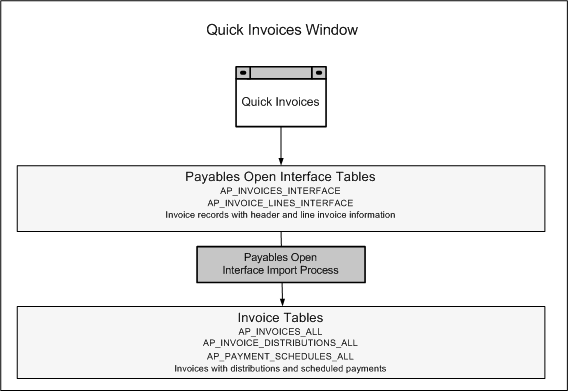
Payables uses information you enter in the Quick Invoices window to create invoices in Payables. You enter invoice header and line information in this window. This information is stored in the Payables Open Interface tables. Because the system performs limited validation and defaulting of invoice values while you are entering invoices, you can enter invoices more quickly in the Quick Invoices window than you can in the Invoice Workbench (the Invoice Workbench is the Invoices window and its associated windows).
For a text description of the previous graphic, see: Text Description of the Quick Invoices Window Graphic.
After you enter invoice records in the Quick Invoices window, you can submit a customized workflow program to automate your processes for managing invoices. For example, you can customize the workflow program to validate the cost center on all invoices before you import them.
You then submit the Payables Open Interface Import Program to validate the values you entered, provide any default values, and then create invoices with distributions and scheduled payments in the regular Payables tables.
After import, Payables provides a report that lists invoice records that were successfully imported and any that could not be imported because they had invalid or missing information. You can query the rejected invoice records in the Quick Invoices window, correct them, and then resubmit them for import.
When you import invoice records successfully, Payables creates regular invoices that you can view, modify, and validate in the Invoice Workbench.
After you successfully create invoices based on data in the invoice records, you can purge the invoice records from the Payables Open Interface tables.
