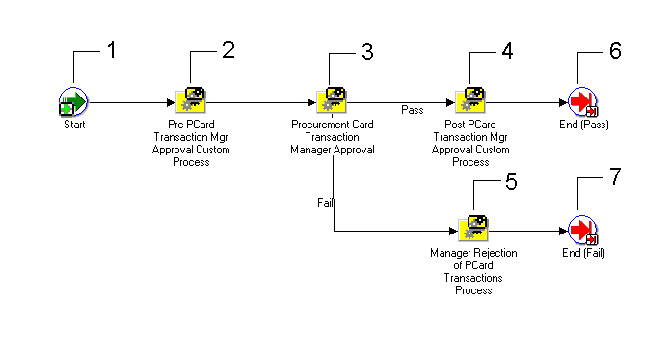
The AP Procurement Card Manager Approval Transaction workflow is a predefined workflow that you can initiate to notify managers of transactions incurred by their direct reports. The AP Procurement Card Manager Approval Transaction workflow determines if workflow will notify a manager of transactions created by the manager's employee's credit card, and it determines if the manager must approve the transactions.
You initiate submit the AP Procurement Card Manager Approval Transaction workflow from the Submit Request window by submitting the Procurement Card Transactions Approval Process. See: Procurement Card Transactions Approval Process.
The status of a transaction after the successful completion of the AP Procurement Card Manager Approval Transaction workflow is contingent upon the Employee Notification Method (ENM) and Manager Notification Method (MNM) settings in the Profiles window. If MNM is set to None or Notification Only, then the status of a Verified transaction is automatically set to Approved. If Manager Approval is required, then the manager sets the transaction status to either Approved or Rejected.
The following table summarizes how the ENM and MNM settings affect the transaction status after the AP Procurement Card Manager Approval Transaction workflow completes:
| MNM | ENM = None | ENM = Verification or Notification |
|---|---|---|
| MNM = None or Notification | Approved | Approved |
| MNM = Approval | Set by the manager | Set by the manager |
Select the manager notification method in the Profiles window. See: Profiles Window.
Install and configure Oracle Workflow. See: Installing Oracle Applications.
Employees verify credit card transactions. If at the Credit Card Profile level, the Employee Notification Method is Notification Only or Verification Required, Verification can occur during the AP Procurement Card Employee Verification Workflow. If at the Credit Card Profile level the Employee Notification Method is None, the Procurement Card Transactions Validation program automatically sets the status to Verified.
To set up the AP Procurement Card Manager Approval Transaction Workflow:
Install the Oracle Workflow Builder client component program. See: Oracle Workflow Client Installation Notes for Oracle Applications.
The AP Procurement Card Manager Approval Transaction workflow definition (.wft) file is automatically loaded into the database under the APPS account when you install Self-Service Web Applications. Using the Oracle Workflow Builder program, you can open the AP Procurement Card Manager Approval Transaction workflow definition file by providing the APPS username, password, and database. Show the AP Procurement Card Manager Approval Transaction workflow item type and choose OK.
Set Workflow Timeout Activities:
Request Mgr Approval of Emp Incurred PCard Transactions
(Optional but recommended) Customize Workflow Messages:
Notify Mgr of PCard Trxns Incurred By Direct Reports
Request Mgr Approval Of Emp Incurred PCard Transactions
Inform Emp That Manager Has Rejected PCard Transaction
This is a Standard function activity that simply marks the start of the process.
| Function | WF_STANDARD.NOOP |
| Result Type | None |
| Prerequisite Activities | None |
This activity is provided for you to customize to meet your business needs. If you do not customize this activity, the activity will not affect the Workflow process.
| Function | N/A |
| Result Type | None if not customized. |
| Required | No |
| Prerequisite Activities | None |
This process selects and builds manager transaction information in accordance with the verification method you selected: Notification Only, None, or Approval Required.
This process selects transactions for a direct manager's employees from AP_EXPENSE_FEED_DISTS where the status is Verified and the MANAGER_APPROVAL_ID column in NULL. The process then checks the Manager Notification Method you selected in the Profiles Window (None, Notification Only, Approval Required). See: Profiles Window. If the Notification Method is Notification Only, transactions are grouped in notifications based on the direct reports of a manager and the credit card profile. If the Notification Method is Approval Required, transactions are grouped in notifications based on a single direct report for a manager and the credit card profile. See: Manager Rejection of Procurement Card Transaction Process.
Note: This process does not select records in AP_EXPENSE_FEED_DISTS that have a status of Hold, Disputed, or Personal. You can modify the Pre or Post Procurement Card Transaction Manager Approval Process if you want to select these statuses for manager notification.
The activities in this process are described below. See: Procurement Card Transactions Approval Process.
| Required | Yes |
| Prerequisite Activities | None |
This activity is provided for you to customize to meet your business needs. If you do not customize this activity, the activity will not affect the Workflow process.
| Function | N/A |
| Result Type | None if not customized. |
| Required | No |
| Prerequisite Activities | Procurement Card Transactions Approval Process |
This process sets transaction statuses to Rejected and notifies the employee card holder that their manager has rejected their transactions. See: Manager Rejection of Procurement Card Transactions Process.
| Required | No |
| Prerequisite Activities | None |
This function activity marks the end of the process.
| Function | WF_STANDARD.NOOP |
| Result Type | None |
| Prerequisite Activities | Start |
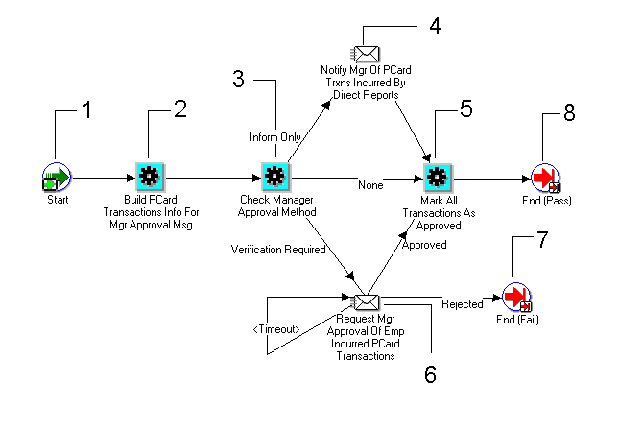
This is a Standard function activity that simply marks the start of the process.
| Function | WF_STANDARD.NOOP |
| Result Type | None |
| Prerequisite Activities | None |
This activity prepares credit card transactions that have a status of Verified for use in the manager approval or manager notification message.
| Function | AP_WEB_PCARD_WORKFLOW_PKG. BUILDMANAGERAPPROVALMESSAGE |
| Result Type | N/A |
| Required | Required if the verification method you selected was Notifications Only or Approval Required. |
| Prerequisite Activities | None |
This activity checks the manager verification method you selected in the Profiles window. See: Profiles Window. The verification method you selected determines whether to notify the manager, or if approval is required.
| Function | AP_WEB_PCARD_WORKFLOW_PKG. CHECKMANAGER APPROVALMETHOD |
| Result Type | Returns Manager Notification method |
| Required | Yes |
| Prerequisite Activities | None |
For transactions for which the Manager Notification Method is Notification Only, this activity sends a message to managers informing them of credit card transactions for which their direct reports are responsible. The managers do not respond to this message.
| Required | Yes (if Manager Notification method is Notification Only |
| Prerequisite Activities | Build PCard Transaction Info For Manager Approval Message, and Check Manager Approval Method |
If a manager responds to a request for transactions approval by indicating that transactions are approved, this activity changes the status of transactions on the notification to Approved.
| Function | AP_WEB_PCARD_WORKFLOW_PKG. MARKTRANSACTIONSASAPPROVED |
| Result Type | Changes transaction status from Verified to Approved. |
| Required | If you do not perform this activity, you must change the status of transactions to Approved, or another acceptable status before they can be transferred to the Payables Open Interface tables. |
| Prerequisite Activities | None |
For transactions for which the Manager Notification Method is Approval Required, this activity sends a message to managers informing them of credit card transactions for which their direct reports are responsible, and it requests approval for the transactions. Managers can approve or reject transactions.
| Required | Yes (if Manager Notification method is Approval Required) |
| Prerequisite Activities | Build PCard Transaction Info For Mgr Approval Msg, and Check Manager Approval Method |
This function activity marks the end of the process.
| Function | WF_STANDARD.NOOP |
| Result Type | None |
| Prerequisite Activities | Start |
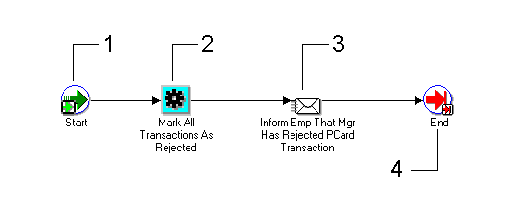
This is a Standard function activity that simply marks the start of the process.
| Function | WF_STANDARD.NOOP |
| Result Type | None |
| Prerequisite Activities | None |
If a manager responds to a request for transaction approval by indicating that transactions are rejected, this activity marks all transactions from the notification as Rejected.
| Function | AP_WEB_PCARD_WORKFLOW_PKG. MARKTRANSACTIONSASREJECTED |
| Result Type | Changes transaction status from Verified to Rejected. |
| Required | If you do not perform this activity, you must change the status of transactions to Rejected. |
| Prerequisite Activities | None |
This notification activity sends a message to an employee card holder that the card holder's manager has rejected the card holder's transactions.
| Required | No |
| Prerequisite Activities | None |
This function activity marks the end of the process.
| Function | WF_STANDARD.NOOP |
| Result Type | None |
| Prerequisite Activities | Start |