Set up relationship types and relationship phrase and role pairs that can be used to create relationships among entities in the TCA Registry. These relationships are shared throughout the Oracle E-Business Suite. See: Relationships Overview.
Oracle Trading Community Architecture provides seeded relationship types and phrase and role pairs, but you can create new ones as needed. See: Seeded Relationship Types, Phrases, and Roles, Oracle Trading Community Architecture Reference Guide.
Relationships administration lets you:
Create relationship types, including a relationship phrase and role pair for each new type.
Convert nonhierarchical relationship types into hierarchical types.
Copy relationship types and, optionally, also the relationships.
Add phrase and role pairs to existing seeded or user-created relationship types.
Note: You cannot update the definition of existing relationship types. You can only add phrase and role pairs to them.
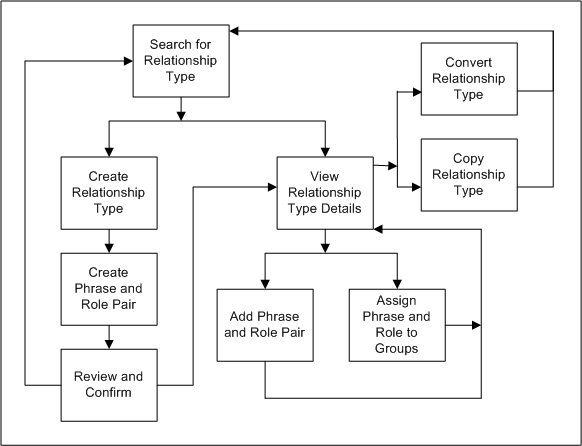
This diagram describes the process flow of setting up relationship types as well as phrase and role pairs.
Search for a relationship type that you want to view, or to make sure that the relationship type you want to create does not already exist. See: Searching for Relationship Types.
If you do not see the relationship type that you want in the search results, you can create a new type. Otherwise, select a relationship type from the results and view its details.
If you are creating a new relationship type, you:
Define and create the relationship type.
Create a relationship phrase and role pair for the relationship type.
Review and confirm your definitions.
Return to search for another relationship type or view details of the type that you just created.
If you are viewing details for a selected or newly created relationship type, you can:
Convert the relationship type, if it is nonhierarchical, into a hierarchical type, or copy the relationship type to create a new type. See:
After you convert or copy a relationship type, you return to the Relationship Type page.
Add a relationship phrase and role pair to the type or to assign phrases and roles from this relationship type to relationship groups. See:
Adding Relationship Phrase and Role Pairs to Relationship Types.
Assigning Relationship Phrases and Roles to Relationship Groups.
After you add a phrase and role pair or assign to relationship groups, you return to view the details of your relationship type.
