Evaluate whether the default Account Generator process meets your accounting requirements. No setup steps are required to use the default. The default process can also be updated later as your needs change. You can make minor changes to the default process without changing the name.
Each Account Generator workflow is called an item type. Oracle Receivables comes with the following Account Generator item type:
AR Substitute Balancing Segment
The AR Substitute Balancing Segment contains the following workflow processes:
Replace Balancing Segment
Generate Account Using FlexBuilder Rules
This process updates the balancing segment during certain accounting activities. For a list of these activities, see: Deriving Balancing Segment Values.
Note: The Replace Balancing Segment workflow process updates the balancing segment on all receivables activities except miscellaneous cash, bank errors, or guarantee commitments.
The AR Substitute Balancing Segment item type has these attributes:
Original CCID - This number indicates the original account number of the balancing segment for this transaction.
Substitute CCID - This number indicates the new account number of the balancing segment for this transaction.
Chart of Accounts ID - This number indicates the account structure that your organization uses to record transactions and maintain account balances. This attribute is common to each Oracle Financials application.
Error Message - This indicates that an error has occurred. This attribute is common to each Oracle application.
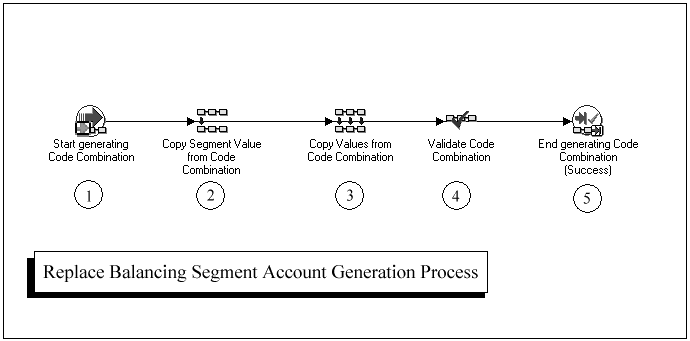
The Replace Balancing Segment process consists of three unique activities that comprise the five activity nodes that appear in the following workflow diagram.
In the workflow diagram shown below, the process activity nodes are numbered for reference in the descriptions that follow. (The numbered circles are not part of the process diagram.)
Replace Balancing Segment Process
Following is a description of each activity in the sample process for Replace Balancing Segment Account Generation, listed by function name. You can create all the components for an activity in the graphical Oracle Workflow Builder except for the PL/SQL stored procedures that the function activities call.
This is a standard activity that marks the start of the process.
Node 2 copies the new balancing segment value from the substitution code combination ID (CCID). For examples of how the Account Generator derives the balancing segment for different accounting activities, see: Deriving Balancing Segment Values.
This activity copies the remaining segment values from the original code combination into the new code combination for this transaction.
Node 4 contains the standard Flexfield function for validating a code combination. For this function to work, the attribute value New code combinations must be set to True.
This standard activity ends the code combination generation process.
The Account Generator:Purge Runtime Data profile option ensures that data used to build account combinations is purged after the Account Generator has completed. For more information, see: Profile Options in Oracle Application Object Library.
